Question
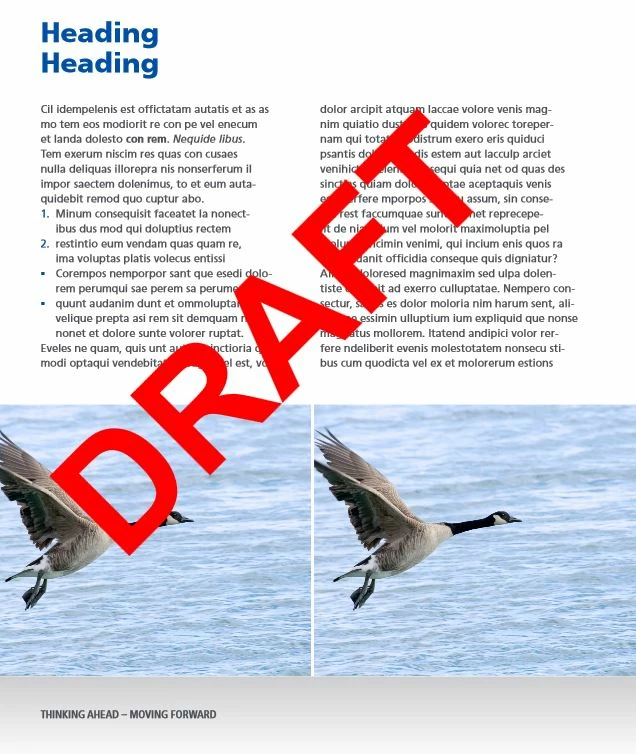
watermark opacity does not work
Hi,
We are using the Adobe InDesign CC Server 2014, and calling its functionality via scripts. One feature, what we have to use is adding watermark to every page and generate PDFs with watermark.
Watermark must be in the middle of the every page and displaywed with 50% opcaity.
We trying to achive it with the attached code below.
Sadly opacity setting is ignored. What we are doing badly?
Positioning to the middle is not really working either.
myDocument.watermarkPreferences.watermarkHorizontalPosition = WatermarkHorizontalPositionEnum.WATERMARK_H_CENTER;
This kind of setting not seems to be working, so we used the
myDocument.watermarkPreferences.watermarkHorizontalOffset = 20;
which is working, but not really what we needed.
Regards
Balázs
| createPDF:function(bmpSource, bmpDestination, postfix, profile, watermark, multipageFile) { |
| var wt = 'DRAFT'; | |||
| var pfdFiles = []; | |||
| // pdf export preference | |||
| var pageCount = myDocument.pages.length; | |||
| var pageRange = app.pdfExportPreferences.pageRange; | |||
| var myPDFExportPreset = null; | |||
| if( profile != null && profile.length ) { | |||
| myPDFExportPreset = app.pdfExportPresets.item(profile); | |||
| } | |||
| else { | |||
| if( app.scriptArgs.isDefined("bmpProfile") ) { | |||
| bmp_log.debug("loading profile: " + app.scriptArgs.getValue("bmpProfile")); | |||
| myPDFExportPreset = app.pdfExportPresets.item( app.scriptArgs.getValue("bmpProfile") ); | |||
| } | |||
| } | |||
| bmp_log.debug("createPDF using profile: " + myPDFExportPreset.name); | |||
| if( 'true' == watermark ) { | |||
| bmp_log.debug("initializing watermark preferences..."); | |||
| myDocument.watermarkPreferences.watermarkVisibility = true; | |||
| myDocument.watermarkPreferences.watermarkDoPrint = true; | |||
| myDocument.watermarkPreferences.watermarkDrawInBack = false; | |||
| myDocument.watermarkPreferences.watermarkText = wt; | |||
| myDocument.watermarkPreferences.watermarkFontFamily = "Arial"; | |||
| myDocument.watermarkPreferences.watermarkFontStyle = "Bold"; | |||
| hM = myDocument.viewPreferences.horizontalMeasurementUnits; | |||
| vM = myDocument.viewPreferences.verticalMeasurementUnits; | |||
| myDocument.viewPreferences.horizontalMeasurementUnits = MeasurementUnits.points; | |||
| myDocument.viewPreferences.verticalMeasurementUnits = MeasurementUnits.points; | |||
| var x2 = Math.pow(parseInt(myDocument.documentPreferences.pageWidth),2); | |||
| var y2 = Math.pow(myDocument.documentPreferences.pageHeight,2); | |||
| var z = Math.sqrt(x2 + y2); | |||
| myDocument.viewPreferences.horizontalMeasurementUnits = hM; | |||
| myDocument.viewPreferences.verticalMeasurementUnits = vM; | |||
| myDocument.watermarkPreferences.watermarkFontPointSize = Math.ceil(z/(wt.length+2)); | |||
| myDocument.watermarkPreferences.watermarkFontColor = UIColors.red; | |||
| myDocument.watermarkPreferences.watermarkOpacity = 50; | |||
| myDocument.watermarkPreferences.watermarkRotation = -45; | |||
| myDocument.watermarkPreferences.watermarkHorizontalPosition = WatermarkHorizontalPositionEnum.WATERMARK_H_CENTER; | |||
| myDocument.watermarkPreferences.watermarkHorizontalOffset = 20; | |||
| myDocument.watermarkPreferences.watermarkVerticalPosition = WatermarkVerticalPositionEnum.WATERMARK_V_CENTER; | |||
| myDocument.watermarkPreferences.watermarkVerticalOffset = 20; | |||
| } |
| if( 'false' == multipageFile ) { | |||||||
| bmp_log.debug("creating pdf for each pages..."); | |||||||
| for(var i = 1; i <= pageCount; i ++) { | |||||||
| app.pdfExportPreferences.pageRange = i.toString(); | |||||||
| var myFileName = bmpSource.substr(0, bmpSource.lastIndexOf('.')) || bmpSource; | |||||||
| myFileName = myFileName.split('/').pop(); | |||||||
| var myPDF = new File( bmpDestination + "/" + myFileName + "_page" + i + ('true' == watermark ? '_watermark' : '') + postfix + ".pdf" ); | |||||||
| bmp_log.debug("exporting PDF..."); | |||||||
| if(!myPDF.parent.exists && !myPDF.parent.create()) { | |||||||
| bmp_log.error("Not exported. Unable to create the folder: " + myPDF.parent.fullName); | |||||||
| } else { | |||||||
| if( bmp_util.removeFileIfExists(myPDF) ) { | |||||||
| myDocument.exportFile(ExportFormat.PDF_TYPE, myPDF, myPDFExportPreset, true); | |||||||
| pfdFiles.push( { name:bmp_util.toBase64StringFromUTF8Array(bmp_util.toUTF8Array(myPDF.fsName)) } ); | |||||||
| bmp_log.info("PDF exported to: " + myPDF.fullName); | |||||||
| } | |||||||
| } | |||||||
| } | |||||||
| } | |||||||
| else { |
| bmp_log.debug("creating only one pdf for all pages..."); | ||
| app.pdfExportPreferences.pageRange = "1" + (pageCount > 1 ? "-" + pageCount : ""); | ||
| var myFileName = bmpSource.substr(0, bmpSource.lastIndexOf('.')) || bmpSource; | ||
| myFileName = myFileName.split('/').pop(); | ||
| var myPDF = new File( bmpDestination + "/" + myFileName + ('true' == watermark ? '_watermark' : '') + postfix + ".pdf" ); |
| bmp_log.debug("exporting PDF..."); | ||||
| if(!myPDF.parent.exists && !myPDF.parent.create()) { | ||||
| bmp_log.error("Not exported. Unable to create the folder: " + myPDF.parent.fullName); | ||||
| } else { | ||||
| if( bmp_util.removeFileIfExists(myPDF) ) { | ||||
| myDocument.exportFile(ExportFormat.PDF_TYPE, myPDF, myPDFExportPreset, true); | ||||
| pfdFiles.push( { name:bmp_util.toBase64StringFromUTF8Array(bmp_util.toUTF8Array(myPDF.fsName)) } ); | ||||
| bmp_log.info("PDF exported to: " + myPDF.fullName); | ||||
| } | ||||
| } | ||||
| } | ||||
| if( 'true' == watermark ) { | ||||
| myDocument.watermarkPreferences.watermarkVisibility = false; | ||||
| myDocument.watermarkPreferences.watermarkDoPrint = false; | ||||
| } | ||||
| app.pdfExportPreferences.pageRange = pageRange; | ||||
| return pfdFiles; |
},
 AdChoices