Dominique_R2
Known Participant
August 9, 2026
Answered

Ways to import a photograph in a book: full-size TIFF, downsized JPG, etc.

  • August 9, 2026
  • 9 replies
  • 39 views

Hello all,

I hope this forum is the right place to ask this type of question. If it doesn’t belong here, do not hesitate to delete it and I’ll take it elsewhere.

I am working on a project of art book, a coffee-table book. To give you an idea, the page size is currently set at 250 mm wide (almost 10 inches) × 340 mm tall (13.3 inches). The basic photos I work with are uncompressed TIFF files of 7,500 × 5,200 pixels, which at the rate of 300 ppi, should be enough to cover a full spread when necessary. Each TIFF file “weighs” about 230–270 MB.

However, many times I will use the photos at sizes smaller than one page. My question is, in such a case, should I always Place the full-sized TIFF file anyway, and trim it down to the desired dimensions in InDesign, or do that work before in Photoshop and import (Place) only the smallest possible photo file, so as to avoid bloating my book document? Or does it not really matter after all, as the number of megabytes saved would be negligible?

Placing the full-sized file would provide more flexibility, like allowing me to enlarge the photo again if the layout of the page should change, but as it is going to be a photo-intensive book, I may need to trim down the overall size, even though I will create separate documents for chapter to be later assembled via the Book option.

Many thanks in advance for your advice. I will need the best quality photos, so I do not intend to go below 300 ppi, nor use JPEGs as I do not want any kind of compression.

Dominique

    Correct answer rob day

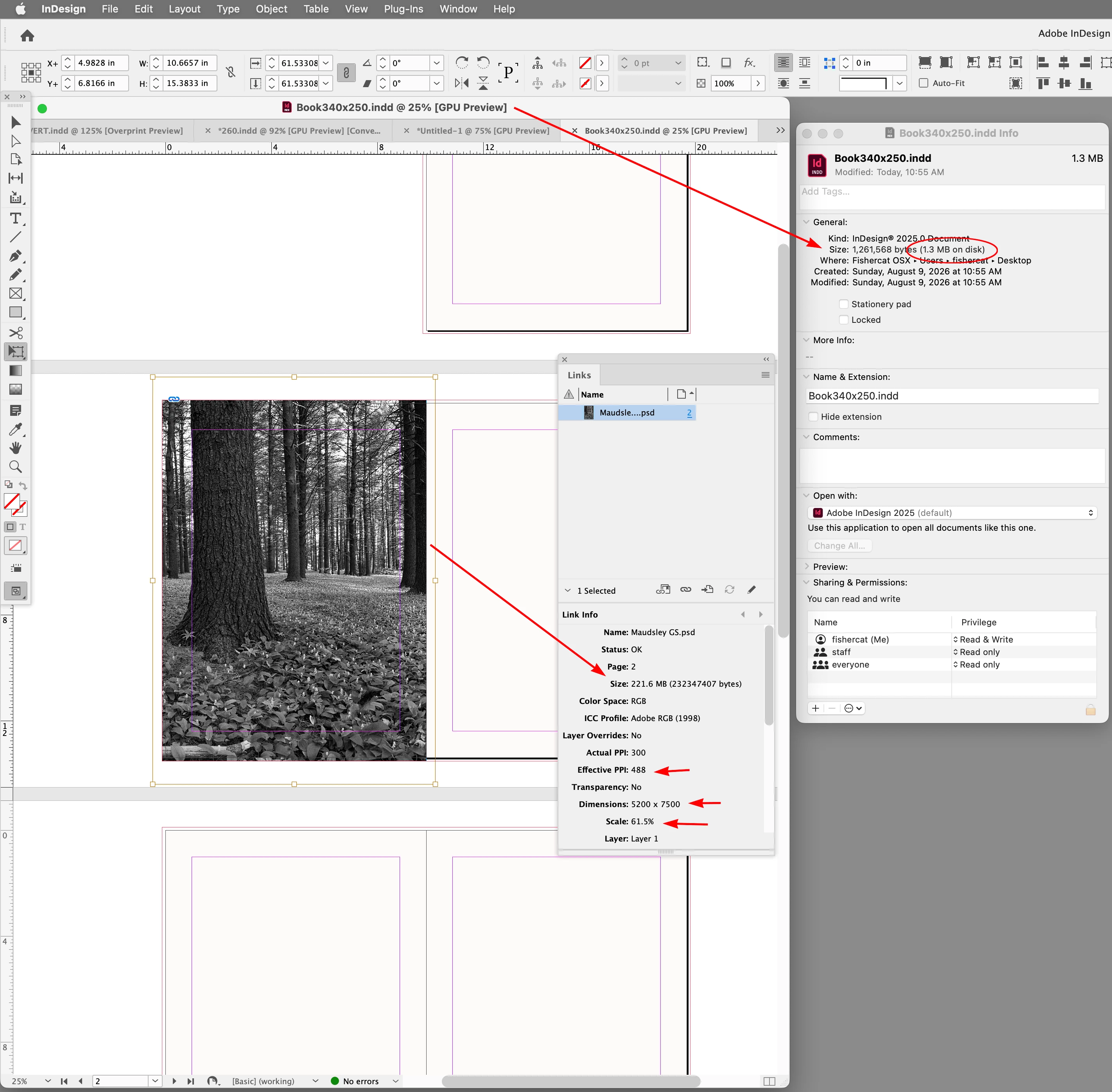
    Hi ​@Dominique_R2 , As long as you don’t Embed the link, placed images will have little affect on the InDesign document’s file size. Here there is a 221MB placed image and the InDesign file size is 1.3 MB:


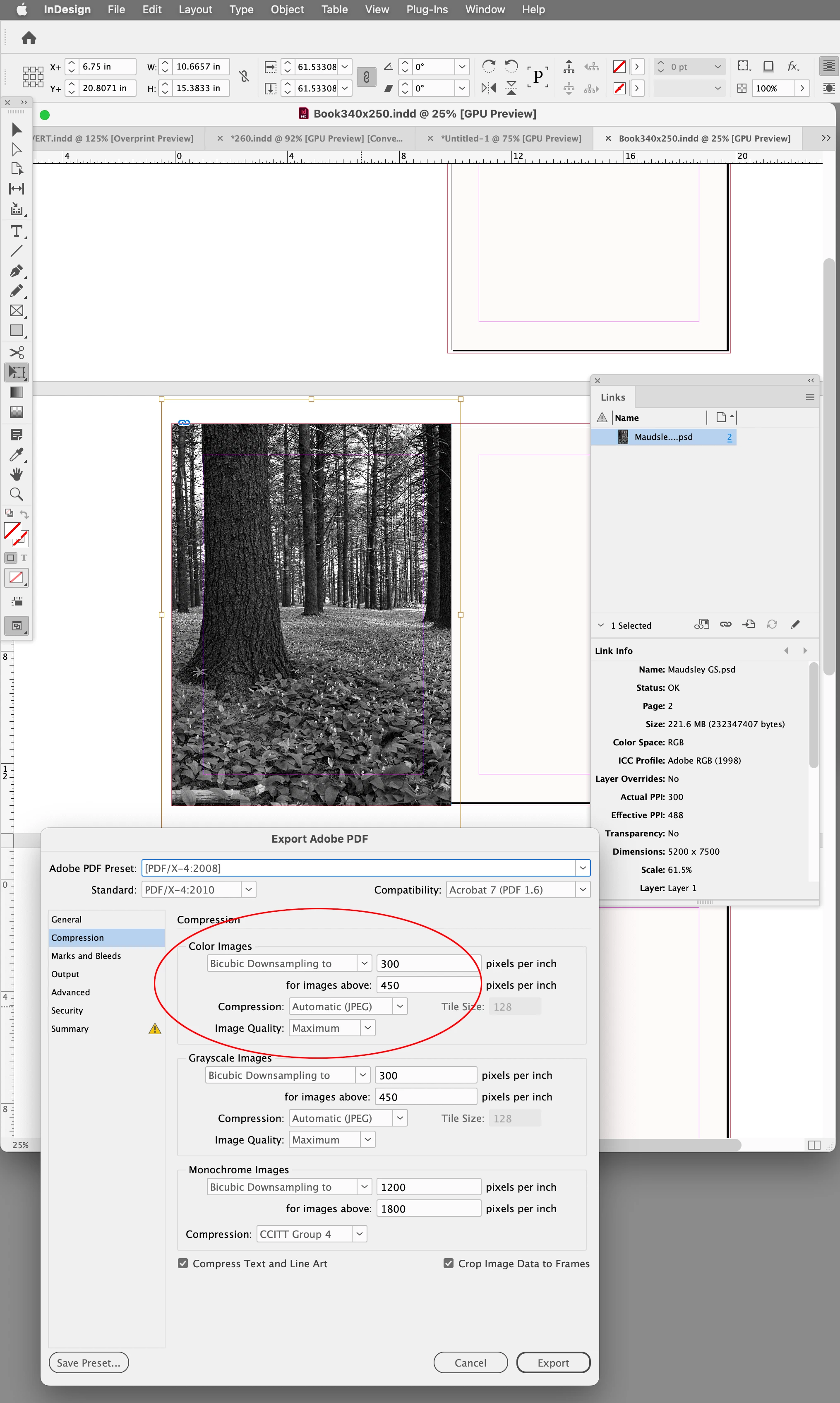
    There would be little benefit in downsampling your 5200 x 7200 pixel image because that can happen on a PDF Export via the Compression tab settings—here the 488 PPI Effective Resolution will be downsampled to 300 on the PDF export:


    9 replies

    Dominique_R2
    Known Participant
    August 9, 2026

    Wrong location, sorry, message can be deleted.

    Dominique_R2
    Known Participant
    August 9, 2026

    Wrong location, sorry, message can be deleted.

    J E L
    Community Expert
    Community Expert
    August 9, 2026

    @Dominique_R2, Rob has given you the answer to your main question, but I notice you indicate that you plan to create separate documents for each chapter to be later assembled via the Book option. There are reasons to do so, and there are designers who use this feature, but I have designed many large-format photography books through the years and have always stayed with one document. I’m currently working on a book that is 386 pages, with more than 500 images and graphics. I prefer working with one document because I find the TOC, indexes, endnotes, and other auto-generated text tools are easier to apply without glitches. I don’t think I’ve ever created a book using the “Book” option, but I have inherited books that were set up like this that had so many problems I was hired to convert them all into one document. If your printer has a limit on upload size, you can break the PDF document into two or more separate documents as needed. There are different ways to use InDesign and you may have good reasons for using the chapter-by-chapter structure, but I mention this in case it’s helpful.

    Dominique_R2
    Known Participant
    August 9, 2026

    That is very interesting and helpful. I was wondering about that myself, and based on your advice, I think I will change tack and go single-document too. Thanks a lot for adding to the previous respondents, there is real practical added value in your message.

    J E L
    Community Expert
    Community Expert
    August 9, 2026

    You're welcome! I think you will be very happy to work in one document, with a separate file for the back cover / spine / front cover, of course. If you have any questions while you are building your book, or InDesign in general, please come back to ask us.

    rob day
    Community Expert
    rob dayCommunity ExpertCorrect answer
    Community Expert
    August 9, 2026

    Hi ​@Dominique_R2 , As long as you don’t Embed the link, placed images will have little affect on the InDesign document’s file size. Here there is a 221MB placed image and the InDesign file size is 1.3 MB:


    There would be little benefit in downsampling your 5200 x 7200 pixel image because that can happen on a PDF Export via the Compression tab settings—here the 488 PPI Effective Resolution will be downsampled to 300 on the PDF export:


    Dominique_R2
    Known Participant
    August 9, 2026

    Thanks a lot for the detailed answer, that’s great!

    Inspiring
    August 9, 2026

    The file size of the images does not affect the file size of the InDesign document as InDesign only sets a pointer to the file as a link.

    Dominique_R2
    Known Participant
    August 9, 2026

    Thank you very much, now I remember reading about this. You’ve refreshed my memory!