
Weird: Baseline and margin anomaly on ONE page of 100
Hello ... Not a fulltime ID user, but pretty experienced on basics+. I pulled text from a Word doc into an ID doc. The resulting doc is 100 pages. All the text is left-justified, two-columns. On Page 4—and on no other page—the text in the left column is hanging over the left edge of the margin by a tiny little bit, a point or less. The text on this page starts in the middle of a paragraph, but this margin-overhang anomaly continues down the left column before correcting in the right column and in all subsequent columns on all subsequent pages!
As well, while all text is locked to the baseline (both the baseline and leading are set to the same 0p13.2), the second line of text skips a baseline, creating an unwanted vertical space of exactly 0p13.2 between the first line and the second. Again, this anomaly happens only on Page 4 and nowhere else in the document! Here's a screen grab:
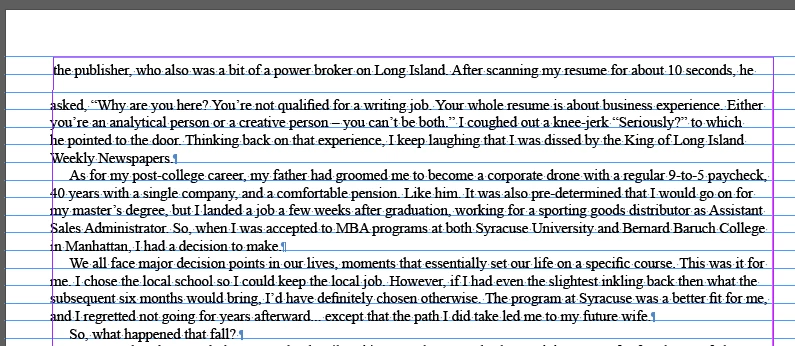 At first I suspected some kind of oddity carried over from the Word doc. I have turned on Invisible Characters, thinking there might be a buried retrun or soft-return, but nothing doing there. I've backspaced the offending text onto the previous page, but it just obediently backs up and aligns properly on the previous page, while the text lower on the affected page moves up and retains the two anomalies. I've cut a few lines of text from the top of the affected page, and the remaing text pulls to the top as expected, but still retaining the anomalies.
I'm at my wits' end. If anyone has any suggested fixes I might try, I would be much obliged.
 AdChoices