Inspiring
October 21, 2021
Answered

Weird behaviour of itemByRange function

  • October 21, 2021
  • 8 replies
  • 1090 views

Hi everyone! I wanted to use itemByRange function for applying styles to certain cells of table, but i totally confused of behaviour of this function. Maybe someone can help me understand what i'm doing wrong.
So, i have the following table.
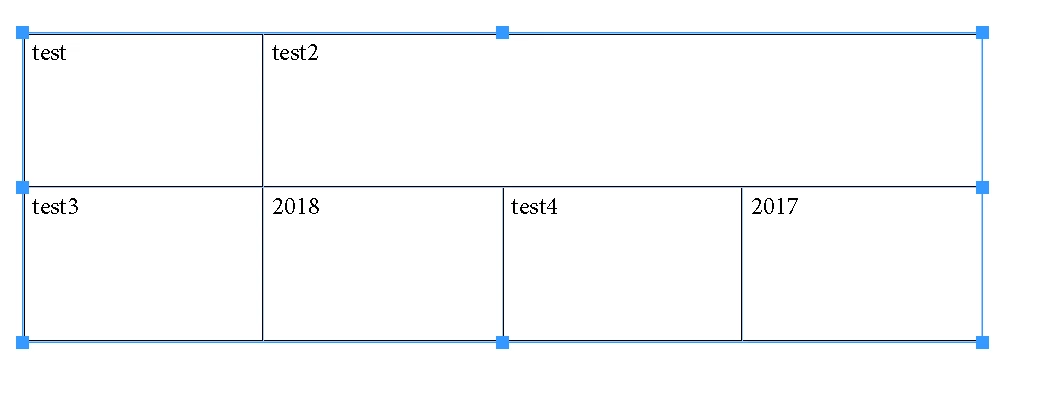
 It consits of 5 cells. If i acess them one by one via next expression  cells.item(i).contents everything is fine, i can see correct content (for example "test" for index 0, "test2" for index 1, "test3" for index 2). But when i use itemByRange, for example next expression - alert(cells.itemByRange(1,3).contents), i can see next output  test2, 2018, test4, 2017, which seems weird for me, because i thought itemByRange returns elements from a  sequential collection of cells and i thought it would return something like test2, test3, 2018.
The weirdest thing here is that when i try something like this 
cells.itemByRange(0,1).contents it returns test, test2 - exactly as i imagined.
I would appreciate any help with understanding the problem)

 

This topic has been closed for replies.
Correct answer Marc Autret

Hi @AlexBryanskiy 


The essential issue regarding the command Cells.itemByRange(iniend) is that it does not target a sequential collection of cells (as you may expect from considering increasing cell indices.) In fact, itemByRange() somehow mimicks the process of selecting cells in InDesign, based on opposite corners.


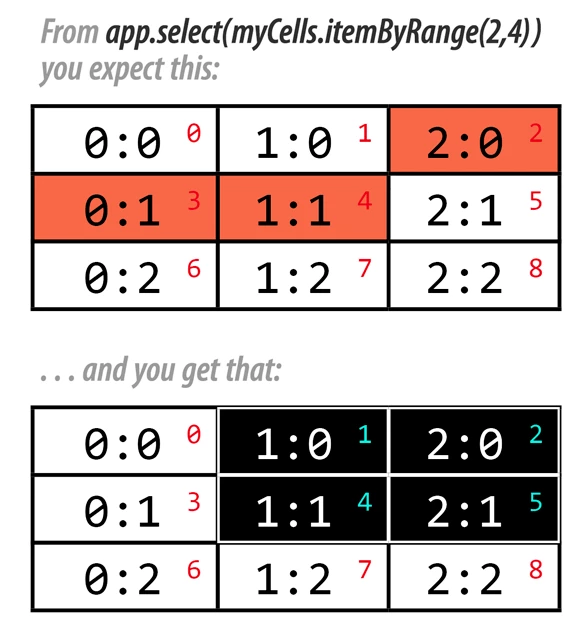
Here is a simple example in a 3×3 tables without merged cells. Your ini cell is "2:0" (index 2) and your end cell is "1:1" (index 4):

Your expectation is not met because the sequence [2,3,4] in red does not form a possible selection. Instead, itemByRange treats the ini and end parameters (resp. 2 and 4) as “opposite corners”, which finally leads to the target cells [1,2,4,5] forming as such a plural cell. [Keep in mind that Cells.itemByRange() returns an abstract Cell, not a true collection of cells.]


What is disturbing—without a picture—is that cell 3 does not belong to itemByRange(2,4)!


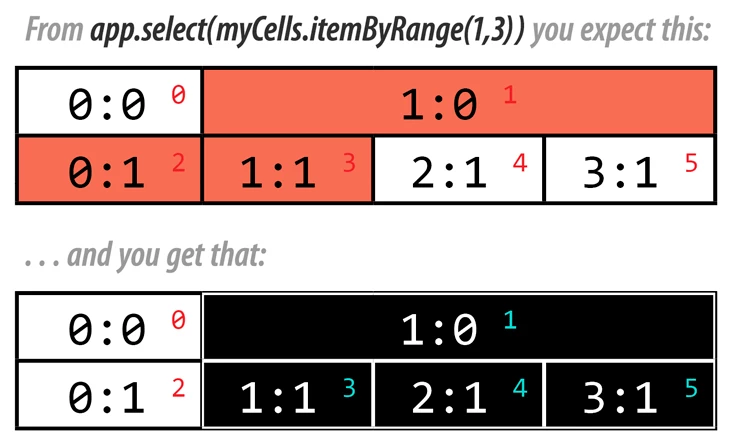
The same principle applies on merged cells:


That's a bit more complex because  "1:0" visually spans three columns (it strictly belongs to myTable.columns[1] though), so it is not easy to visualize "1:0"—"1:1" as opposite corners. But the result is consistent. [There are also cases where itemByRange(0,-1) does not grab the entire set of body cells, while myCells.everyItem() works fine.]


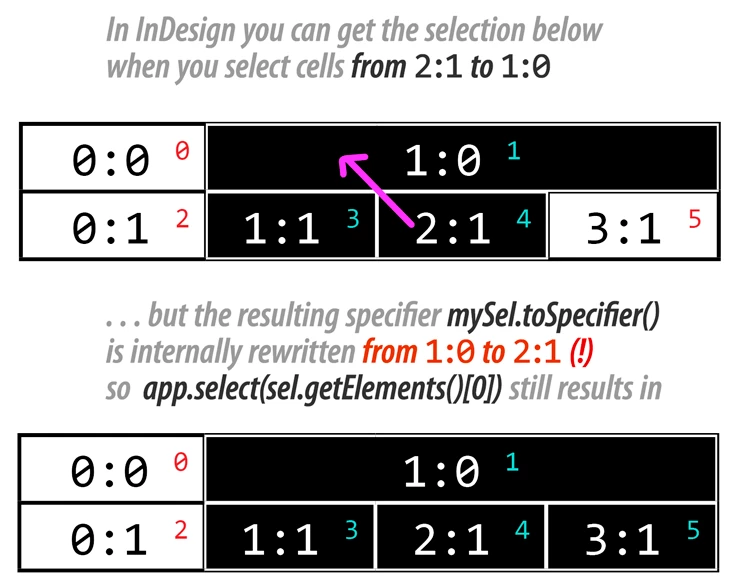
The main issue, IMHO, is that Cells.itemByRange is insensitive to the ini→end direction. In InDesign, selecting from "1:0" to "2:1" is not the same as selecting from "2:1" to "1:0". In the latter case, you can exclude "3:1" from the selection because "2:1" is then considered the bottom-right corner, as shown below:


I wasn't able to specify the "2:1"→"1:0" range using Cells.itemByRange. Maybe the Colums collection could help, but columns and rows are articial clusters that should ultimately resolve to Cell specifiers. Regarding the plural Cell abstraction, it looks like it can operate as a cell range (=selectable) in some cases, but not always!


Hope that helps.

Marc

8 replies

Community Expert
October 26, 2021

Hi Marc,

tested again and could not repeat my contradictonary results.

A minimal square shaped area of cells is always the result with cells.itemByRange().

Or as you pointedly said, cells.itemByRange() follows a "opposite corners" rule.


Hm. It dawns on me, that I must have tested a different range, ( 2,3 ) for example, not ( 1,2 ), and for this one it's clear that the result is the contents of two cells only, because both cells are direct neighbors in the same row of cells.


Regards,
Uwe Laubender

( ACP )

Community Expert
October 25, 2021

Hi Marc,

hm… I'm not convinced. There must be "more" to this case.

Let me explain this a little bit.


I was not working with a selection of cells. I was not working with a selection of the table.

I had the text frame selected holding the table.


Perhaps most important:

I opened Alex' document with InDesign CC 2019 , the version the document was saved the last time.

I selected the text frame with the table.


app.selection[0].tables[0].cells.itemByRange(1,2).contents 


returned the contents of all the cells in the table.

That indeed would proof your great explanation!


I had different results when opening the same document with InDesign 2021:


app.selection[0].tables[0].cells.itemByRange(1,2).contents


returned the contents of cells[1] and cells[2] only.


The different results I had with InDesign 2021, contents of cells[1] and cells[2] only, also showed up when I worked with an IDML file of Alex' document in CC 2019 which contradicts my first test with Alex' original document.


Regards,
Uwe Laubender

( ACP )

Community Expert
October 25, 2021

Another thought:

Maybe I had the contradicting results because I ran my code on an unsaved document when I worked with IDML or opening the document in a later version of InDesign?

Have to test that again.


Regards,
Uwe Laubender

( ACP )

Marc Autret
Marc AutretCorrect answer
Legend
October 25, 2021

Hi @AlexBryanskiy 


The essential issue regarding the command Cells.itemByRange(iniend) is that it does not target a sequential collection of cells (as you may expect from considering increasing cell indices.) In fact, itemByRange() somehow mimicks the process of selecting cells in InDesign, based on opposite corners.


Here is a simple example in a 3×3 tables without merged cells. Your ini cell is "2:0" (index 2) and your end cell is "1:1" (index 4):

Your expectation is not met because the sequence [2,3,4] in red does not form a possible selection. Instead, itemByRange treats the ini and end parameters (resp. 2 and 4) as “opposite corners”, which finally leads to the target cells [1,2,4,5] forming as such a plural cell. [Keep in mind that Cells.itemByRange() returns an abstract Cell, not a true collection of cells.]


What is disturbing—without a picture—is that cell 3 does not belong to itemByRange(2,4)!


The same principle applies on merged cells:


That's a bit more complex because  "1:0" visually spans three columns (it strictly belongs to myTable.columns[1] though), so it is not easy to visualize "1:0"—"1:1" as opposite corners. But the result is consistent. [There are also cases where itemByRange(0,-1) does not grab the entire set of body cells, while myCells.everyItem() works fine.]


The main issue, IMHO, is that Cells.itemByRange is insensitive to the ini→end direction. In InDesign, selecting from "1:0" to "2:1" is not the same as selecting from "2:1" to "1:0". In the latter case, you can exclude "3:1" from the selection because "2:1" is then considered the bottom-right corner, as shown below:


I wasn't able to specify the "2:1"→"1:0" range using Cells.itemByRange. Maybe the Colums collection could help, but columns and rows are articial clusters that should ultimately resolve to Cell specifiers. Regarding the plural Cell abstraction, it looks like it can operate as a cell range (=selectable) in some cases, but not always!


Hope that helps.

Marc

Inspiring
October 25, 2021

Thanks so much for such great explanation!)

Community Expert
October 23, 2021

And I see the correct results when I save your document to IDML and work on with the opened IDML file in InDesign CC 2019, CS6 or InDesign 2021. Also when I open your document from InDesign CC 2019 in InDesign 2021.


Regards,
Uwe Laubender

( ACP )

Community Expert
October 23, 2021

Hi Alex,

I see also some strange results with that table:

var table = app.selection[0].tables[0];
table.cells.itemByRange( 1 , 2 ).contents;

// RESULT: The contents of all cells in the table
// test,test2,test3,2018,test4,2017


Regards,
Uwe Laubender

( ACP )

Community Expert
October 21, 2021

Well, Brian, I wouldn't say this in general…

Basically we need a sample document to tell more.


Little anecdote: Recently I came accross a situation where merged text cells that were not selected brought InDesign to a freeze ( and crash ) while I tried to open the Edit menu to remove the contents of the selected cells.


In a situation like that try to read out anything from the selection by script. You'll be surprised.


Regards,
Uwe Laubender

( ACP )

Inspiring
October 22, 2021

Thanks for the response! Here is the sample document which i used:

brian_p_dts
Community Expert
Community Expert
October 21, 2021

There's little rhyme or reason to merged cells and scripting. Sometimes best to unmerge() and remerge after doing necessary calculations. 

Inspiring
October 22, 2021

Thanks! I'll try to do it.

Community Expert
October 21, 2021

Hi Alex,

please provide the sample document with that table of your screenshot.

Merged cells are an issue in itself sometimes.


Regards,
Uwe Laubender

( ACP )

Inspiring
October 22, 2021

Thanks for response. Here is sample document wich i used.