

Roger Breton
Legend
October 26, 2023
Answered

Weird Polygon tool berhavior?

  • October 26, 2023
  • 1 reply
  • 388 views

Here's what I do. First, select the Polygon tool in the toolbar with a click of the mouse.

Then click and drag in the middle of the page *without* releasing the mouse.

Initially, the up and down arrow keys increase or decrease the "number of sides". Fine.

But! If I tap and release the space bar then, up and down arrow keys gives a "grid" of Polygons!

Holding the space bar down while tapping the right or left arrow keys turns the Polygon into a star.

Is that what you are getting too?
All under US Keyboard definition. Important.
 

This topic has been closed for replies.
Correct answer Roger Breton

Even weirder... I'm not sure what to think?
I start with a triangle.

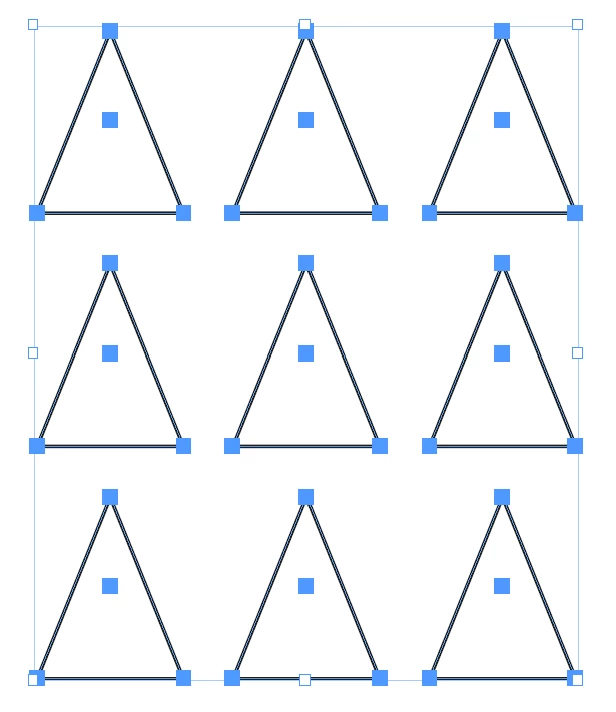
Arrow keys produce a grid of triangles, as this image shows:

But if I tap once on the Space bar (press and release) then the behavior of the arrow keys change?
Left and Right transforms into a star shape while Up and Down adds/decrease the number of sides.
Is the the correct behavior?

1 reply

Roger Breton
Roger BretonAuthorCorrect answer
Legend
October 26, 2023

Even weirder... I'm not sure what to think?
I start with a triangle.

Arrow keys produce a grid of triangles, as this image shows:

But if I tap once on the Space bar (press and release) then the behavior of the arrow keys change?
Left and Right transforms into a star shape while Up and Down adds/decrease the number of sides.
Is the the correct behavior?

Rishabh_Tiwari
Community Manager
Community Manager
October 26, 2023

Hi @Roger Breton,


Thank you for reaching out. This is an expected behaviour. Please check this video(Timestamp- 3 minutes) and feel free to update the discussion if you need further assistance.


Thanks

Rishabh