



dublove
Legend
Sep 15, 2026 11:36 AM UTC
Question

Weird! Why is the content adaptation framework code ineffective for it?

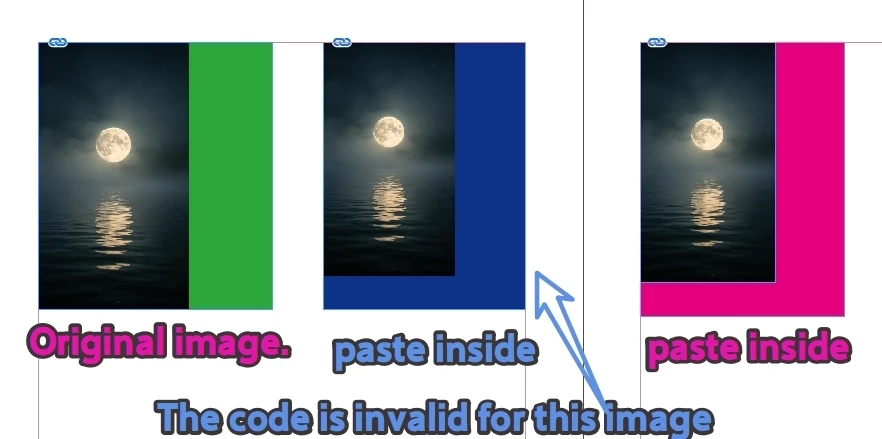
Please use the direct selection tool to select the innermost image.

The code is invalid for the blue image in the middle. Effective on the right side.


The reason for this may be that I held down "Ctrl+Shift+left mouse button" and dragged the innermost "image".

var d = app.activeDocument;
var item = d.selection[0];

//alert(item.constructor.name);
//alert(item.parent.parent.constructor.name);

// direct selection tool
if (item.constructor.name == "Image") {
//alert('000')
contentFitToFrame(item.parent.parent)
}

function contentFitToFrame(s) {
//alert('001')
s.frameFittingOptions.fittingAlignment = AnchorPoint.TOP_LEFT_ANCHOR;
s.fit(FitOptions.FILL_PROPORTIONALLY);
}
 

    9 replies

    rob day
    Community Expert
    Community Expert
    Sep 15, 2026 4:08 PM UTC

    ...

    Translate
    rob day
    Community Expert
    Community Expert
    Sep 15, 2026 2:44 PM UTC

    This is another example of the problems you will run into with nested frames. Each frame has its own frameFittingOptions and fit methods, but you are only setting one of the two. You’ll get a different result If you set the parent and parent.parent, which in this case are rectangles:


    var d = app.activeDocument;
    var item = d.selection[0];

    if (item.constructor.name == "Image") {
    contentFitToFrame(item.parent)
    contentFitToFrame(item.parent.parent)
    }

    function contentFitToFrame(s) {
    s.frameFittingOptions.fittingAlignment = AnchorPoint.TOP_LEFT_ANCHOR;
    s.fit(FitOptions.FILL_PROPORTIONALLY);
    }


    Translate
    dublove
    dubloveAuthor
    Legend
    Sep 15, 2026 3:19 PM UTC

    Hi ​@rob day 

    The problem doesn't lie here. Pay attention to the blue one, its function should be:
    contentFitToFrame(item.parent.parent)。
    But I don't know why it's contentFitToFrame (item. parent)


    The outermost frame of the original image is' item. parent '.
    Once pasted into the frame, its outermost frame is item.parent.parent

    Translate
    rob day
    Community Expert
    Community Expert
    Sep 15, 2026 3:25 PM UTC

    Pay attention to the blue one


    My example is using the blue version in your 1028.indd file

    Translate
    Community Expert
    Sep 15, 2026 11:46 AM UTC

    when you are pasting you are pasting the image with it parent rectangle. So for the centre image

    item.parent.parent is rectangle

    However for the left most image item.parent is rectangle and item.parent.parent is spread

    Translate
    -Manan