
Inspiring
December 20, 2022
Répondu

What happened to 'find similar fonts'?

Ive only recently found out that there used to be a 'find similar fonts' feature when choosing a typeface, but this no longer appears to be there?


I know I can browse Adobe Fonts, and also find similar fonts based on an image... but is there still a way to find a similar font to one that you already have installed?
Ce sujet a été fermé aux réponses.
Meilleure réponse par Barb Binder

Hi @mttplbkp:


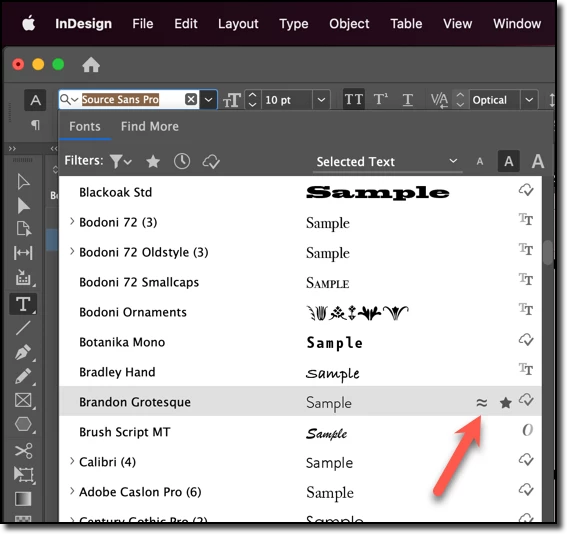
Select a font in the fonts list and click the squiggly = button.


~Barb


2 commentaires

Mike Witherell
Community Expert
Community Expert
December 20, 2022

Here is a beta preview of next year's Adobe InDesign icon interface shown on multiple screens


Mike Witherell
James Gifford—NitroPress
Legend
December 20, 2022

That, at least, I can read. 🙂


I was toying with a mockup of an ID menu with everything swapped to hieroglyphics, but you'll just have to visualize it as I ran out of play time. 🙂


Seriously, I know ID has an increasing need to cram more and more into a finite amount of screen real estate, but there must be a solution other than endlessly multiplying micro-icons... that then play hide-and-seek on top of things.


There are some important, often-used features lurking behind cryptic icons barely big enough to click on. That's... wrong.


Barb Binder
Community Expert
Barb BinderCommunity ExpertRéponse
Community Expert
December 20, 2022

Hi @mttplbkp:


Select a font in the fonts list and click the squiggly = button.


~Barb


~Barb at Rocky Mountain Training
James Gifford—NitroPress
Legend
December 20, 2022

I see the ID interface slowly reduced to microscopic icons. Pretty soon we're going to have to master hieroglyphics just to use it. 🙂