



dublove
Legend
August 16, 2026
Answered

What is the name of the script for "proportional spacing" in character styles?

  • August 16, 2026
  • 10 replies
  • 36 views

I couldn't find the code name for 'proportional spacing' in the InDesign ExtendeScript API.

https://www.indesignjs.de/extendscriptAPI/indesign-latest/#CharacterStyle.html
So I installed an English version of InDesign and suddenly realized that the interface between the Chinese and English versions is different.


The English version does not even have the option of "proportional spacing".
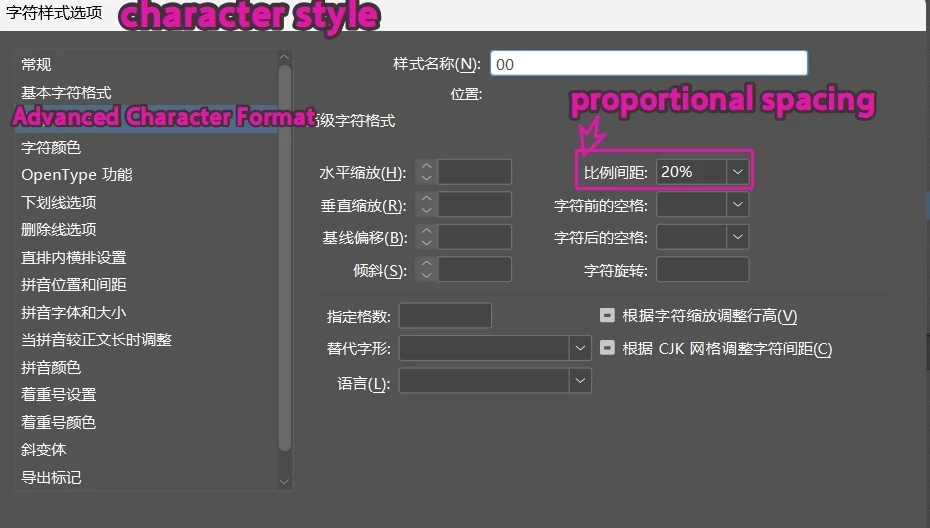


    Correct answer Peter Kahrel

    In this case you can set the proportional spacing in the character style to any value, say, 76. Then use this script to display the property whose value is 76:

    p = app.documents[0].characterStyles.item('c').properties;
    for (i in p) {
    if (p[i] == 76) {
    alert (i + ': ' + p[i]);
    break;
    }
    }


    10 replies

    rob day
    Community Expert
    Community Expert
    August 16, 2026

    Hi ​@dublove, I cant test on my English version of InDesign, but there are all the ruby properties in the API:


    https://www.indesignjs.de/extendscriptAPI/indesign-latest/#CharacterStyle.html


    dublove
    dubloveAuthor
    Legend
    August 16, 2026

    Hi rob day.

    I tested it with Peter Kahrel.
    The code is "tsume: 0.76,"

    rob day
    Community Expert
    Community Expert
    August 16, 2026

    I was wondering if you can get at the other properties you are showing in your Chinese language screen capture (that do not exist in the English version) via the ruby properties?

    Peter Kahrel
    Community Expert
    Community Expert
    August 16, 2026

    Where did it come from? It’s a pretty straightforward thing.

    > it can only be 76%

    You enter 76 in the interface, it will be shown as 76%, but the script will return 76.

    Now, suppose you run the above script and the alert says xyz: 76, then you set the property in script thusly:

    myCharacterSty.xyz = 76

    or 

    myCharacterSty.properties = {xyz: 76}


    dublove
    dubloveAuthor
    Legend
    August 16, 2026

    The script has no prompts.

    I seem to know that this is the code name chosen for testing uncertainty.

    I tested that font size 22.12 will pop up.
    But the 'proportional spacing' did not pop up.


    Peter Kahrel
    Community Expert
    Peter KahrelCommunity ExpertCorrect answer
    Community Expert
    August 16, 2026

    In this case you can set the proportional spacing in the character style to any value, say, 76. Then use this script to display the property whose value is 76:

    p = app.documents[0].characterStyles.item('c').properties;
    for (i in p) {
    if (p[i] == 76) {
    alert (i + ': ' + p[i]);
    break;
    }
    }


    dublove
    dubloveAuthor
    Legend
    August 16, 2026

    HI ​@Peter Kahrel 

    This is the first time I have seen such a structure.
    Where did I come from?
    It can't be set to 76, it can only be 76%.My goal is to set the properties of character styles.
    like this

    myCharacterSty.properties={


    }
