

dublove
Legend
June 16, 2026
Question

What is the reason why some documents cannot recognize Document fonts?

  • June 16, 2026
  • 2 replies
  • 24 views

Still feeling depressed and unsolvable.

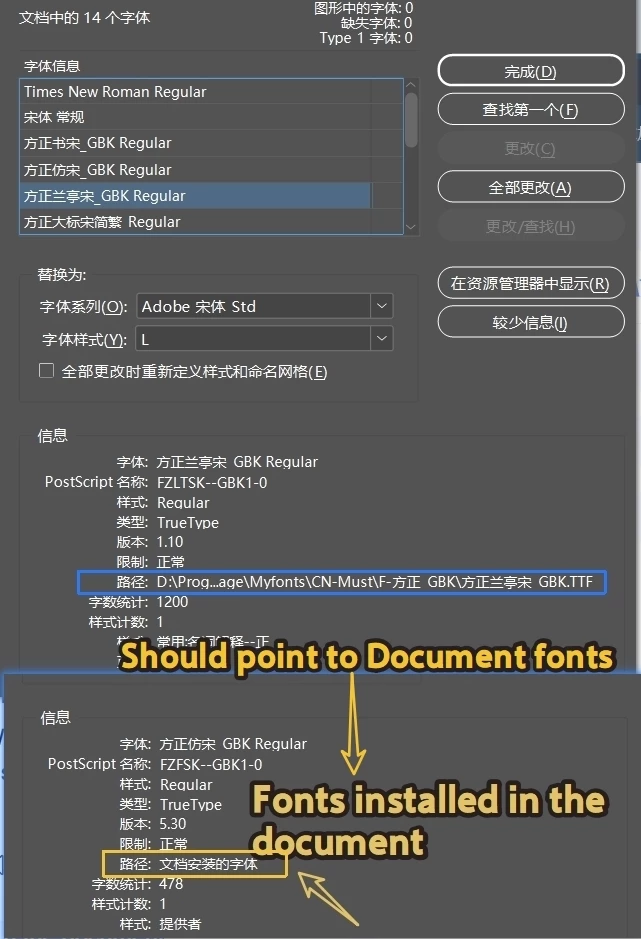
I have packaged the fonts and placed them in the Document fonts directory. When I opened the document, I found that the fonts pointed to C: \ windows \ fonts or other font directories.


Normally, the Document fonts directory should be checked first. If it cannot be found, should it be directed to the C drive?
When pointing to Document fonts, the path will display 'Fonts installed in the document'


I have already reopened my ID, and even restarting my computer doesn't work. Still pointing to C: \ windwos \ fonts
Is there any way?

Why is there no bug report classification in InDesign when posting?


    2 replies

    Community Expert
    June 17, 2026

    This happens sometimes when the font is installed on the computer and is present in the Document Fonts directory as well. I have experienced this. Or if different versions of the same font are accessible. Uninstalling the font from the computer lets it load from the folder, though this is not an ideal solution

    -Manan
    rob day
    Community Expert
    Community Expert
    June 16, 2026

    Is your Restrictions line under the Version number translating as Normal?


    dublove
    dubloveAuthor
    Legend
    June 16, 2026

    @rob day 

    Restrictions: Normal
    This is the font I usually use.