
justinbmiller
Participating Frequently
February 4, 2019
Question

What is the TypeQuestCache?

  • February 4, 2019
  • 1 reply
  • 7657 views

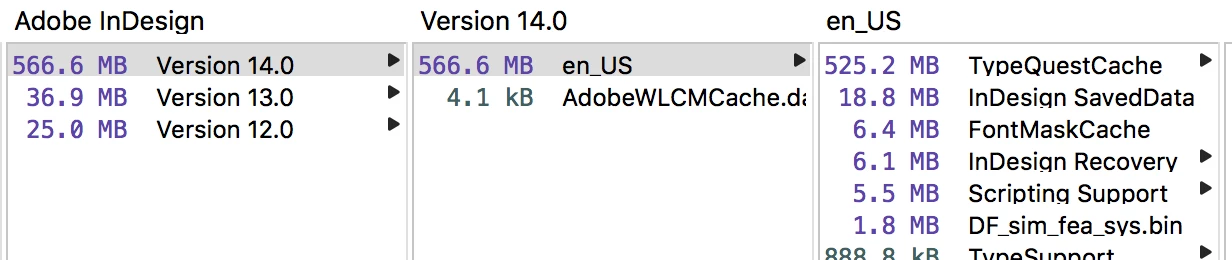
I've had a couple other versions of Id on this machine but the latest (14.0) seems to be taking up the most space in the cache. A new folder has shown up inside this latest version's cache folder. It's titled "TypeQuestCache" and it doesn't show up in any of the other versions. I'm assuming it may have something to do with TypeKit but then why isn't it called that?

It's taking up over half a gig of space. Can I delete the contents of that file? I recently synced some fonts from Tk but that was through PS.
This topic has been closed for replies.

1 reply

Steve Werner
Community Expert
Community Expert
February 4, 2019

I don't think it's from Typekit. I've used a lot of Typekit fonts with InDesign CC 2019 (version 14) and here's what my folder looks like:

Have you used any third party font utilities?

justinbmiller
Participating Frequently
February 4, 2019

No, I haven't used any third party font utilities. Aside from TypeKit, everything is vanilla. I ended up deleting the entire folder, which put it down to a few MB. I then opened up a tri-fold brochure that uses Open Sans, Georgia, and Baskerville fonts. After quitting Id, that TypeQuestCache folder ballooned to 250MB.

Steve Werner
Community Expert
Community Expert
February 4, 2019

What's new in InDesign CC 2019 and Illustrator CC 2019 is that you can preview Adobe Fonts (previous Typekit fonts) before they are installed (synced). It may be that a cached preview is being built to speed up that process.

Have you been using that feature a lot in CC 2019?

But these days 250 to 500 Mb is really not that big. And I say that working on a laptop with an SSD with 500 Gb of storage.