
Ganesh_JI
Inspiring
December 13, 2018
Answered

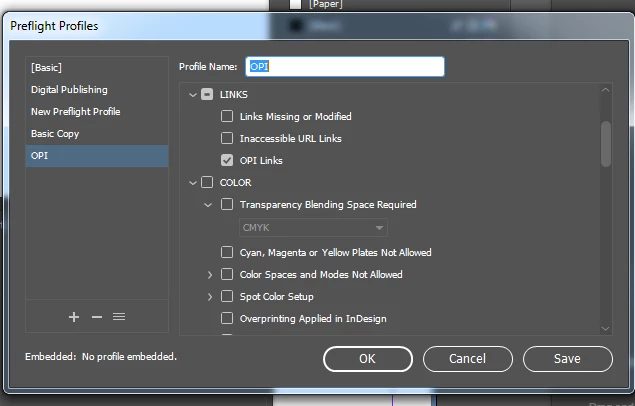
What is the use of OPI links in indesign preflight

  • December 13, 2018
  • 4 replies
  • 13215 views

OPI is a technology that allows the embedding of low-resolution versions of images in a file. ... PDF files containing OPI-images are commonly referred to as 'thin PDF files'. PDF files containing only high resolution images are sometimes called 'fat PDF file.

In indesign preflight what is the use of OPI links in Links menu.

Please let us know any live example for the OPI links. or when it shows error in indesign preflight if we check OPI Links.
    This topic has been closed for replies.
    Correct answer Laubender

    Hi gansanban ,

    are you recieving PDF or EPS files, maybe adverts or other material, you have to place on InDesign pages from unknown or very old sources? It's not very likely but it is still possible that they could contain OPI information that would link to highres image sources.

    Then I would check for OPI Links and flag them as errors. Otherwise you could end up with lowres representations of integrated images.

    Personally the last time I actively used an OPI workflow with an OPI Server that automatically exchanged lowres data with highres one at output time is more than 20 years away.

    Regards,
    Uwe

    4 replies

    Ganesh_JI
    Ganesh_JIAuthor
    Inspiring
    December 14, 2018

    Hi All

    Thank you all, now i understood the opi concept

    Thans

    Ganesh.R

    Legend
    December 13, 2018

    I think the most important use, since OPI is almost dead now, is to warn you that someone in your workflow is using OPI. The results will probably not be what they want or expect.

    Community Expert
    December 13, 2018

    Not something I have used in over 15 years.

    However, some places may operate that way, especially if dealing with extremely large EPS or PDF files, the OPI option allows for the files to be replaced with the hi-res versions on a server, which I'm sure is still a workflow option for a lot of companies with large files, like photographers, fine art, or other things of that nature.

    Or simply to ensure the same image is used unaltered throughout a product print run.

    LaubenderCommunity ExpertCorrect answer
    Community Expert
    December 13, 2018

    Hi gansanban ,

    are you recieving PDF or EPS files, maybe adverts or other material, you have to place on InDesign pages from unknown or very old sources? It's not very likely but it is still possible that they could contain OPI information that would link to highres image sources.

    Then I would check for OPI Links and flag them as errors. Otherwise you could end up with lowres representations of integrated images.

    Personally the last time I actively used an OPI workflow with an OPI Server that automatically exchanged lowres data with highres one at output time is more than 20 years away.

    Regards,
    Uwe