
Participating Frequently
June 26, 2023
Question

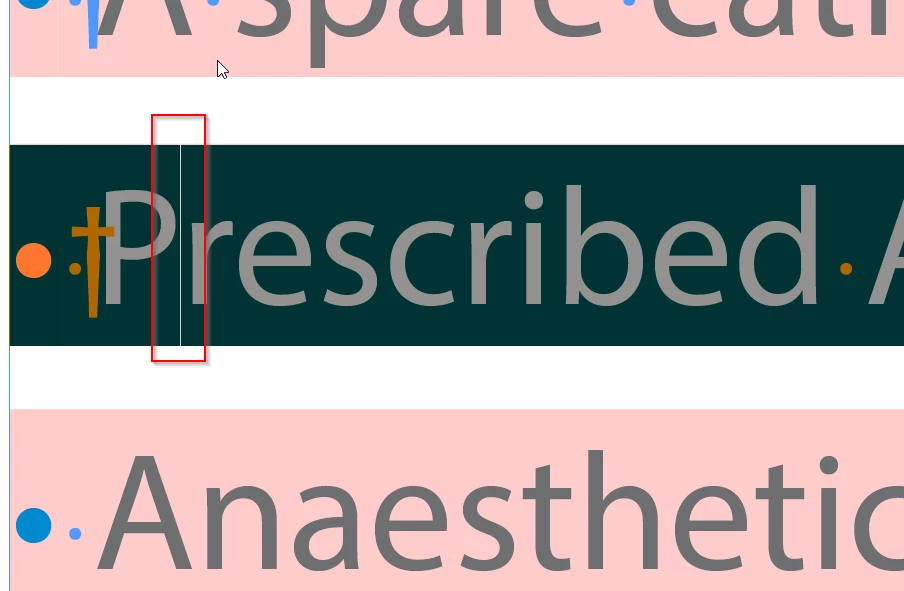
What is this line in between the words?

  • June 26, 2023
  • 6 replies
  • 3721 views

Can any one help understanding what the below line is? This is invisible when text is not selected and only appears when the word is selected. This is causing the words/paragraph to break in SDL studio when wherever this line appears. Doesnt look like any marker. Never seen this before.
This topic has been closed for replies.

6 replies

Legend
June 30, 2023

Hello,


As another poster noted there is a difference with the leading 13.5 - 14.  When the substittuded check box is selected, the pink you see is drawn by a GlobalTextAdnorment routine. Some times the boundery of the highlight regions overlap and you will see a darker area where they overlap. I suspect this is just a visual effect.


P.


Edited to sya..


Here is one of my GTA going wrong. 

Brad @ Roaring Mouse
Community Expert
Community Expert
June 27, 2023

Two observations to add:

I created a sample file of my own, and was able to see the same thing (btw: did it in an older version of ID to eliminate versioning as the issue). In my case I went back to CC2020.

a) in most (but not all) cases, the lines occur between changes of colour: in the your file, the bullet is blue, the SPACE between (and any Indent to Here inerts) is Pink and the text is Grey)... and also in changes in line spacing, as there's plenty of that going on for some reason. It could be your software is "seeing' these differences as places to break copy.

b) the lines appear or disappear if I toggle between CPU and GPU, so this points to a screen draw issue.

That being said, there are no 'hidden' characters in any way.

Regardless, you need to work with paragraph styles, especially with your indented bullet items instead of using spaces and "Indet to Here"... and make sure any overrides are eliminated if they aren't required.


Peter Spier
Community Expert
Community Expert
June 27, 2023
quote


Regardless, you need to work with paragraph styles, especially with your indented bullet items instead of using spaces and "Indet to Here"... and make sure any overrides are eliminated if they aren't required.


By @Brad @ Roaring Mouse


Unfortunately @Sourabh Shivaji Khutwad is not the author of the original document here, so that seems not likely.

Joel Cherney
Community Expert
Community Expert
June 27, 2023

When I get a damaged or poorly constructed InDesign doc that I have to throw into an app like SDL Trados Studio, I never know how much preparatory work is going to be necessary before it's ready to go to translation. Sometimes I just have to fly through and remove some soft returns with a regex; other times I have to basically rebuild it from the ground up. But my target isn't a well-constructed InDesign document, it's merely one that is not so broken that it gets stuck in the hopper. However, folks in Sourabh's shoes (like me) do expect in most cases to need to do at least some preparatory work before a given InDesign doc gets processed. Honestly, the quality of work we talk about here on these forums is found in maybe 2-3% of the docs I handle, and that's being generous. Files from many people with the "graphic designer" job title are just absolute spaghetti inside.


Sourabh's problem here is that these minor style changes discussed by Brad are leading to major tagging problems, when they ordinarily wouldn't. I sometimes go through and correct a client's styling before dropping the file into the TM hopper, as such automatic text-harvesting tools tend to work better with well-groomed styles. But this case, where some minor color changing is leading to very fragmented text in Trados, is an outlier. If I had to clear "all overrides" on all InDesign docs before dropping 'em into my TM workflow, well, I'd be billing for twice as many hours.... or, more likely, my social service clients would only be able to afford half as much translation work.


Peter Spier
Community Expert
Community Expert
June 26, 2023

It looks to me like the cursor and is a screen draw artifact. Does it move if you highlight something else?

Participating Frequently
June 26, 2023

Hi Peter, it is not cursor mark, here's a screenshot with cursor. I am able to delete it completely but there are a lot of instances and will consume a lot of time to delete and type the content again in multiple files.


Peter Spier
Community Expert
Community Expert
June 26, 2023

I'm not saying it's an active cursor, but rather a bad screen draw.

Can you share a small sample file that shows this? I'd like to see if the mark is present on multiple systems.

Willi Adelberger
Community Expert
Community Expert
June 26, 2023

What happens if you delete "inset here” and replace it with intent in paragraph styles?

Participating Frequently
June 26, 2023

Hi Willi, replacing with new style doesnt or deleting the inset marker doesnt make any change.

Geоrge
Legend
June 26, 2023

It looks like "Discretionary Line Break"


Remember, never say you can't do something in InDesign, it's always just a question of finding the right workaround to get the job done. © David Blatner
Participating Frequently
June 26, 2023

Hi George, thank you for your reply, it is not Discretionary Line Break as that was the first thing that came to my mind. I doubt this may be something related to version issue but not sure.

Participating Frequently
June 26, 2023

I forgot to metion that this issue is appearing in InDesign and the version I am using is 18.4