
Inspiring
April 3, 2025
Answered

What is this mysterious text area?

  • April 3, 2025
  • 4 replies
  • 2935 views

Hi all.

I'm trying to understand the formatting of some docs I've inherited, and I'm new to InDesign.

I don't understand what I'm dealing with in the attached screen shot. There appear to be three columns, but the text frame has only one. The area(s) containing the text are part of the text frame (they disappear when the text frame is hidden or deleted), but can't be selected in the layer view.


And, as you can see, the mystery area exists outside the text frame itself. What might this be?


Note: The other objects in the layer list are on a facing page, out of view.
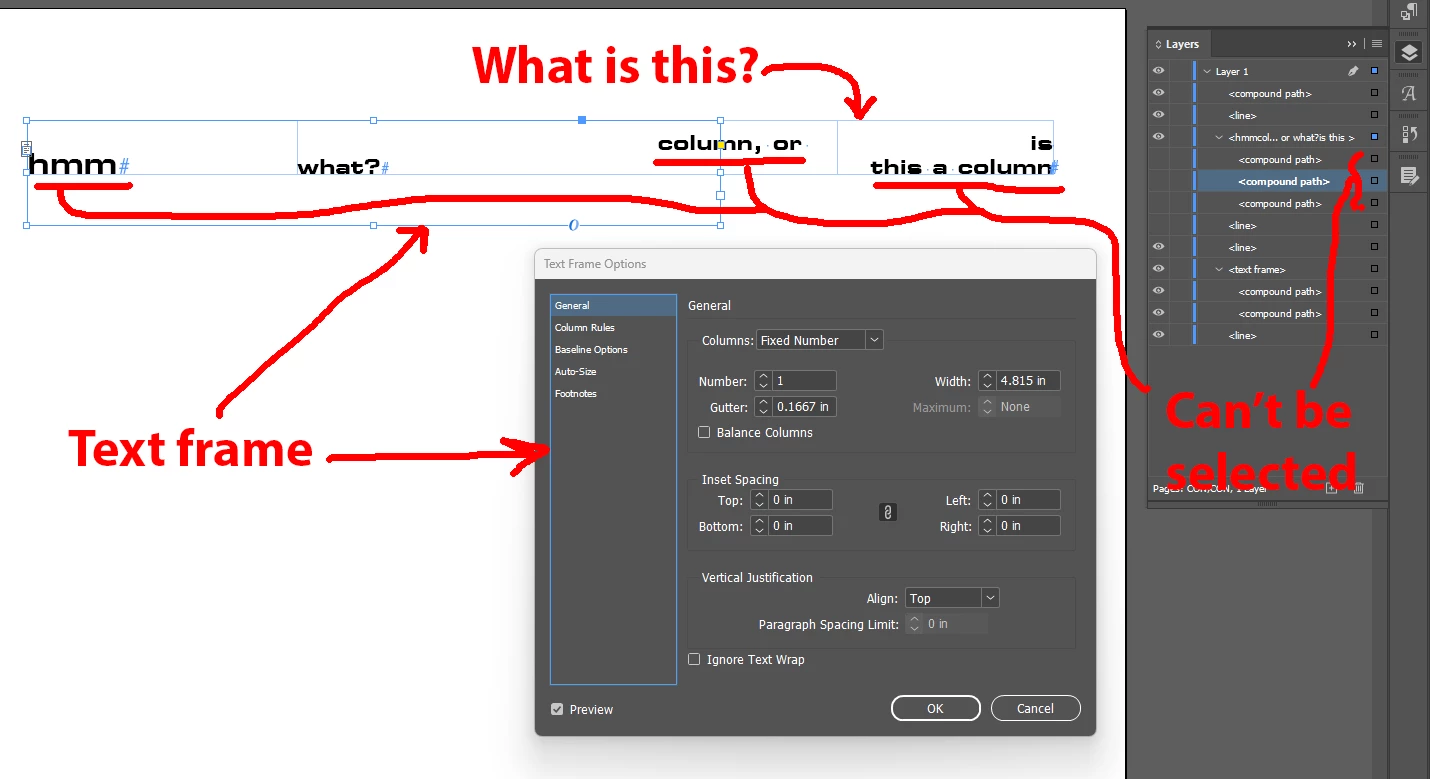
Correct answer Robert at ID-Tasker

@Thomas_Calvin 


It's a Table.


4 replies

Inspiring
April 3, 2025

Thanks guys. It is most likely a table, and I can tab between the columns. But it does not appear as an entity in the layer list; there are no other layers in the doc aside from what's depicted.


Where would the table properties be shown?

James Gifford—NitroPress
Legend
April 3, 2025

Start by dragging the text frame wider for access to those columns.

Then select the table full width, and drag the right margin in to a net width better suited to your text frame size.

All controls are in the Table palette and/or Table menu.

Inspiring
April 3, 2025

Thanks. I had made the frame smaller to show how the mystery area overflowed it. Even with it as big as possible, you can't select the table... except with another mystery thing; it has no ToolTip, does nothing when clicked, and produces no relevant context menu when right-clicked:

But when double-clicked, it turns the cursor into the row/column-selection arrow.


The question is why the table is not mentioned anywhere, and is missing from the Properties pane:

Robert at ID-Tasker
Robert at ID-TaskerCorrect answer
Legend
April 3, 2025

@Thomas_Calvin 


It's a Table.


jmlevy
Community Expert
Community Expert
April 3, 2025

I think that it is a table.

James Gifford—NitroPress
Legend
April 3, 2025

Not being able to select it is odd. OP might try tabbing/arrowing over from the accessible columns to see.

James Gifford—NitroPress
Legend
April 3, 2025

Something in an underlying text frame, or another (possibly locked) layer?