
Participant
May 5, 2025
Answered

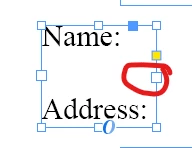
what is this thing on the text frame
  • May 5, 2025
  • 2 replies
  • 263 views

I keep instinctively trying to resize my text frames using these......boxes? handles? and clicking on the left OR right one like....sucks my text out and makes a small picture/icon of my text and makes it copy/pasteable. What is this thing even called and how do I make it not do that? I just want to be able to shorten or lengthen text frames without changing their other dimension quickly and easily. 

Correct answer Brad @ Roaring Mouse

The bigger boxes, top left and bottom right, are the In/Out Ports for linking text. When your text box gets too small, these will overlap the sizing boxes underneath. When that happens, just hold your mouse button down for a moment and the arrows will appear allowing you to resize the box.

2 replies

Brad @ Roaring Mouse
Community Expert
Brad @ Roaring MouseCommunity ExpertCorrect answer
Community Expert
May 6, 2025

The bigger boxes, top left and bottom right, are the In/Out Ports for linking text. When your text box gets too small, these will overlap the sizing boxes underneath. When that happens, just hold your mouse button down for a moment and the arrows will appear allowing you to resize the box.

Joel Cherney
Community Expert
Community Expert
May 6, 2025

Your frame is so small that your out port and your handle are in the same place. The in port and out port are for threading frames together into a single story. Here's a quick GIF with a rather taller text frame so you can see an example of how the in port and out port are used:

When your frame is small, InDesign maps the functionality of the side handles to the in port and out port. So if you click and drag, it should behave like a handle, but if you click and release without moving the mouse it should behave like a port.