Inspiring
May 19, 2020
Answered

When exporting my book, the pages do not flow as spreads.

  • May 19, 2020
  • 7 replies
  • 2373 views

Hello all, 


I am trying to create a PDF and ePUB of the book I have create in InDesign, however the pages are not flowing properly. I have some nice flowing spreads and then two random pages that stick out as individual pages. All the chapters are individual files with facing pages that I have saved into a book that has been synchronised. How do I get all the pages flowing nicely?


Thank you
 

This topic has been closed for replies.
Correct answer Barb Binder

Hi Tom from London:


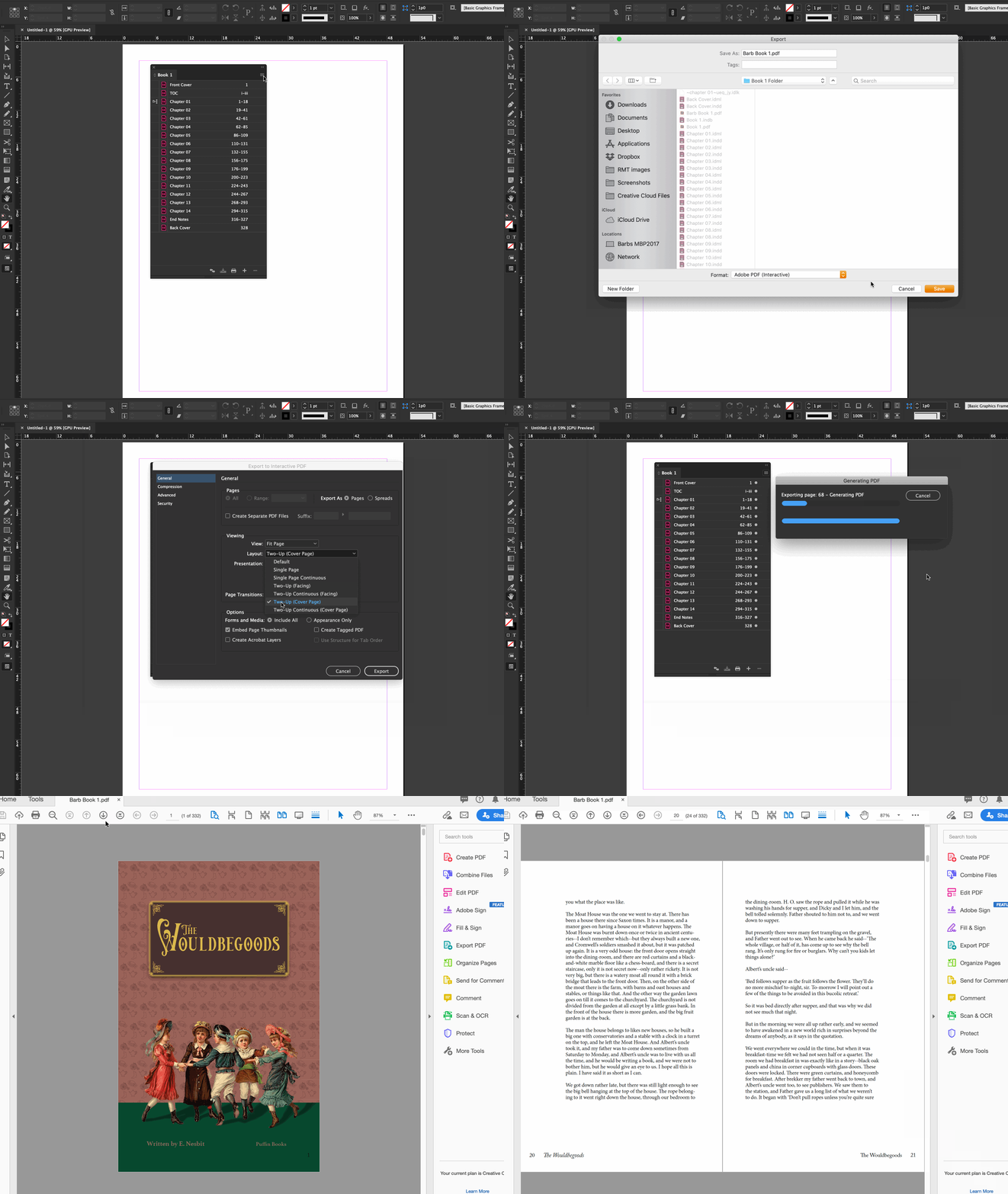
I'll address the PDF part of the question. The book is set up correctly, I suspect it was your export settings. In the animation below, I am exporting an Interactive PDF (because I believe you want to see the PDF on screen) and I'm setting it to Export as Pages (not spreads), Fit to Page and Two up with the cover page.


~Barb


7 replies

Barb Binder
Community Expert
Barb BinderCommunity ExpertCorrect answer
Community Expert
May 21, 2020

Hi Tom from London:


I'll address the PDF part of the question. The book is set up correctly, I suspect it was your export settings. In the animation below, I am exporting an Interactive PDF (because I believe you want to see the PDF on screen) and I'm setting it to Export as Pages (not spreads), Fit to Page and Two up with the cover page.


~Barb


~Barb at Rocky Mountain Training
Derek Cross
Community Expert
Community Expert
May 21, 2020

If I were producing this text-heavy book, I'd produce one version as a PDF and create another as a Reflowable PDF. The two formats are not compatible.

Inspiring
May 21, 2020

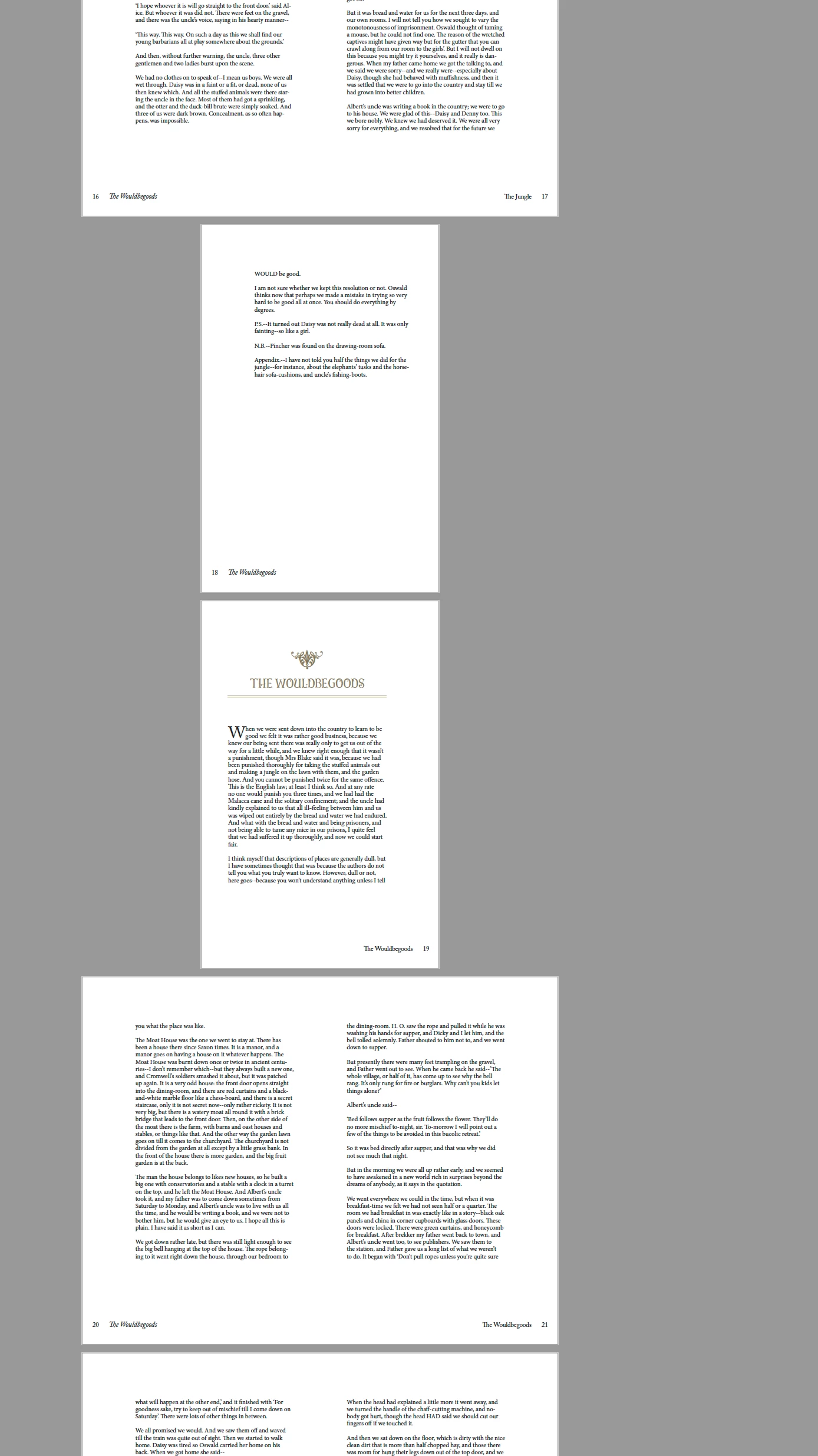
cust:  "… however the pages are not flowing properly. I have some nice flowing spreads and then two random pages that stick out as individual pages …"
issue:  the flow is not continuous when viewing in acrobat … sometime dbl-pg and sometime sngl-pg.


this is elementary … i  have  attached  two  screen-caps  below … to  better  illustrate.

in acrobat … the pdf layout appears different between pg18-19.
in indesign … division between chap1+2 appears different.

start indesign … open both chap1+2+3 files … toggling “pages-palette” in view for each

  • chap-1 … first-pg starts on right-side … last-page ends on left-side
  • chap-2 … first-pg starts on right-side … last-page ends on right-side
  • chap-3 … first-pg starts on left-side … last-page ends on right-side

all other chaps … first-pg starts on left-side … last-page ends on right-side … this is good (according to poster).


according  to  your  request … seems to me you’d want the first-page to always appear on left-side in the pages-palette … and last-page to always appears on right-side.  the way you have it set up … you are commanding indesign to stop current pagination after pg18 and start new pagination at pg19.  you may add blank-page at end of chapter … such as what you correctly set up between chap-4 and chap-5.


fwiw … same issue appears with toc-section … you start/stop it obnoxiously … forcing the software to begin/end pagination crudely.


original-layout:


optimal-layout:

Community Expert
May 21, 2020

I also get the same results as you have pasted in your screenshot when using spread option, it seems to make sense as well. It is not merging two seperate spreads into one. A similiar question is being discussed at the following link, there a user has posted a workaround that you can try unless some chimes in with a proper way(if it even exits)

https://community.adobe.com/t5/indesign/export-book-to-pdf/m-p/11148525?page=1#M187093


-Manan

-Manan
Derek Cross
Community Expert
Community Expert
May 20, 2020

If this is a Reflowable ePub you'd want single pages only.

Community Expert
May 20, 2020

Can you share a sample document where this issue happens.


-Manan

-Manan
Inspiring
May 20, 2020
Community Expert
May 19, 2020

Did you select to export as spreads in the export dialog


-Manan

-Manan
Inspiring
May 19, 2020

Hey Manan, yes I did