
rodrigoe55625431
Inspiring
November 20, 2025
Question

When I press 'W' my design previsualization changes

  • November 20, 2025
  • 4 replies
  • 138 views

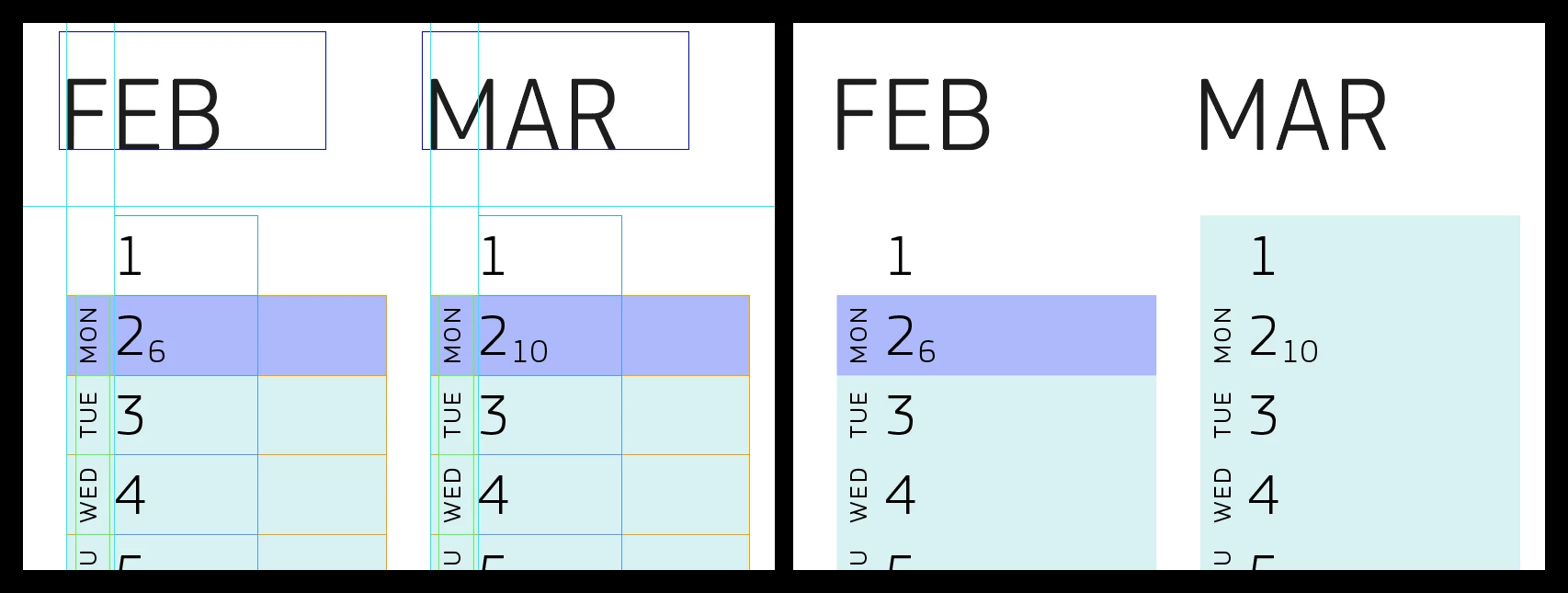
I’m working on the design below, and when I press W, the layout changes back and forth—see screenshots below. The version on the left is how it should look, on the right, how it should not look. The issue disappears after I restart the application, but it returns soon after. This is a significant issue for professional designers, it means we can no longer rely on the accuracy of what your software displays. Setup: macOS Tahoe 26.1, InDesign 21.0.1.


PS: The screenshot on the right seems to display a previous step in the process, for unknown reasons.

PPS: I’m not talking about how ‘W’ hides/shows the bounding boxes, I’m talking about the design itself changing.
 

4 replies

BobLevine
Community Expert
Community Expert
November 20, 2025

Have you tried turning off GPU Performance?

Dave Creamer of IDEAS
Community Expert
Community Expert
November 20, 2025

I see the difference. Changing to [Edit presentation] preview mode should not change your design. 

Other can checking overprint and/or non-printing settings, I would need to see the problem file.


David Creamer: Community Expert (ACI and ACE 1995-2023)
Frans v.d. Geest
Community Expert
Community Expert
November 20, 2025

Yes, that is how it works when you are not using the text tool, it is the shortcut to toggle between 'normal' and 'preview' mode just as it always has been. A, as you call it 'professional designer' of course should know this 😉

rodrigoe55625431
Inspiring
November 20, 2025

Pay more attention to the images provided. Thanks.

Frans v.d. Geest
Community Expert
Community Expert
November 20, 2025

I did, and I and Rob Day explained it to you.

rob day
Community Expert
Community Expert
November 20, 2025

Hi @rodrigoe55625431 , W is the default shortcut key command for toggling between the Normal and Preview Screen Mode.


rodrigoe55625431
Inspiring
November 20, 2025

Yeah thanks Rob Day, I know. But if you look closely at screenshots L and R, you’ll see the colour boxes change, not just the bounding boxes, which are completely normal. That is what I’m reporting.

rob day
Community Expert
Community Expert
November 20, 2025

Can you share the file? Or try exporting an IDML and reopening