Known Participant
September 18, 2025
Question

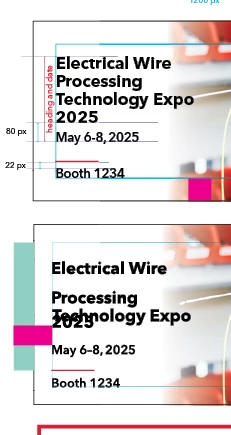
When I resize my artwork (not the document) the type changes

  • September 18, 2025
  • 5 replies
  • 209 views

I have tried grouping and turning the txt into outlines. Help!


5 replies

Peter Spier
Community Expert
Community Expert
September 18, 2025

Looks to me like there are at least two threaded text frames in play here, and that the text Electrical Wire Technology Expo has auto-leading rather than a fixeed leading value, and that those lines are set to Align to Grid. Making the text larger is increasing the leading, forcing the text to skip grid lines and pushing the Date into the next frame (which looks like it is overlapping slightly).

I think the missing type is the reult of unwanted text wrap as the others have suggested.

Randy Hagan
Community Expert
Community Expert
September 18, 2025

I would suggest that you 1) Go to the Type pull-down menu and turn on the Show Hidden Characters command. This turns on invisible characters like spaces, tabs and line returns, among others, in the type you've set in your document. Just like you'd see in Microsoft Word. I'll betcha a nickel you've got an extra tab between the end of the word Wire and the line return. If you eliminate that extra tab, the lines should align again. The other option is 2) Turn off the Text Wrap around the placed graphic behind your type. 

Either one should be the end of your problem. Clean up any resulting anomalies and your type should be fine.


Hope this helps,


Randy

Bill Silbert
Community Expert
Community Expert
September 18, 2025

I agree that we need more information here. Just as an educated guess, though, what happens if you select the text frame and then in the Text Frame Options dialog (Command/Control-B) you click on "Ignore Text Wrap"? Does the text still go awry when you try and enlarge the artwork?

Participant
September 26, 2025

Did a work around, will follow up next week. Thank you.

Harshika Verma
Community Manager
Community Manager
September 26, 2025

Sure. We will be waiting for your response.


Thanks,

Harshika

Known Participant
September 18, 2025

I also loose type


leo.r
Community Expert
Community Expert
September 18, 2025
quote

I also loose type


By @Michelle243007171z7l


You'll need to at least list the exact sequence of actions that lead to the undesired consequences you experience. Plus everything mentioned by @BobLevine above.

BobLevine
Community Expert
Community Expert
September 18, 2025

You're going to need to supply a lot more information and you're probably better off just posting the file.

What version of InDesign? What operating system? Is there text wrap applied? What's the leading set to?

Participant
September 26, 2025

Thank you for your help.

I did a work around and have because I had a tight deadline. i would still like to know what is going on for the future.

Next week, when my schedule frees up, I will send the file w/o proprietory information.
