

Mr. Met
Inspiring
June 9, 2018
Question

When ID starts up panels are missing

  • June 9, 2018
  • 2 replies
  • 602 views

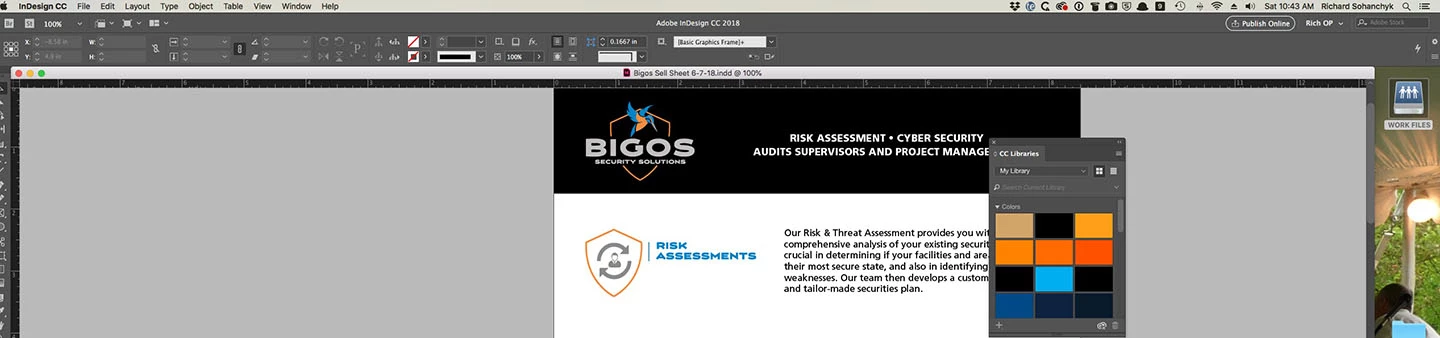
I quit out of all apps at the end of the day. Next morning, I fire up ID and the panels are usually missing. I reset workspace and the panels appear but they don't flyout. I have to quit ID again and restart. Any idea what is causing this and what I can do to avoid this being a daily occurrence.

    This topic has been closed for replies.

    2 replies

    Bill Silbert
    Community Expert
    Community Expert
    June 10, 2018

    Problems with panels can many times be solved by trashing your InDesign cache files (which is not the same as trashing preferences).

    To do so:

    For Macintosh Users: With InDesign closed launch a Finder Window in column view and click on your home folder. With the Option Key pressed choose Library from the Finder Go Menu. Within the Library folder find the “Caches” folder. Within the Caches folder find and delete the entire file “Adobe InDesign”. I find that deleting the cache file completely leads to a lasting change. 

    For Windows Users: On Windows 7 and above the caches files are hidden. To find them go to the Control Panel and open Folder Options and then click the View tab. Then select “Show hidden files and folders” or “Show hidden files, folders or drive options” in Advanced Settings. Then delete (or rename) the folder at the end of this path: C:\Users\[User Name]\AppData\Local\Adobe\InDesign\Version [#]\<Language>\Cache.

    Derek Cross
    Community Expert
    Community Expert
    June 9, 2018

    Which version of InDesign and OS?

    Try resetting your InDesign preferences: Close InDesign. Then hold down Ctrl + Alt + Shift (Windows) or Cmd + Ctrl + Opt + Shift (Mac), and relaunch InDesign. Respond in the affirmative to the dialog asking if you really want to replace the preferences.

    Mr. Met
    Mr. MetAuthor
    Inspiring
    June 16, 2018

    High Sierra 10.13.5 and whatever most recent CC iteration Indesign is at.

    BobLevine
    Community Expert
    Community Expert
    June 16, 2018

    Turn on the application frame.