Legend
November 15, 2012
Answered

When is a document valid

  • November 15, 2012
  • 1 reply
  • 938 views

Hello,

I seem to be tripping up on some very basic stuff.

We install an event listener to detect selection changes. This works well if we manually close the palette. If we quit while the palettte is open we get an error saying we are accessing a document when there are not any open.
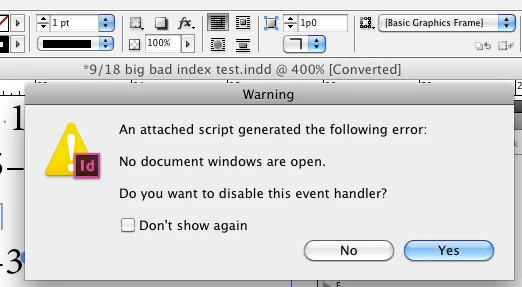
Here is the error. There is a document window.

The following code demonstrates the problem. In my opinion the alert should not display the documnet name when quiting but it does.

What is the best test to see if a document is valid.

Thanks.

P.

#targetengine "paltester";

main();

function main()

{

          var w = new Window( "palette", "pal test" );

          w.onShow = function ()

          {

                    app.addEventListener("afterSelectionChanged", selectionChangedFunction);

                    return;

          }

          w.onClose = function ()

          {

                    app.removeEventListener("afterSelectionChanged", selectionChangedFunction);

                    return;

          }

          w.show ();

          function selectionChangedFunction ( )

          {

                    if(app.documents.length <= 0 )

                              return;

                    alert ( app.documents[0].name );

                    return;

          }

}

This topic has been closed for replies.
Correct answer Marc Autret

Hi Pickory,

The event type afterSelectionChanged is associated to an Event whose target is usually a LayoutWindow (not a Document). When the document's window is closed, however, that event is probably triggered from the app (target). I'm not sure. Anyway, the error you get shows that the app.documents property is not yet updated—on Mac OS—when the event is notified. So, you should use a stronger condition (based on the event target), then try to access the active document if all is fine:

function selectionChangedFunction(/*Event*/ev)

{

    var doc,

        docName;

    if( ev.target instanceof LayoutWindow )

        {

        doc = app.properties.activeDocument;

        docName = doc && doc.properties.name;

        alert( docName );

        }

}

Hope that helps.

@+

Marc

1 reply

Marc Autret
Marc AutretCorrect answer
Legend
November 15, 2012

Hi Pickory,

The event type afterSelectionChanged is associated to an Event whose target is usually a LayoutWindow (not a Document). When the document's window is closed, however, that event is probably triggered from the app (target). I'm not sure. Anyway, the error you get shows that the app.documents property is not yet updated—on Mac OS—when the event is notified. So, you should use a stronger condition (based on the event target), then try to access the active document if all is fine:

function selectionChangedFunction(/*Event*/ev)

{

    var doc,

        docName;

    if( ev.target instanceof LayoutWindow )

        {

        doc = app.properties.activeDocument;

        docName = doc && doc.properties.name;

        alert( docName );

        }

}

Hope that helps.

@+

Marc

PickoryAuthor
Legend
November 15, 2012

Thank you so much, Marc.

All the best.

P.