

kc8iqw
Participant
March 17, 2026
Answered

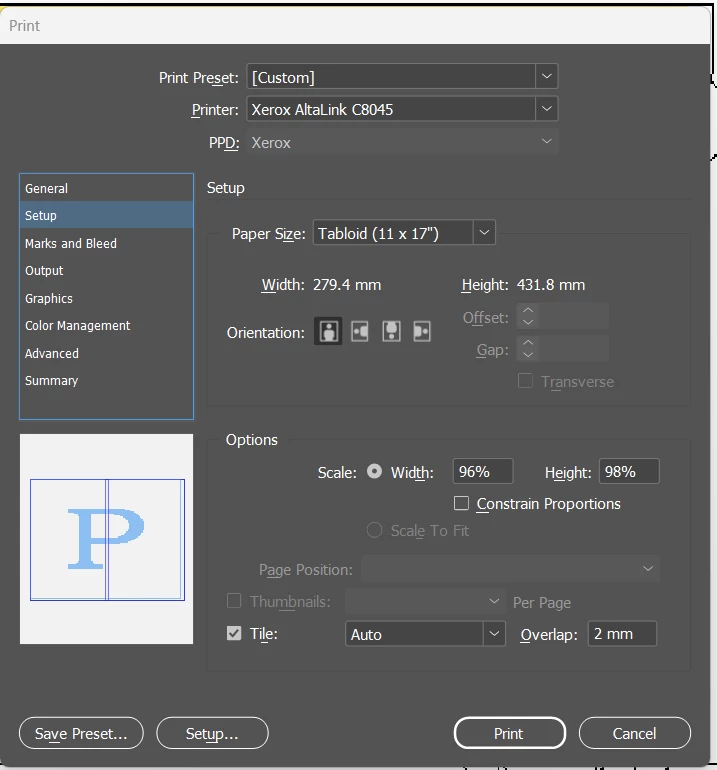
When using the Tile in print setup it shows 2 pages but prints 6

  • March 17, 2026
  • 1 reply
  • 53 views

I currently have these print settings and, as you can see, the print preview is showing it should print on 2 tabloid pages, however, it prints 6 pages.  I haven’t tried with 0 overlap, but I would like a little to line up on as we all know printers can shift 2mm.

The canvas is configured as about 10 mm less than 11x34 with 4mm margins.


    Correct answer kc8iqw

    @rob day Okay I think I have it figured out.  Turns out that despite me telling it Tabloid, the software and print driver were talking behind my back.  I set it to “defined by driver” and adjusted scale accordingly and now it prints as expected.  I usually avoid using driver defined as it can give unexpected results sometimes.


    As a side note, do you know where the setting is to turn off the printing of the file name/time for tiled prints?  I’d hate to make 2 exacting cuts to remove it on this sticky paper.

    1 reply

    rob day
    Community Expert
    Community Expert
    March 18, 2026

    it prints 6 pages


    Hi ​@kc8iqw , Can you also show the General and Output tabs? Is General > Pages > Range set to the page you are trying to print (not the default All).


    Also an InDesign document’s pages can be set to different dimensions. Select the page you are trying to print in the Pages panel with the Pages tool active and check the page dimensions in the Transform panel.

    kc8iqw
    kc8iqwAuthor
    Participant
    March 18, 2026

    Gladly. It’s a single page document, just a “sign” if you will.  I’ve attached the print summary, page and layout as well.


    General
    Output


    rob day
    Community Expert
    Community Expert
    March 18, 2026

    You might also double-check the Page dimensions, which can be different than the Document Setup you are showing. Can you share the doc?