
Participant
June 21, 2018
Answered

Where is my bullet point and numbers tool on my toolbar?

  • June 21, 2018
  • 1 reply
  • 3185 views

Hello - I have InDesign CC2018 on my computer at work (new job) and both the bullet point and numbering tools are not shown on the top dashboard/tool bar. How do I put those on there? I have tried a number of things to no avail. Thank you!
    This topic has been closed for replies.
    Correct answer Barb Binder

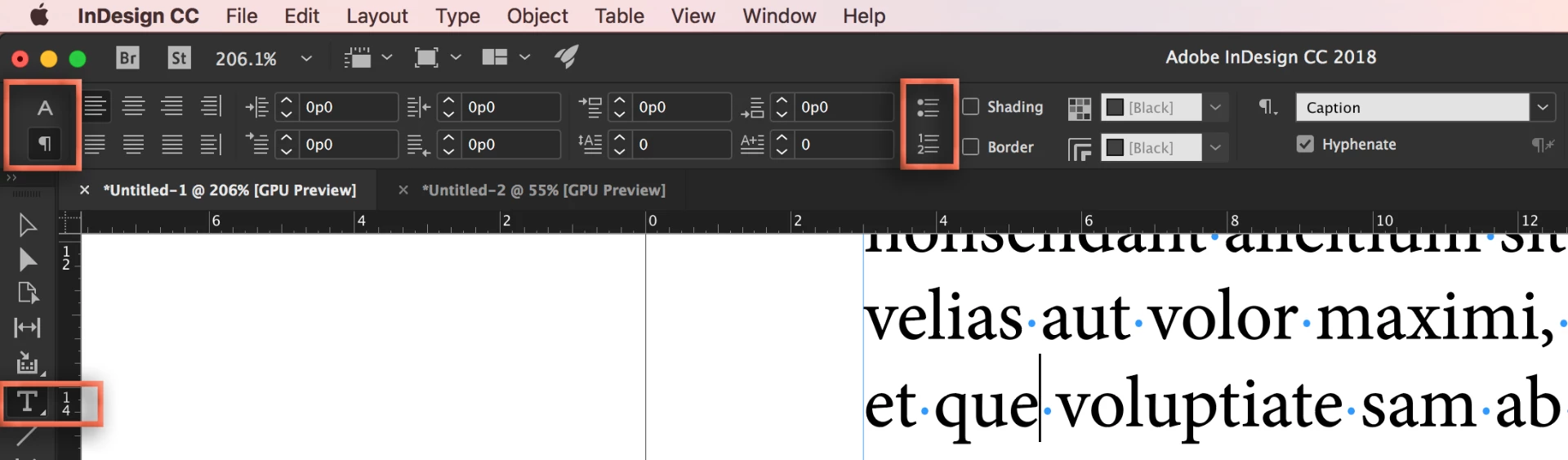
    When you have the Type tool selected, the Control Panel has two views: Character View and Paragraph View. Choose the Paragraph view by clicking on the ¶. If you still don't see them, let us know and we can help you hide some of the tools that appear in front to make room.

    ~Barb

    1 reply

    Barb Binder
    Community Expert
    Barb BinderCommunity ExpertCorrect answer
    Community Expert
    June 21, 2018

    When you have the Type tool selected, the Control Panel has two views: Character View and Paragraph View. Choose the Paragraph view by clicking on the ¶. If you still don't see them, let us know and we can help you hide some of the tools that appear in front to make room.

    ~Barb

    ~Barb at Rocky Mountain Training
    Participant
    June 21, 2018

    Thank you!!!! You'd think I would know that by now! 

    Barb Binder
    Community Expert
    Community Expert
    June 21, 2018

    Hi Anne:

    You are welcome! A new job likely means a new computer. Wide screens can show all of the character and paragraph buttons at the same time. Narrower displays will make you swap between the two views. That's probably what got you!

    ~Barb

    ~Barb at Rocky Mountain Training