

dublove
Legend
October 1, 2025
Answered

Where is the “Inner Margin” option for enableTextFrameGeneralOptions? I can't find it.

  • October 1, 2025
  • 1 reply
  • 170 views

I don't know what its English name is.
So I often can't find it.

Perhaps it should be called TextFrameOptions.


https://www.indesignjs.de/extendscriptAPI/indesign-latest/#ObjectStyle.html
In the English version ID, is what I see on the interface the same as the name in ExtendScript?


Perhaps it's here? But I'm not sure which one.
https://www.indesignjs.de/extendscriptAPI/indesign-latest/#ChangeObjectPreference.html
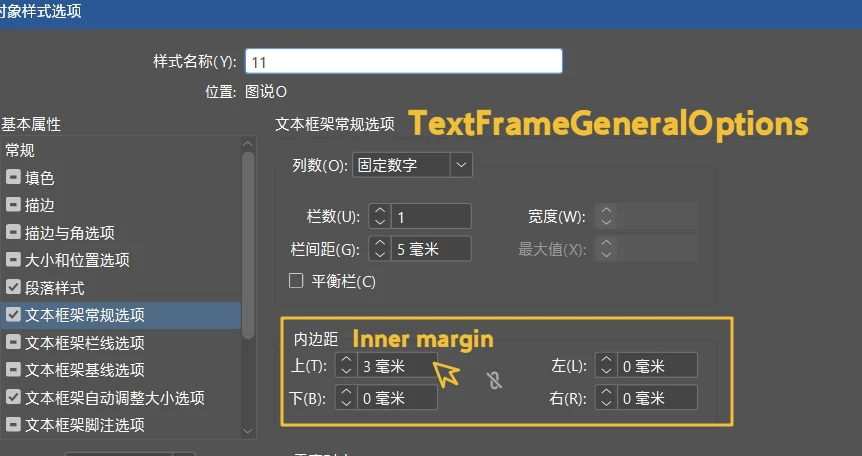
 

Correct answer Peter Kahrel

insetSpacing

1 reply

Peter Kahrel
Community Expert
Peter KahrelCommunity ExpertCorrect answer
Community Expert
October 1, 2025

insetSpacing

dublove
dubloveAuthor
Legend
October 1, 2025

Thanks Peter Kahrel
Thanks

 
app.documents[0].objectStyles.itemByName(AA).properties =
{
textFramePreferencesInsetSpacing: [6, 0, 0, 0],
Spacing: [6, 0, 0, 0],
}
Neither of these worked.


Can't it be written in the properties?
Is this the only way to write it?

app.documents[0].objectStyles.itemByName(“AA”).textFramePreferences.insetSpacing = [6, 0, 0, 0]
Peter Kahrel
Community Expert
Community Expert
October 1, 2025

Your first code sample doesn't work because AA should be in quotes and the properties should be like this:


app.documents[0].objectStyles.itemByName('AA').properties =
{
textFramePreferences : {insetSpacing: [6, 0, 0, 0]}
}


Your second codde sample doesn't work because you used curly quotes. Use straight quotes and the one-liner works fine.


app.documents[0].objectStyles.itemByName('AA').textFramePreferences.insetSpacing = [6, 0, 0, 0]