Participant
January 29, 2021
Answered

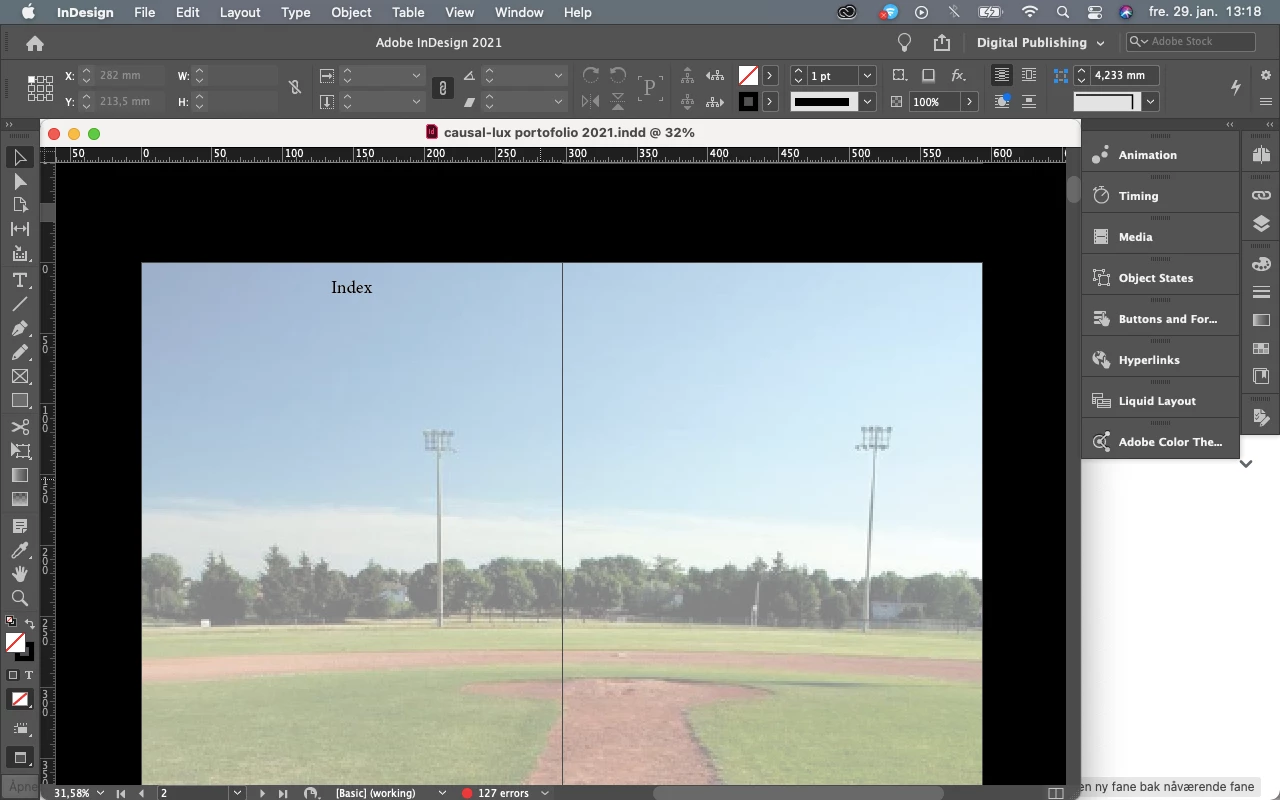
White bar in indesign how to remove? tab. it takes up so much space
  • January 29, 2021
  • 4 replies
  • 627 views

This topic has been closed for replies.
Correct answer default3vbkqa7dlt5u

Thank you for all the help! I ended up deleting indesign and setting and reinstalled indesign. And it solved the problem!!

4 replies

Participant
September 21, 2022

In version 17.4 (2022) go to Window in the top menu line and choose Application Frame.

default3vbkqa7dlt5uAuthorCorrect answer
Participant
January 29, 2021

Thank you for all the help! I ended up deleting indesign and setting and reinstalled indesign. And it solved the problem!!

John Mensinger
Community Expert
Community Expert
January 29, 2021

^That^. Plus, make sure Preferences > Interface > Enable Floating Document Window Docking is enabled.

Legend
January 29, 2021

Hello default3vbkqa7dlt5u,

Take the floating document and dock it to the app by dragging it up just below the rulers.


Regards,

Mike
