Inspiring
May 23, 2018
Answered

White paragraph rules and transparent objects

  • May 23, 2018
  • 4 replies
  • 1018 views

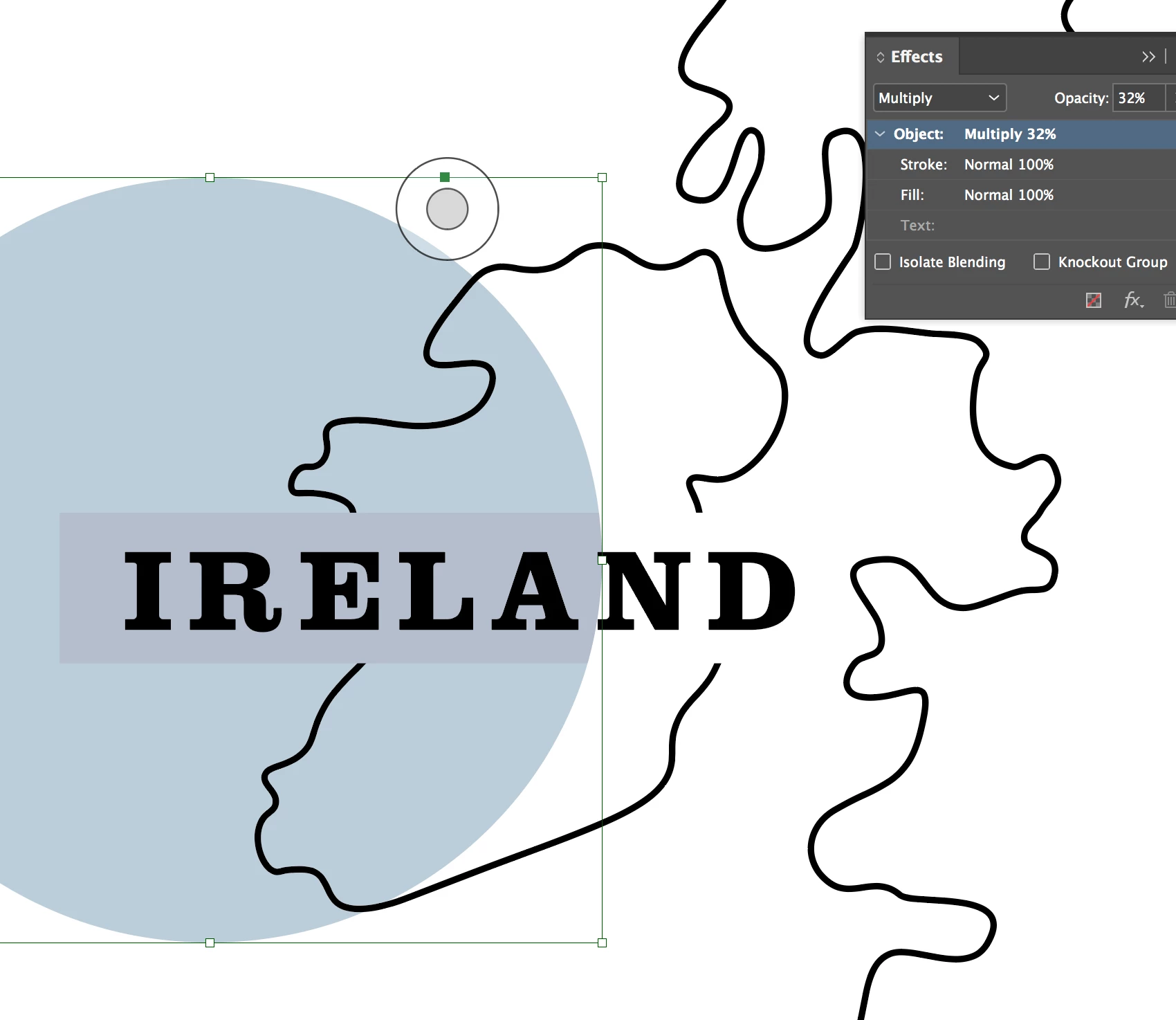
I'm using white ("PAPER" swatch) paragraph rules to knockout unwanted portions of a map behind my text. I'm placing circles with a colour fill over the text and map, the circle objects are set to multiply. It seems the paragraph rule becomes visible when I do this... in the attached screenshot, the paragraph rule on "IRELAND"  appears as it should around the "N" and "D", but when the circle is place on top the "white" becomes visible.

I've exported to PDF and the problem persists there as well.

Any tips to mitigate this would be much appreciated.
This topic has been closed for replies.
Correct answer BobLevine

Another thing, check your transparency blend space.

4 replies

Mike Witherell
Community Expert
Community Expert
May 25, 2018

What happens if you turn off paragraph rules, and instead turn on paragraph shading?

Mike Witherell
Joe SevenAuthor
Inspiring
May 25, 2018

Hi Michael,

Shading produces the same result as a paragraph rule.

Changing the transparency blend space to RGB seems to fix the issue for paragraph rules and shading. I'll have to keep an eye on this when going to print though.

BobLevine
Community Expert
BobLevineCommunity ExpertCorrect answer
Community Expert
May 23, 2018

Another thing, check your transparency blend space.

Joe SevenAuthor
Inspiring
May 24, 2018

Hi Bob, changing transparency blend space to RGB seems to have fixed the issue, thanks.

The document I'm working on is destined for print. Is working with RGB blend space ok? I exported a couple PDF's and they look fine. However I almost always work in CMYK modes as I work primarily in print.

Mike Witherell
Community Expert
Community Expert
May 24, 2018

Are you sure your paper white is 0, 0, 0, 0 in CMYK values? I tried your layout idea and I get proper behavior either in CMYK or RGB blend space.

What filetype is your graphic? How is it made?

Mike Witherell
Mike Witherell
Community Expert
Community Expert
May 23, 2018

What if you send the circle to back; don't multiply it; and try multiplying the b/w map instead?

Mike Witherell
BobLevine
Community Expert
Community Expert
May 23, 2018

Don't use a blend mode. Just set the transparency.

Joe SevenAuthor
Inspiring
May 24, 2018

Tried that. Same result. Unless you meant something else?