Participating Frequently
December 19, 2022
Question

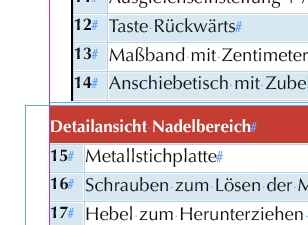
White Space in Text Frame in Front of the Table
  • December 19, 2022
  • 3 replies
  • 408 views

Can someone explain what is it? And how to get rid of this white space.


This topic has been closed for replies.

3 replies

Community Expert
December 19, 2022

Could also be a right aligned paragraph that holds the table.


Regards,
Uwe Laubender
( Adobe Community Expert )


James Gifford—NitroPress
Legend
December 19, 2022

That, too; hard to tell from the small screen snip. I'm betting on a paragraph indent from the body text or such that got carried into the table placement.


Steve Werner
Community Expert
Community Expert
December 19, 2022

1. Select all the table cells (using the Type tool). Then click on the right side outside the table but within the frame. Your cursor will be the height of the table.


2. Press Shift + Left Arrow. Think of the table as one large character. This selects the space to the left of the table.


3. On the Control Panel, when you go in to Paragraph mode, and show the indents, you'll see there's an indent to the left of the table. Set it to 0, and press Return/Enter.


4. That should get rid of the extra space.

James Gifford—NitroPress
Legend
December 19, 2022

I would say it is left-indent applied to the table's anchor paragraph.


Use the arrow keys to move so that the cursor is flashing along the left edge of the table. Review the spacing applied to that paragraph/element.