
Document Geek
Community Expert
Community Expert
March 7, 2018
Answered

Why are my InCopy inline objects locked?

  • March 7, 2018
  • 2 replies
  • 1290 views

I was trying to do an InCopy workflow with a client, but it didn't provide the level of control that she needed, so she is just working right in InDesign. So I went in and deleted the InCopy assignment I had set up. But now all my inline graphics and anchored text frames have lock symbols on them. How can I fix this and be able to access the inline content again?
    This topic has been closed for replies.
    Correct answer BobLevine

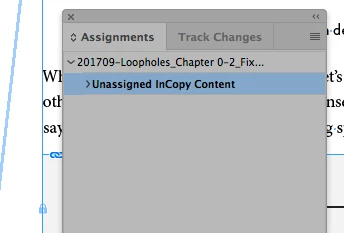
    It doesn't twirl down.


    That means there's nothing there. Is the lock icon a lock or it an InCopy icon?

    Have you tried unlock all on spread if they're just locked objects?

    2 replies

    Document Geek
    Community Expert
    Community Expert
    March 7, 2018

    I don't know... I opened the dropdown and clicked on the bottom most row, and then the trash can lit up so that I could press it. What should I have done?

    BobLevine
    Community Expert
    Community Expert
    March 7, 2018

    Expand the unassigned content by clicking on the triangle.

    Document Geek
    Community Expert
    Community Expert
    March 7, 2018

    It doesn't twirl down.

    BobLevine
    Community Expert
    Community Expert
    March 7, 2018

    Did you delete the assignments or all of the InCopy content? Two distinct things that need to be done.

    Check your assignments panel and make sure to look under unassigned content.

    Links panel would be somewhere else to check.