

Participant
October 15, 2025
Question

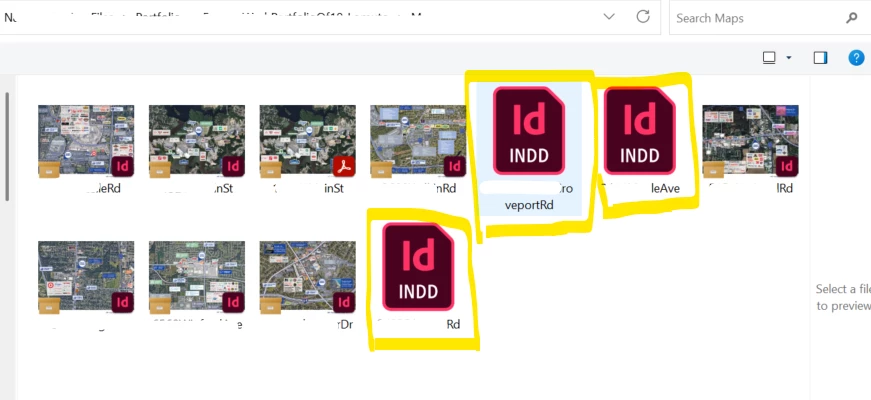
Why are some INDD files in preview mode and others are not?

  • October 15, 2025
  • 5 replies
  • 172 views

The 3 that I worked on are not showing a preview. The other images that my colleagues worked on, are showing a preview image. Does anyone know why?

 

5 replies

Participating Frequently
June 15, 2026

i tried previewing the same file in my mac and it works - i can see a preview - 

so it cant be the version on indd and the preferences are correct -- can you tell me how to reset the preview cache in my OS? 

Abhishek Rao
Community Manager
Community Manager
June 17, 2026

Hi ​@JSkolnick,


Thanks for the update. Could you please confirm your exact InDesign 2026 version (for example, 21.4, 21.3, etc.)?

To help me take this further with the product team, could you share a screenshot of how the affected INDD files appear in macOS Finder where the previews are working correctly, along with a screenshot of the same files in Windows File Explorer where the previews are not appearing? A screenshot of the file's Properties > General tab on Windows would also be helpful.

Additionally, since you asked about resetting the preview cache, please try clearing the Windows thumbnail cache. Press Windows Key + R, type cleanmgr, and press Enter. Select the system drive, check the Thumbnails option, click OK, and then choose Delete Files when prompted. Once complete, restart Windows Explorer or reboot the machine and check whether the previews return.


Looking forward to your update.

Abhishek

Participating Frequently
June 15, 2026

update -- i added a file from my folder in pc INDD file that does not preview on my pc -- and it previews on my mac  -- so issue must be my pc? 

Participating Frequently
June 15, 2026

windows 11 pro  -- i will try to preview one of the files on my mac as well 

you want me to uninstall the latest version of in design and reinstall it? 


where is the “preview cache” in my os -- but remember i see previews of other types of files 

nikunj.m
Legend
October 22, 2025

Hi alanna_5408,

Just checking in to see if the steps suggested by Abhishek helped. If not, please let us know and we'll be happy to help further. 


Thanks,
Nikunj

Abhishek Rao
Community Manager
Community Manager
October 15, 2025

Hi @alanna_5408,


Thanks for reaching out. This usually happens if the option to save preview images with the document is turned off in InDesign preferences. Please open one of the affected files, go to Preferences > File Handling, and make sure 'Always Save Preview Images with Documents' is checked. Then save the file again and check if the thumbnail appears in File Explorer.

If it still doesn't show up, please confirm your operating system and InDesign version, so I can check this further.


Looking forward to your update.

Abhishek

Participating Frequently
June 15, 2026

hi 

i have the same problem -- i used to be able to preview files i created in in design -- i checked preferences and the check ,ark is there -- however the only thing i dis was i deleted older versions on INDD and was left with the current 2026 one. Also prior to this when the files were in my folder where I am keeping that months work flow i was asked how i wanted to open those files and answered indd ( which i didnt have to do for the last few years) ay that point all my indd files themn had the indd logo going back tyo all my other work flow folders forever. Im not sure if that has anytning to do with it but maybe? i can preview pdfs and jpegs and other files just NOT INDD files 


Anubhav M
Community Manager
Community Manager
June 15, 2026

Hi @JSkolnick,
 

I'm really sorry you're running into the same trouble with your InDesign files, that's frustrating, and I'd love to help get it sorted.

To narrow things down, could you let me know the exact version of your OS? In the meantime, a few things worth trying:

  • Run InDesign under a different administrator account (Windows / macOS)
  • Reinstall the latest version of InDesign
  • Clear and rebuild the preview cache in your OS settings


Hopefully one of these does the trick - looking forward to hearing how it goes!

Anubhav