Participant
June 22, 2015
Answered

Why are there white lines in InDesign preview mode

  • June 22, 2015
  • 12 replies
  • 29226 views

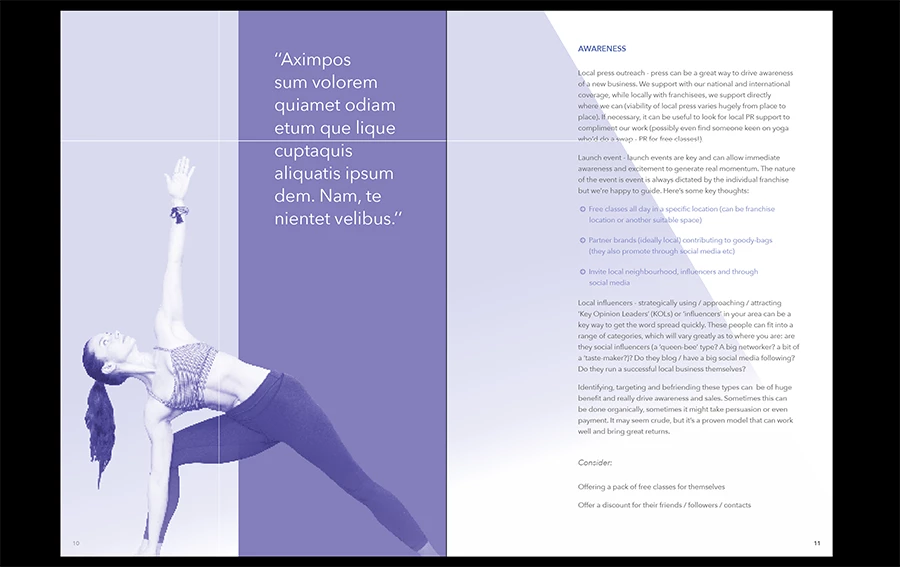
See attached screenshot, these lines appear in the same place on every spread when viewed in preview mode of InDesign CC 2015 - how do I fix this??

Correct answer jeremyjp

Hi @Bim_H -

I came here looking for an answer to the same question, but in tinkering just figured it out.

Turn off Overprint Preview then try presentation mode again.

I had the exact problem you have in the screenshot. I can replicate it repeatedly now. When Overprint Preview is turned on, white lines. Turn it off, white lines gone. You have to do it outside of presentation mode.

12 replies

jeremyjp
jeremyjpCorrect answer
Participant
July 1, 2015

Hi @Bim_H -

I came here looking for an answer to the same question, but in tinkering just figured it out.

Turn off Overprint Preview then try presentation mode again.

I had the exact problem you have in the screenshot. I can replicate it repeatedly now. When Overprint Preview is turned on, white lines. Turn it off, white lines gone. You have to do it outside of presentation mode.

Participant
July 8, 2015

yes this worked, but no problem with that before... 

Great job again adobe (clap clap) ...

BobLevine
Community Expert
Community Expert
June 22, 2015

Looks like stitching. Did you use Acrobat 4 compatibility when exporting?

If so, stop! Use 5 or higher.

Bim_HAuthor
Participant
June 22, 2015

This is not a pdf, this is happening inside InDesign presentation/preview mode! So confused as to why this is happening. It is happening across all my design docs.

BobLevine
Community Expert
Community Expert
June 22, 2015

Okay, sorry.

What kind of image is that in the background? PDF? PSD? TIF?

Do the lines go away if you zoom in or out?