
November 15, 2018
Answered

Why can't I copy/paste my gradient from Illustrator into InDesign?

  • November 15, 2018
  • 11 replies
  • 23767 views

I have followed every tutorial, reviewed every other forum on this, went step by step with all preferences and my gradient still pastes as an image. Is it the new update that refuses to copy/paste swatches between the two? Please help. Thank you.
Correct answer Laubender

Adobe indesign 14.0.2

Adobe illustrator 23.0.3

Windows 10 64 bit


Hi acew1981 ,

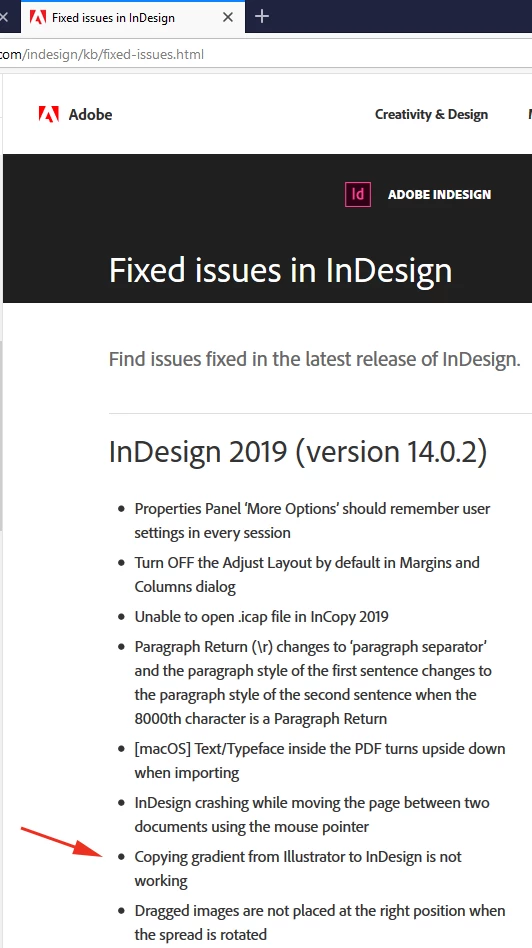
the bug is fixed with InDesign CC 2019 14.0.2.324.

Just tested with Illustrator 23.0.3 on Windows 10.

Paste or Paste in Place was no difference. The gradient I copied over from Illustrator worked as expected.

Also see the list of fixed bugs here:

Fixed issues in InDesign

Regards,
Uwe

11 replies

Community Expert
November 15, 2018

Hi erpdesigns ,

what do you want to accomplish? Storing a gradient from Illustrator in the Swatches panel of InDesign?

You still can do this. But only with gradients where the colors are in the CMYK color model.

Linear gradients and radial ones. Not the new free form of Illustrator CC 2019.

Regards,
Uwe

November 16, 2018

All I want to do is try to bring the gradient swatch over from Illustrator over to InDesign. At one point you could copy and paste it but it does not work. Everything that has been suggested has been done