
elizabethl91772566
Participant
Feb 28, 2018 7:30 PM UTC
Answered

Why can't I create a PDF of printer spreads from InDesign print booklet?

I'm trying to create a booklet from InDesign, but when I try to select "Save as PDF" from print booklet I get an error that says this is not supported. I'm on a relatively new mac, with the newest version of InDesign CC.

I tried a workaround and saved as a Postscript file, with the idea of opening it in Preview or Acrobat and saving as a PDF from there. When I went to save the Postscript file, the Setup dialog box would not allow me to specify anything:
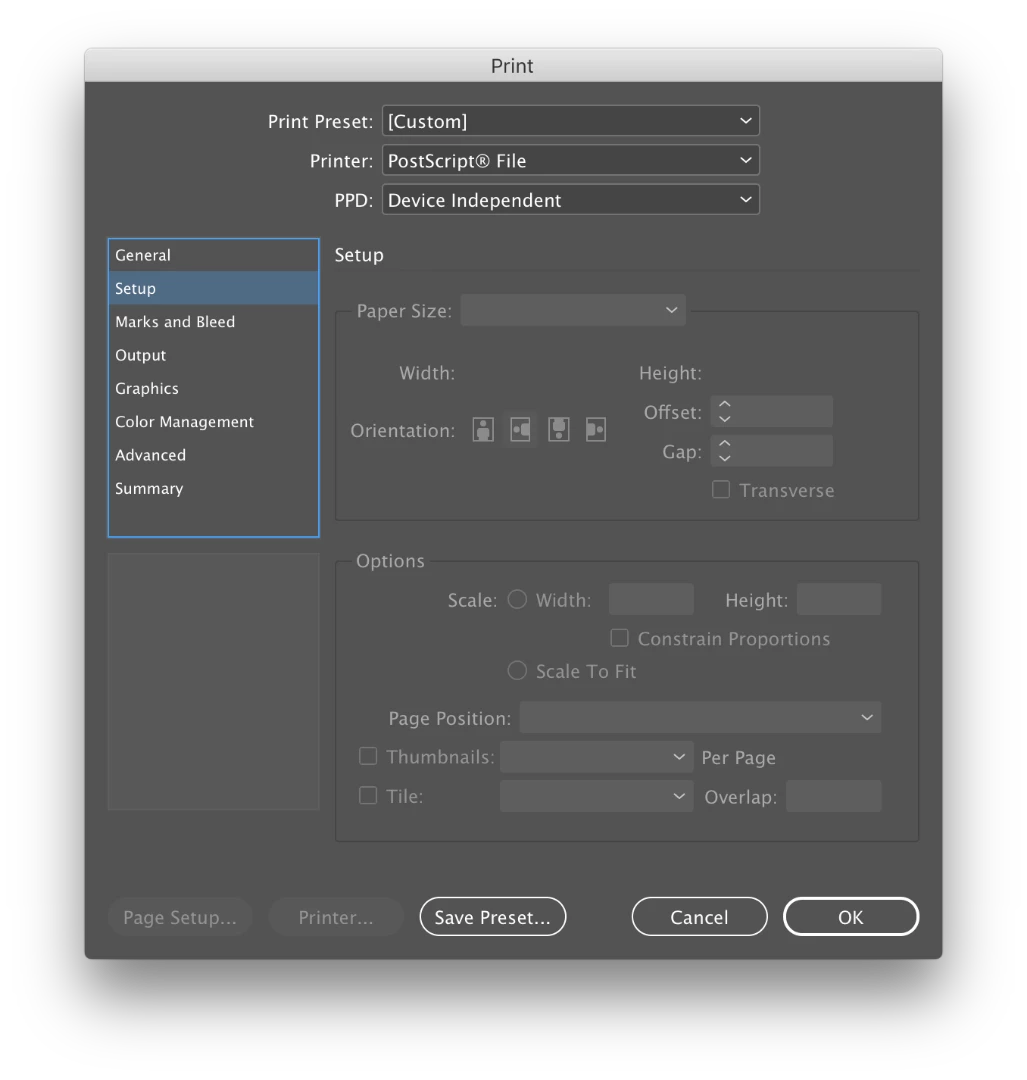
However, the print booklet preview looked okay, so I went ahead and saved it. It should be a booklet with the spreads trimmed out of an 11x17 page, but when I open it in both Preview and Acrobat, it shrinks to fit an 8.5x11 page. Because I can't specify the size when saving (see screenshot above), I don't know how to change this. The actual size of the InDesign document is the correct size — one spread fits on an 11x17 with crop marks.

Basically, my questions boil down to this:

- How can I save my document as a file with imposed spreads?

- Why is it so difficult to do this fairly common task?

- Why have options to export as PDF from print booklet that simply don't work?

- Why can't I make any specifications when saving as a Postscript file?
This topic is closed to new replies. Start a new post to keep the conversation going.
rob day
rob dayCorrect answer
Community Expert
Feb 28, 2018 8:13 PM UTC

The Device Independent PPD will not work, you'll need the Adobe PDF 9.0 PPD.

Re: Print booklet to post script does not work

13 replies

Inspiring
Apr 28, 2018 4:57 PM UTC

The link to Acrobat 9 PPD goes directly to the download of a zip file, and I get an error message of "Failure: insufficient permissions."  I am signed into Adobe support. On OS 10.13.4 using latest updates of Indesign CC & Acrobat Pro DC. How did you get this to work?

Translate
Community Expert
Apr 28, 2018 5:05 PM UTC

Hi Norma,

do you get this error when unpacking the zip file?

Regards,
Uwe

Translate
Inspiring
Apr 28, 2018 5:08 PM UTC

No, I got it from the download. Couldn't unpack....

BUT then I thought -- maybe you have to create the PPDs folder BEFORE you ask for the download.

So I now have the ppd, I guess.

Planning to see if it works now.

Translate
rob day
Community Expert
rob dayCommunity ExpertCorrect answer
Community Expert
Feb 28, 2018 8:13 PM UTC

The Device Independent PPD will not work, you'll need the Adobe PDF 9.0 PPD.

Re: Print booklet to post script does not work

Translate
elizabethl91772566
Participant
Feb 28, 2018 8:33 PM UTC

Thanks for the reply! But my presets folder doesn't have a PPDs folder. Maybe they changed where it lives on the latest version?

Translate
rob day
Community Expert
Community Expert
Feb 28, 2018 8:37 PM UTC

Right, you have to make one. It has to be PPDs—case sensitive

Translate