Known Participant
February 10, 2025
Question

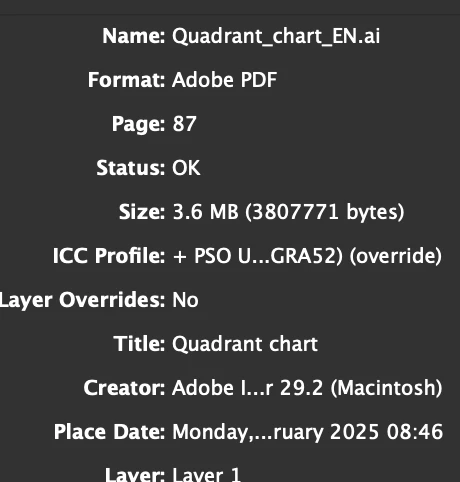
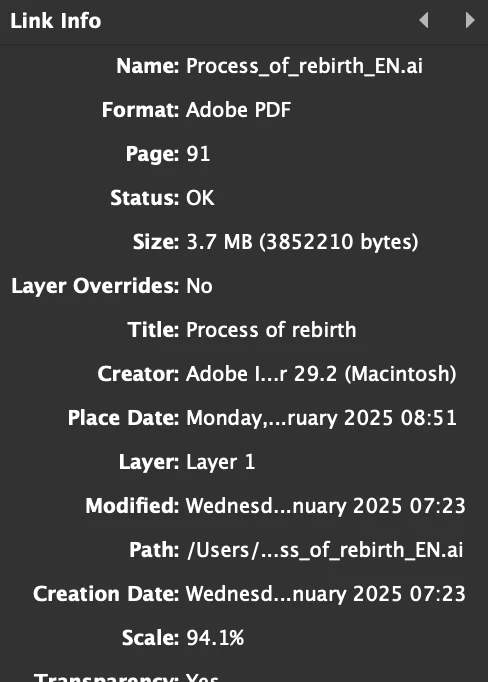
Why do some links not show that there is a ICC profile

  • February 10, 2025
  • 5 replies
  • 1012 views

Hi,

I have a couple of Illustrator graphics linked in my InDesign file. However, I noticed that some of them don’t display an ICC profile, while others do. The printer mentioned that my file needs to be in Uncoated FOGRA 52. Why might this be happening? Should I worry about it, or does it not matter as long as the InDesign file is set up with the required color profile?

Thank you!
 

5 replies

Mike Witherell
Community Expert
Community Expert
February 11, 2025

And that is why I want to see it. For years, .AI files do not show an icc profile in the InDesign Links panel. How did you get that to happen?

(This may be one of those moments when I discover something everyone else knew already.)

Mike Witherell
MateomonoAuthor
Known Participant
February 12, 2025

@Mike Witherell Attached the file. But is it a issue? 

Community Expert
February 12, 2025

@Mateomono said: "… Attached the file."


Hi @Mateomono ,

sorry, but the AI file is not attached.

To attach a file to a reply here in the forum you have to use the forum's editor. Sending an attament when answering by mail is not possible.


Regards,
Uwe Laubender
( Adobe Community Expert )

Mike Witherell
Community Expert
Community Expert
February 11, 2025

Can you share Quadrant_Chart_EN.ai?

Mike Witherell
MateomonoAuthor
Known Participant
February 11, 2025

@Mike Witherell

I didn't set up my file like that. Is that an issue? Also, wouldn't you want me to share a different graphic with you? Quadrant_Chart.ai seems to have the correct ICC profile.

 
Mike Witherell
Community Expert
Community Expert
February 11, 2025

By going to Photoshop > Edit > Color Settings

and setting up your favorite "house rules" for working colorspaces.

Save and name a .CSF file.

Then go to Bridge > Edit > Color Settings

and choose that named .CSF color settings file and click OK.

This synchronizes the same "house rules" for color management into InDesign, Illustrator, and sometimes Acrobat, too.

When you open InDesign > Edit > Color Settings

and

When you open Illustrator > Edit > Color Settings

you see the same color management settings that you decided upon when you were setting this up in Photoshop.

The big three are now harmoniously keeping everything as the same .icc profile. IOW, synchronized.

Mike Witherell
Mike Witherell
Community Expert
Community Expert
February 11, 2025

Historically, the reason that .ai files don't show an .icc profile in InDesign's Links panel is because an .ai file can hold both RGB and CMYK elements. In my experience, the Links panel never shows icc info. I'm wondering how your one example does show color profile?


In order to be thorough, you could examine each .ai file in Illustrator and click on Edit > Assign Profile


But if you have the same default house colorspace management in both Illustrator and InDesign, then any file that doesn't have that colorspace .icc info attached within it will pick up the same colorspace default info when it "File > Places" into InDesign.


Are your apps synchronized for same colorspace defaults?


Mike Witherell
MateomonoAuthor
Known Participant
February 11, 2025

@Mike Witherell Im not sure if my apps are synchronized. How can I check this?

Robert at ID-Tasker
Legend
February 10, 2025

Have you created all the Illustrator files?


MateomonoAuthor
Known Participant
February 11, 2025

@Robert at ID-Tasker Yes, they are all from illustrator. 

Robert at ID-Tasker
Legend
February 11, 2025
quote

@Robert at ID-Tasker Yes, they are all from illustrator. 


By @Mateomono


But have you created all of them? 


Or received from different sources?