Ryanbelo
Participating Frequently
February 20, 2017
Answered

Why does export from indesign to pdf shrinks pages

  • February 20, 2017
  • 5 replies
  • 2151 views

Hello,

I am trying to export a document from ID to PDF and every time I do the PDF seems to convert the size from 8 x 10 original to 1.38 x 1.71 have searched and searched and can't find a solution!
This topic has been closed for replies.
Correct answer Barb Binder

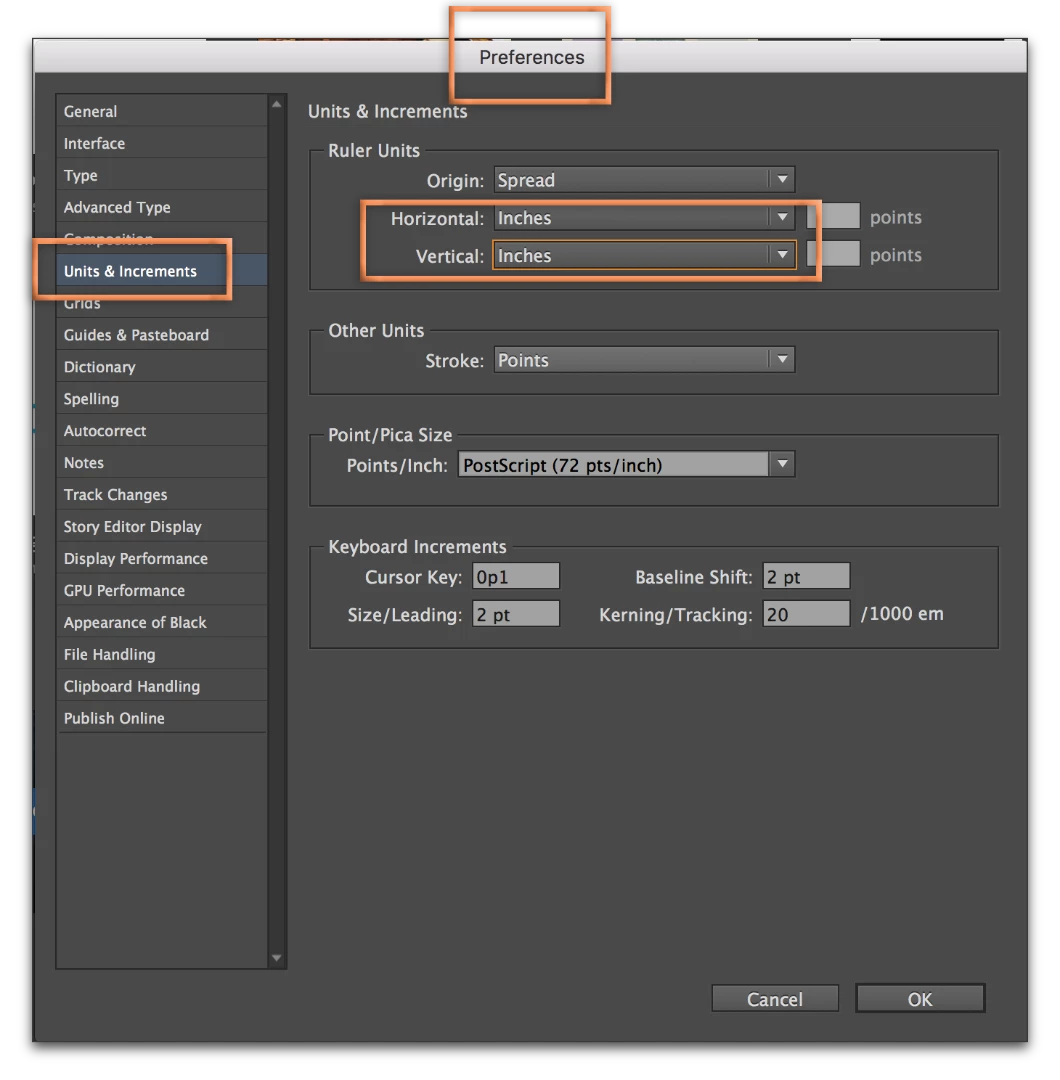
Once you take care of this document, consider setting the defaults to inches to avoid this confusion in the future.

Close all open files, then:

5 replies

Barb Binder
Community Expert
Barb BinderCommunity ExpertCorrect answer
Community Expert
February 20, 2017

Once you take care of this document, consider setting the defaults to inches to avoid this confusion in the future.

Close all open files, then:

~Barb at Rocky Mountain Training
Legend
February 20, 2017

Also, don't use PDF properties in Acrobat to find page size. This is a dangerous and unreliable tool, a terrible idea of Adobe's because it doesn't know what to do with mixed sizes. Instead, hover the mouse in the bottom left of the page in Acrobat and see what it says (the size should appear).

Barb Binder
Community Expert
Community Expert
February 20, 2017

Will you give us your exact steps in InDesign?

~Barb at Rocky Mountain Training
Ryanbelo
RyanbeloAuthor
Participating Frequently
February 20, 2017

File

Export

Save as PDF (Print)

Preset - High quality print

Barb Binder
Community Expert
Community Expert
February 20, 2017

Ok, thanks...and can you show a screen shot of File > Doc Setup in InDesign and then File > Properties > General in Acrobat?

~Barb at Rocky Mountain Training
Frans v.d. Geest
Community Expert
Community Expert
February 20, 2017

The one thing that you can NOT do is... scale when exporting to PDF. So we need some more information on where you see the information: in Acrobat?

Ryanbelo
RyanbeloAuthor
Participating Frequently
February 20, 2017

Yes in Acrobat

Legend
February 20, 2017

How do you measure the PDF size? Where do you see 1.38 X 1.71, and what are your units?

Ryanbelo
RyanbeloAuthor
Participating Frequently
February 20, 2017

In pdf under properties, its in inches.

rob day
Community Expert
Community Expert
February 20, 2017

Make sure the dimension of the page is 8x10. It's possible to have a page size that is different than the document size. Something like this where I have the page selected with the Page tool and it has a different size than the document: