



dublove
Legend
September 12, 2026
Question

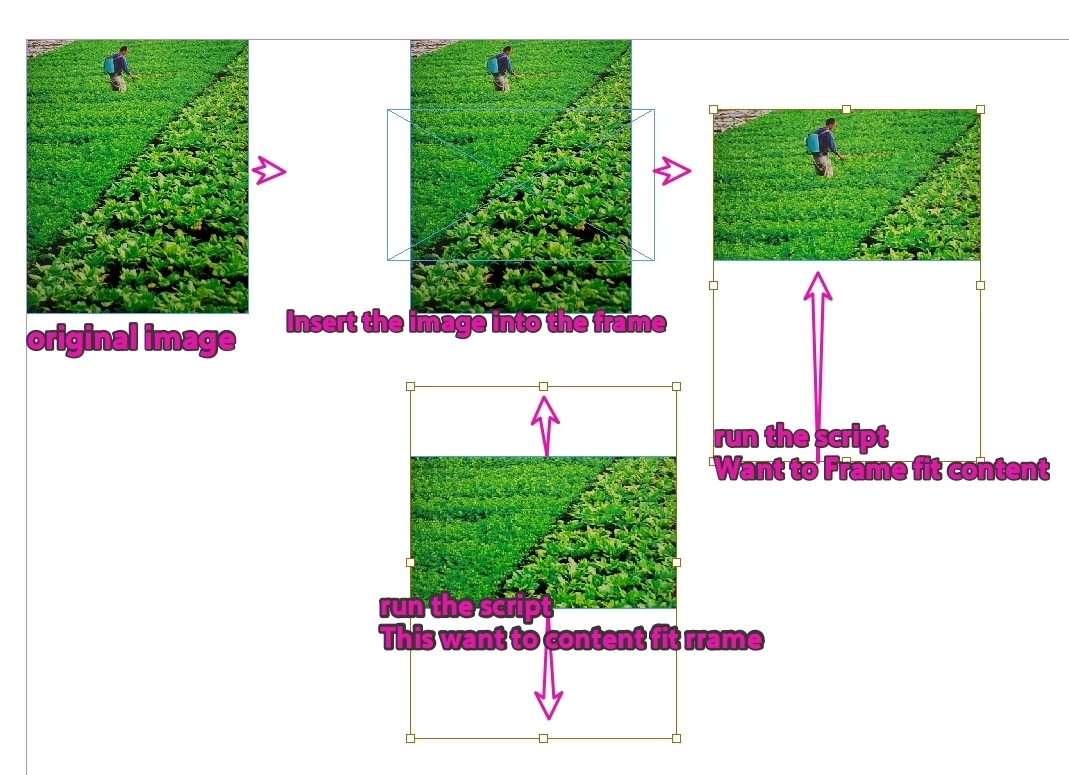
Why does frameFittingOptions become ineffective when the image is pasted into the frame?

  • September 12, 2026
  • 6 replies
  • 35 views

It was effective at the beginning.
I manually dragged it, but running the script afterwards didn't work.

After manually dragging, I tried "Make Frame Fit Content" or "Make Content Fit Frame" respectively, but neither had any effect.

var d = app.activeDocument;
var item = d.selection[0];

frameFitToContent(item);
//frameFitToContent(item.parent);
//contentFitToFrame(item.parent);

function frameFitToContent(s) {
//s.frameFittingOptions.autoFit = true;
s.frameFittingOptions.fittingAlignment = AnchorPoint.TOP_LEFT_ANCHOR;
s.fit(FitOptions.FRAME_TO_CONTENT);
}

function contentFitToFrame(s) {
//s.frameFittingOptions.autoFit = true;
s.frameFittingOptions.fittingAlignment = AnchorPoint.TOP_LEFT_ANCHOR;
s.fit(FitOptions.FILL_PROPORTIONALLY);
}
 

    6 replies

    rob day
    Community Expert
    Community Expert
    September 12, 2026

    Hi ​@dublove , Check what you have selected—frameFittingOptions is a rectangle, polygon, or oval method—not an image method. Some of your images are in rectangles that are nested in another rectangle:


    var d = app.activeDocument;
    var item = d.selection[0];
    frameFitToContent(item)

    function frameFitToContent(s) {
    if (s.constructor.name == "Rectangle") {
    s.frameFittingOptions.fittingAlignment = AnchorPoint.TOP_LEFT_ANCHOR;
    s.fit(FitOptions.FRAME_TO_CONTENT);
    } else {
    alert("Current Selection: " + s.constructor.name)
    }
    }


    dublove
    dubloveAuthor
    Legend
    September 13, 2026

    Hi ​@rob day 

    What I want to say is, how do you make the image fit to the outermost framework.

    Or, the outermost framework fit to the image
    For example”

    //outermost framework
    var outermostFrame;
    if(item.constructor.name=="Image"){
    //I want to achieve this:
    frameFitToContent(outermostFrame);
    //also
    contentFitToFrame(outermostFrame);
    }


    Here's a question, you can't be sure how many layers are nested, how do you get the “outermostFrame”

    Do I need to adapt to each layer once?
    like this:

    frameFitToContent(item.parent)
    frameFitToContent(item.parent.parent)
    ...
    frameFitToContent(outermostFrame)

    Or more scientifically, if more than one nesting is detected, it will prompt correction of the nesting.
    Generally, only one 'paste into' is needed.


    leo.r
    Community Expert
    Community Expert
    September 13, 2026

    If the image container is inserted using the Paste Into command, it’s a problem to manipulate it via scripts in InDesign. At least that’s my experience. 

    I had to deal with such cases a couple of times (although the goal was different from what you’re trying to achieve). In the end I gave up because the time investment wasn’t worth the trouble.

    It’s easier to show a warning and advise the user to insert the image itself into the desired frame, as it’s supposed to be done, instead of using Paste Into to paste the image container into another container. 

    Frankly, I think the Paste Into command shouldn’t even exist in InDesign (or at least should not be applied to image containers). I could be wrong.

    Fortunately, users are rarely using Paste Into for image containers.

    If you eventually succeed in solving this, by yourself or with someone’s help, I’ll only be happy and gladly admit that my own efforts weren’t sufficient.