

iBabs2
Inspiring
March 19, 2018
Answered

Why does the font list default to minion, not the favorites on the top?

  • March 19, 2018
  • 2 replies
  • 3956 views

Hello,

Question on the fonts list dropdown.

When you select it in a new document, it goes to minion, since that is the default font, which I understand, but technically, shouldn't it just go to the top of the list with your favorites?

Is there any way to have it start at your favorites on the top of the list, so you don't have to start at minion and scroll up to the top each time?

thanks,

Babs
This topic has been closed for replies.
Correct answer Barb Binder

Hi iBabs2:

All new documents default to Minion. You can set the default font for all new files by closing all open files InDesign, and then choose Type > Character. Select the new defaults in the Character panel. Close the Character panel, and create a new document to see the new defaults in action.

Notes:

  1. This works for most defaults in InDesign, and
  2. this impacts all new files, but does not go back and change existing files.

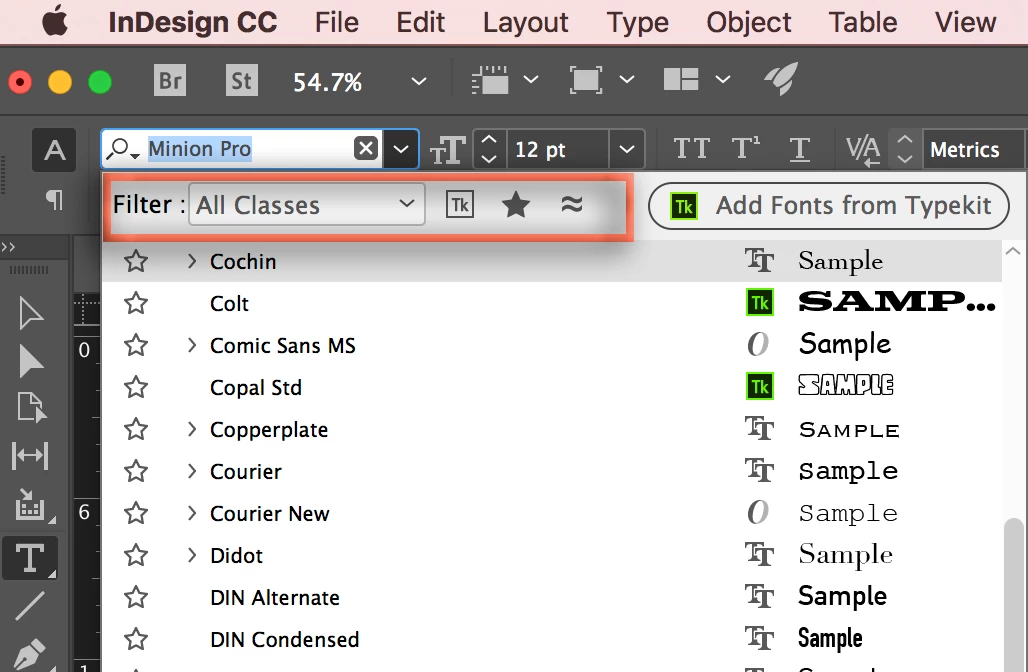
Separately, you can use the filter options at the top of the Fonts menu to just see favorites, or Typekit fonts, etc.

~Barb

2 replies

davidh49200949
Participant
October 7, 2020

No, this does not work.  You can set the character default to another font as often as you like, and whatever, a new document and new text box and this fecking Minion font is there.


This what makes InDesign so pitiful compared witrh Quark.


Barb Binder
Community Expert
Barb BinderCommunity ExpertCorrect answer
Community Expert
March 19, 2018

Hi iBabs2:

All new documents default to Minion. You can set the default font for all new files by closing all open files InDesign, and then choose Type > Character. Select the new defaults in the Character panel. Close the Character panel, and create a new document to see the new defaults in action.

Notes:

  1. This works for most defaults in InDesign, and
  2. this impacts all new files, but does not go back and change existing files.

Separately, you can use the filter options at the top of the Fonts menu to just see favorites, or Typekit fonts, etc.

~Barb

~Barb at Rocky Mountain Training
iBabs2
iBabs2Author
Inspiring
March 19, 2018

Hi Barb,

That is what I ended up doing. Setting the default font to something that started with the letter A.

I just thought I was missing some preference or something.

I just assumed it would start at the top of the list.

Thank you for conforming this.

Best,

Babs

iBabs2
iBabs2Author
Inspiring
March 19, 2018

..one thing I said in error was I meant the most recent used fonts, not the favorites, but still seems to be the same issue... just surprised the most recent used doesn't start at the top ... this still gets me closer to the top. thanks again!