

Jovial_knight50B8
Participating Frequently
July 17, 2022
Answered

Why does the texts in the table "move" when I move it back to the page

  • July 17, 2022
  • 4 replies
  • 2127 views

Hi everyone!

This is an odd problem I am encountering with Indesign. I have the "right" formatting for my tables with text in it, but the weird thing is, whenever I move it to the page, the format gets out of place. In the attached video I recorded here, when I take out the table out of the page, it is in its right format but when I move it back to page, it seems to lose its proper format. Can anyone shed some light on this problem? I already reset the settings and reinstalled the program and it's the same thing. Help from anyone is greatly appreciated!
Correct answer Lukas Engqvist

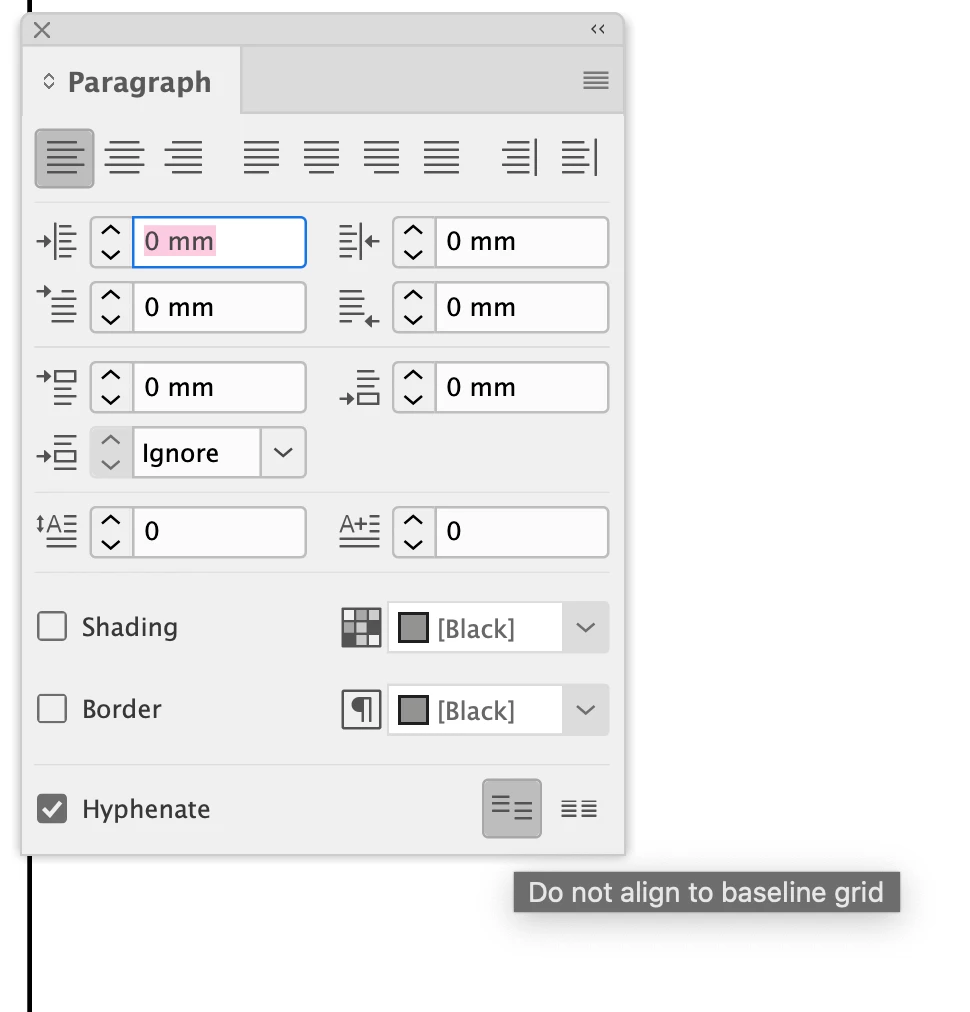
In the paragraph panel there is a button not to align to baseline grid

4 replies

Community Expert
July 18, 2022

@carlo.hofilena said: "when I made the baseline grid visible and moved the tables in and out of the page, I can see that the texts in the table snaps in the grid. How do I remove that?"


Hi Carlo,

the feature you are looking for is part of the applied paragraph style or part of the paragraph if there are text style overrides on the level of paragraphs. You say, that no paragraph styles are used on the text for the table cells; so the best you can do is:


[1] Select all cells of the table; select some text, do the Esc key to select the cell, then do Select All to select the whole table.

[2] Open the Paragraph panel and click that second icon from the right edge at the bottom of the panel.


From my German InDesign on Windows 10:


All text in the table is forced to the baseline grid ( not visible here ) :

All text is released of the baseline grid:


If none of the two icons are selected in the Paragraphs panel after you selected all cells in the table some paragraphs are forced to the baseline grid and some are not:


Regards,
Uwe Laubender
( Adobe Community Professional )

Jovial_knight50B8
Participating Frequently
July 18, 2022

Hi Uwe!

OMG thank you so much for this detailed response! You made my life easier and finally I no longer dread working on the material I am working on because of that! Thank you very much I appreciate it!

Willi Adelberger
Community Expert
Community Expert
July 18, 2022

I suppose that the text aligns to the Baseline Grid.

Jovial_knight50B8
Participating Frequently
July 18, 2022

Hi Willi,Yes' you are correct, when I made the baseline grid visible and moved the tables in and out of the page, I can see that the texts in the table snaps in the grid. How do I remove that?

Willi Adelberger
Community Expert
Community Expert
July 18, 2022
  1. You should always work with paragraph styles. There is not even one reason not to do so.
  2. In the paragraph panel menu is an entry for align to baseline grid. Remove the selection.
Diane Burns
Inspiring
July 18, 2022

Yes, to add, are there paragraph styles applied to your text, and are they on a grid?

Jovial_knight50B8
Participating Frequently
July 18, 2022

Hello Diane, the texts in the table doesn't have paragraph styles applied. Just now, I had the baseline grid appear on my work space and the texts snaps in the grid, how do I remove that?

Legend
July 18, 2022

Have a look at your grids, especially:

View >> Grids and Guides >> Show document grid