Participant
June 8, 2020
Answered

Why InDesign changes 100% Black (K) text to CMYK in PDF?

  • June 8, 2020
  • 4 replies
  • 9872 views

Hi, I'm hoping someone can help me. I have an InDesign document (v15.0.3) with 100% Black text. When I export this to PDF using just the Adobe PDF preset "Press Quality", my 100% black text is converted to CMYK with the text appearing on all 4 printing plates instead of just the black plate. I sent the same file to a friend and he exported to PDF using the same "Press Quality" and the black text came out on only the black plate as 100% black (which is what I want). I have switched computers recently to a Macbook Pro 15, 2019 running Mojave 10.14.6, so I am wondering if there is some setting somewhere in InDesign that I need to change so that 100%black text in InDesing seperates to 100% black text on only the Black plate when exporting to PDF. I hope my explaination is clear. 


  • Macbook Pro 15, 2019 running Mojave 10.14.6
  • InDesign (v15.0.3)
  • I have in set my preferences "Appearance of Black" to Display/Output All Blacks Accurately (but from what I understand this is just for on-screen and digital printing NOT press. 
  • I have my "Document Blend Space" as "Document CMYK"
  • My colour setting is "North American General Purpose 2"
  • I even tried selecting the text and clicking "overprint" in the Attributes menu.
  •  

Please help me.


Thanks, Loomanator

This topic has been closed for replies.
Correct answer Loomanator

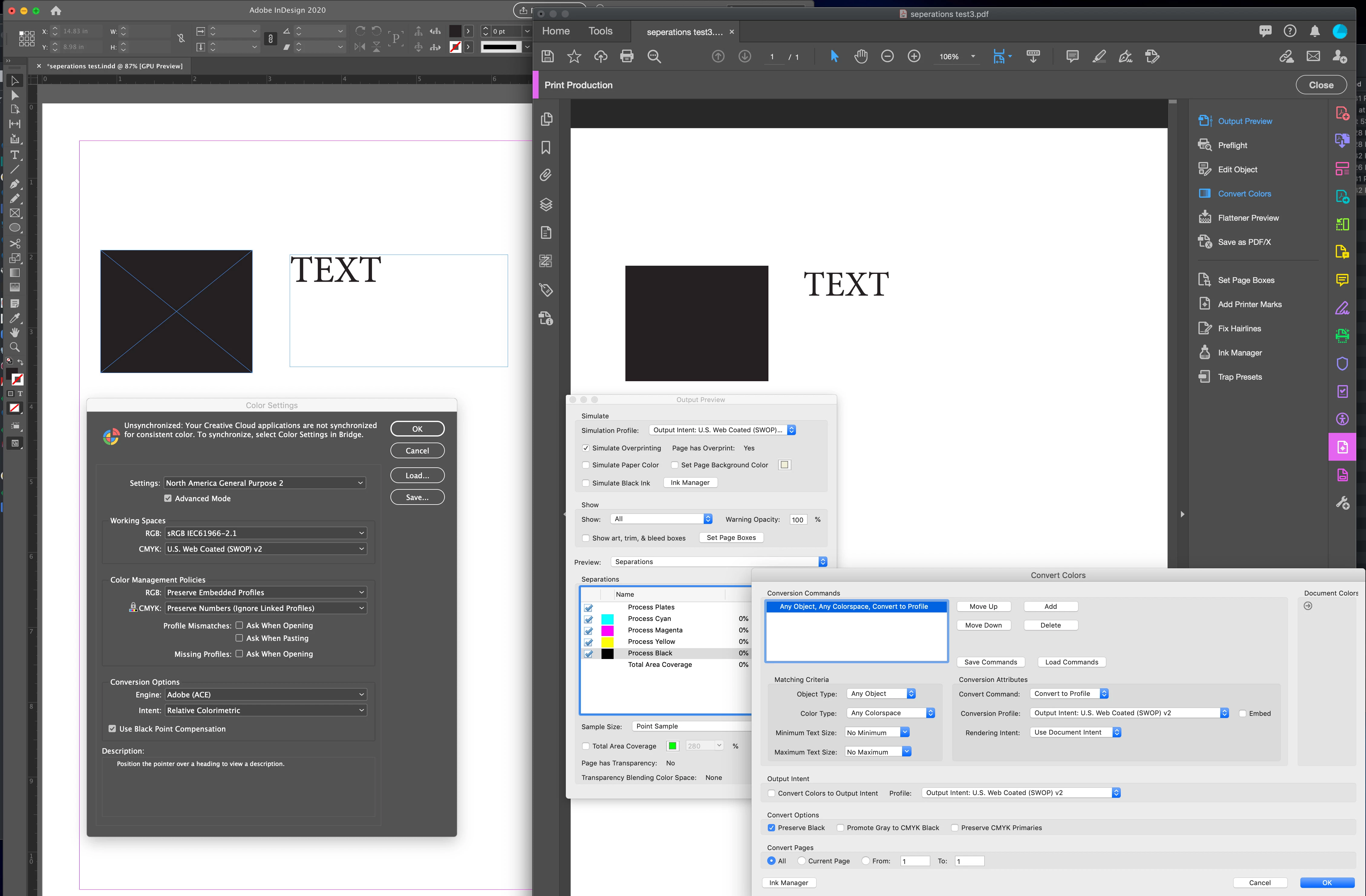
Thank you to everyone for your help! I ended up taking everyone's advice and my problem is solved. I think Acrobat was the problem.

  • I unintalled and reinstalled Acrobat and overwrote my existing preferences
  • I made sure I was using the same Simulation Profile in AcrobatPro and my Document CMYK profile
  • I double checked to make sure Acrobat preference> Accesibility> Replace document colors was turned off
  • And I noticed one other little thing - under Convert Colours, I clicked Preserve Black on

Everything seems fine now, with my 100% black text only on the black plate in PDF. Thank you so much for all your help!!

4 replies

Luke Jennings3
Community Expert
Community Expert
June 9, 2020

I suspect the issue is with Acrobat, not InDesign. Check the Acrobat preference> Accesibility> Replace document colors, if this is on, it could change the color of the black type. Try resetting your Acrobat preferences, or re-install, taking care to say yes to overwriting the existing preferences.

LoomanatorAuthorCorrect answer
Participant
June 11, 2020

Thank you to everyone for your help! I ended up taking everyone's advice and my problem is solved. I think Acrobat was the problem.

  • I unintalled and reinstalled Acrobat and overwrote my existing preferences
  • I made sure I was using the same Simulation Profile in AcrobatPro and my Document CMYK profile
  • I double checked to make sure Acrobat preference> Accesibility> Replace document colors was turned off
  • And I noticed one other little thing - under Convert Colours, I clicked Preserve Black on

Everything seems fine now, with my 100% black text only on the black plate in PDF. Thank you so much for all your help!!

rob day
Community Expert
Community Expert
June 8, 2020

Is the black text filled with the default [Black] swatch, and is the color mode of the swatch CMYK? If the Intent of the document is something other than Print the default [Black] swatch would be RGB.


Try exporting using the PDF/X-4 preset and view the PDF in AcrobatPro with Output Preview turned on.

Participant
June 8, 2020

Rob:


Thanks for your help as well.

Is the black text filled with the default [Black] swatch, and is the color mode of the swatch CMYK? - Yes

If the Intent of the document is something other than Print the default [Black] swatch would be RGB. - The document is for print. When I roll the mouse over default [Black] it gives me a C=0, M=0, Y=0, K=100 break.


It is odd. When I view with seperations preview in InDesign the CMYK break looks fine (my text is on the black plate only), but when I use Output preview in Acrobat my text is broken into CMYK and is on all the CMYK plates.


I tired PDF/X4-2008 as well, but unfortuately that did not work either. Thanks again. Any help is much appreciated. I did notice another thread where the person re-installed Adobe Acrobat. I will try that as well. Also I did a test from Illustrator with the same result. I have never encountered this before.

vladan saveljic
Inspiring
June 8, 2020

It's better to export to PDF/X4-2008

but if you want to check your "press quality" optons can we see this your settings?

Participant
June 8, 2020

Thanks for your help. I tired PDF/X4-2008 as well, but unfortuately that did not work either. Attached is a screen shot of my settings. Thanks again. Any help is much appreciated. I did notice another thread where the person re-installed Adobe Acrobat. I will try that as well. Also I did a test from Illustrator and had no success.

rob day
Community Expert
Community Expert
June 8, 2020

Is the Simulation Profile in AcrobatPro your Document CMYK profile:


Community Expert
June 8, 2020

Moving to InDesign forum for better responses


-Manan

-Manan