
Why is a book name in a TOC style?
System: Mac 10.13.6; InDesign CC 13.1
I'm working on book named ETO_Training.indb. I had a problem with the TOC (my fault and I fixed it), but while I was looking at the TOC style, there is a book identified, but it's not the current book:
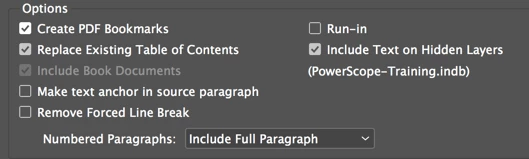
What is odd to me (among a few things ) is the TOC is working fine; I mean, I would assume the TOC is instructed to point to PowerScope-Training, but it's grabbing the content of the book where it resides. Since everything works it's really a don't care, but still, I'd to know more about this. But it gets more weird.
I opened the TOC in thePowerScope book and saved it to a new name on my Desktop, with the intent of making a new style with no book to remember, but the style remembered it. Then, I closed all files and did a File > New > TOC Styles > New . . . and the dialog had a book file there from a couple of days ago!
I guess you could say its not really a question if there is nothing not working . . . but does anyone know what's going on?
 AdChoices