


Participant
Oct 30, 2026 7:05 AM UTC
Question

Why is adobe express greyed out in indesign?

I have been using Adobe express, not the app but the inbuilt quick action or from the contextual task bar in indesign, I have been using the feature for quick photo edits instead of opening photoshop or Express app, I only noticed now that the option is greyed out for some reason I dont know why. 

I need help please.

Attached below for reference
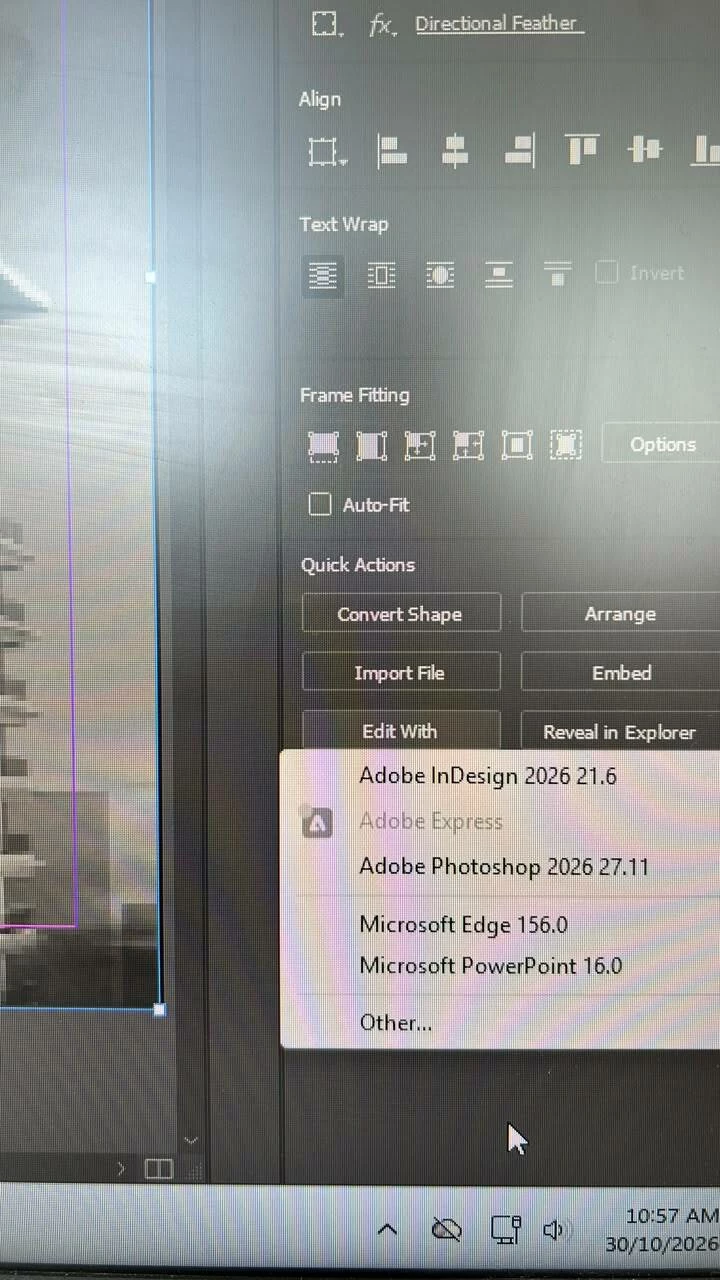


    3 replies

    Abhishek Rao
    Community Manager
    Community Manager
    Oct 30, 2026 9:26 AM UTC

    Hi ​@efficient_makere5c3,


    I'm sorry to hear that the Adobe Express option is suddenly greyed out in InDesign, especially since it was working previously.

    Thank you for confirming that you've already tested the same image and tried creating a new document.

    According to this helpx  documentation, Edit with Adobe Express supports PNG, JPEG, PSD, and AI images in RGB color mode, but not CMYK.

    Could you please try the following?

    1. Create a new InDesign document and use File > Place (Ctrl + D) to import a standard RGB JPEG or PNG image directly from your computer, rather than copying and pasting it. Select the image and check whether Edit with Adobe Express becomes available.

    2. If it remains greyed out, please confirm the image's file format and color mode, along with the language of your installed InDesign application, as the feature has certain format and locale restrictions.

    3. Please also try signing out of Creative Cloud Desktop, restarting your computer, and signing back in to check whether that restores the functionality.

    If the issue persists, could you please share your Windows version and a short screen recording showing the workflow from placing an RGB image to the Adobe Express option appearing greyed out?


    Looking forward to your update!
    Abhishek
    Adobe InDesign Community Team

    Translate
    leo.r
    Community Expert
    Community Expert
    Oct 30, 2026 8:05 AM UTC

    Is it possible that this object is not intended for Adobe Express editing? Or is it the same image (or type of image) you were able to edit previously?

    Translate
    Participant
    Oct 30, 2026 8:12 AM UTC

    It is the same image previously, even when I tried to create a new file and copy paste an image in the rectangle or rectangle frame box, it still does not appear or is greyed out

    Translate