Participant
Mar 3, 2019 1:32 AM UTC
Answered

Why is find/change missing "selection" as option to search?

I am working in Indesign CC 2019 on a document that will not show "selection" when perfoming find/change.

It only show document as the option to search. How do I restore all the options (selection, story, etc.).  ??  Mike

    Steve Werner
    Steve WernerCorrect answer
    Community Expert
    Mar 3, 2019 1:43 AM UTC

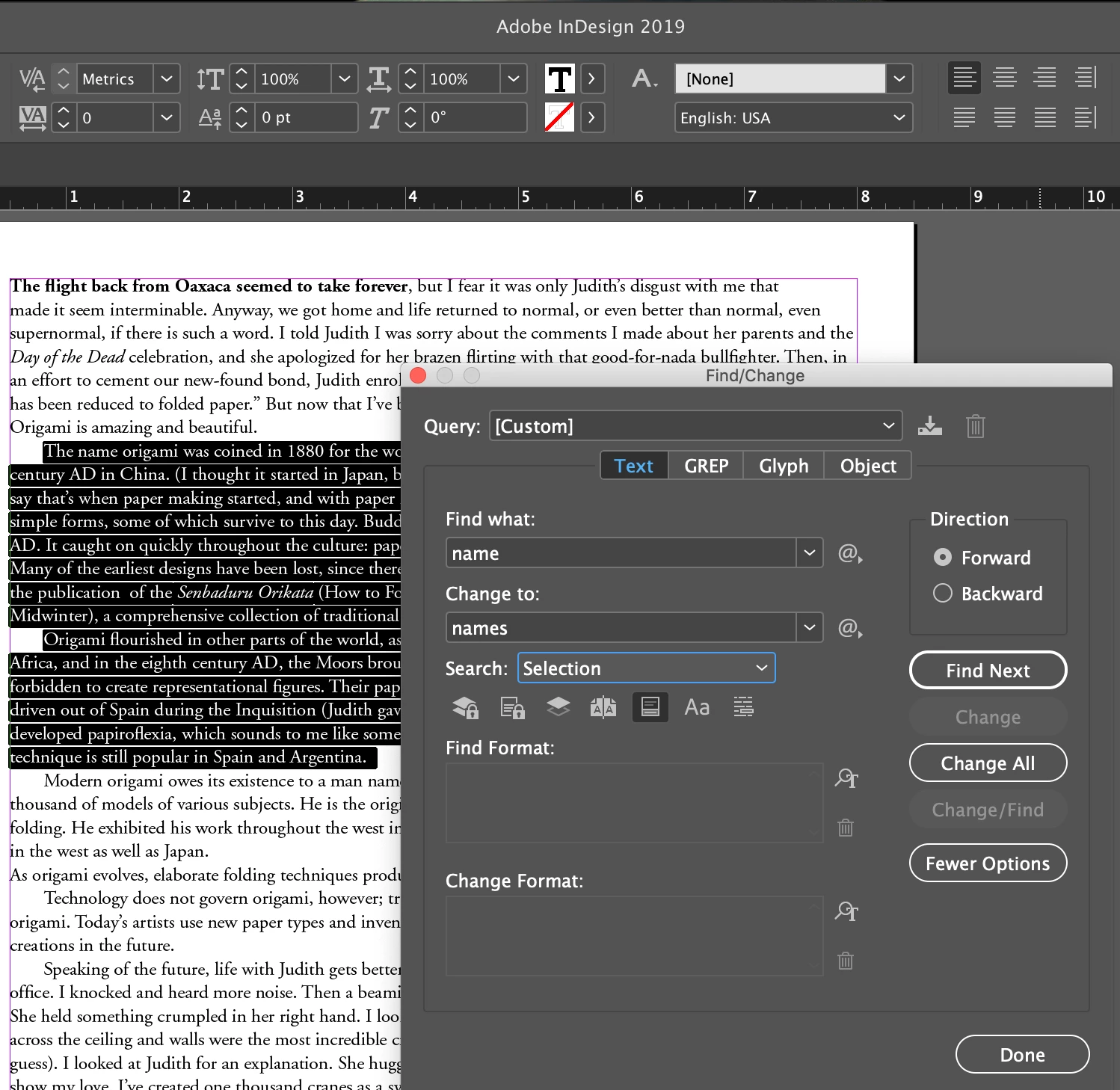
    In Find/Change, the Selection option only appears when you have made a selection in text. It's working in InDesign CC 2019 for me as you can see in this screen capture:

    If it's not working, you might try restoring InDesign preferences:

    Set preferences in Adobe InDesign 

    44 replies

    Participating Frequently
    Sep 24, 2026 10:48 AM UTC

    Just came here to write about this issue. I’m on Indesign v21.6 on windows 11. 

    The options of ‘selection’, ‘story’ are absent in the Find/Change panel.  Restarting indesign doesn’t help. What should I do? Is resetting preferences the only way out or some other workaround is there too?

    I even tried to copy paste just one text box in a blank new document but the issue is still there. 


    Update. Found the solution!

    Deleted this folder after closing InDesign and restarted. 

    C:\Users\myusername\AppData\Local\Adobe\InDesign\Version 21.0\en_US\Caches

    Translate
    nik.m
    Community Manager
    Community Manager
    Sep 24, 2026 11:19 AM UTC

    Hi @Mitch98, thanks for reaching out and sharing the update!

    Let us know if you need help with anything else. We would recommend starting a new conversation though.


    Thanks,

    Nikunj

    Translate
    hatshatahsththstst
    Known Participant
    Jun 20, 2022 3:49 PM UTC

    Also still having this problem.

    Too busy forcing animations and cloud crap instead of providing a workable tool.

    Translate
    Participant
    Jan 13, 2023 5:50 PM UTC

    Depends on what you are doing. This happens when for example I created a page of sticker lables in InDesgn with all the same word on each lable. If I duplicate the page and want to have the next page be a different word. When I select all 30 labels on the duplicate page the "selection" option doesnt show. I dont want the "Document" option since it will change the previous page data which is not what I want. For my situation "Selection" isnt the right option anyway but instead "Stories" is. This personally worked for my situation.

    Translate
    Participant
    Jun 2, 2022 3:16 PM UTC

    Constantly have to restart indesign while working because of this issue. Please fix it. Absurd bug that affects everyday use constantly, spanning multiple versions of indesign. Inexcusable.

    Translate
    Inspiring
    Jun 2, 2022 6:20 PM UTC

    +one. It's ridiculous. This bug has been hanging around for years.Fix it. Fix it. Fix it. 

    Translate
    Community Expert
    Jun 3, 2022 6:58 AM UTC

    Hi Henrik,

    best do a bug report at InDesign UserVoice or support one that is already there with your vote.

    If you found a bug report at UserVoice or if you did one yourself, please share the link to that report here so that others who are also affected get a chance for voting as well. InDesign UserVoice is here:

    https://indesign.uservoice.com/forums/601180-adobe-indesign-bugs


    FWIW: I'm not affected on my Windows 10 machine.

    Perhaps a MacOS only issue?


    Regards,
    Uwe Laubender
    ( Adobe Community Professional )

    Translate
    dzgnr89
    Inspiring
    May 6, 2022 4:56 AM UTC

    Facing this issue on a regular basis. Deselecting the text box, working on something else like drawing some rectangles,  doesn't bring the option for "search selection" back in the find/change box.


    Enclosed is a short screen recording of what exactly happens. 


    Translate
    dzgnr89
    Inspiring
    May 3, 2022 6:42 AM UTC

    I am using latest 17.2 update of InDesign 2022 and still facing this issue. 

    Translate
    Participant
    Mar 8, 2021 3:22 PM UTC

    This bug persists in the most current version of InDesign and this thread should definately not be marked "Solved" the only way I get this option to re-appear is to restart InDesign. Frustrating.


    Translate
    Inspiring
    Apr 21, 2021 1:57 PM UTC

    Confirmed. Restart is the only solution. This bug has been hanging around for years which suggests it's buried deep in the code somewhere and probably hard to replicate.

    Translate
    Participant
    Jul 1, 2021 3:10 PM UTC

    I was able to fix this bug by just closing the problem document and opening it again (didn't have to restart InDesign).

    Translate
    TᴀW
    Legend
    Feb 15, 2021 11:41 PM UTC

    This is a really annoying bug.

    For occasions when Selection is missing and nothing brings it back, and you just cannot be bothered to restart InDesign, run the following one-line script. It assumes you have selected something in InDesign and have set up the GREP find/change as needed.


    app.selection[0].changeGrep();


    Or, if you want to execute a regular find/change (not GREP), then this:


    app.selection[0].changeText()


    This won't bring back the "Selection" option though...

    Ariel

    Translate
    id-extras.com | InDesign tools & scripts for typesetters, form designers, and translators
    Community Expert
    Dec 9, 2020 10:29 PM UTC

    Hi clintp1,

    as I said above, try the following:


    [1] Close the Find/Change panel.

    [2] Deselect all.

    [3] Select the text again.

    [4] Open the Find/Change panel.


    Regards,
    Uwe Laubender

    ( ACP )

    Translate
    Inspiring
    Dec 9, 2020 10:43 PM UTC

    I have....many...many times. even restarted and that worked for about 2 selections. then back to missing again. but available in text search now. about to restart again and see what happens

    Translate
    Inspiring
    Dec 9, 2020 11:00 PM UTC

    AHHHH ok found a work around. 

    If you have selected something and opened the Find/Change panel and there is no "selection" option, use any other option then just apply any small inconcequential change. It will then automatically show 'Selection' and you can continue on your way.


    well it worked for me anyway. Good luck

    Translate
    Inspiring
    Dec 9, 2020 10:15 PM UTC

    This has been happening to me even when i have things selected. First it started in the "text" tab. now i cant search selected anywhere? Having to dump preferences is not viable when you have extensive workspace and short cut key settings its just a pain in the (_._)


    Translate
    jmlevy
    Community Expert
    Community Expert
    Dec 9, 2020 10:24 PM UTC

    Having to dump preferences is not viable when you have extensive workspace and short cut key settings its just a pain […]

    Custom wokspaces and shortcut sets are stored in different files than preferences. So, resetting preferences don't make you loose them.

    Translate
    Community Expert
    Dec 22, 2019 3:40 PM UTC

    Hi arjun2,

    also came accross this behavior that option Selection wasn't available.

    What helped: Deselect all. Select again.


    Regards,
    Uwe Laubender

    ( ACP )

    Translate