
Known Participant
April 2, 2017
Answered

Why is InDesign creating PDFs that display negative images in some browsers?

  • April 2, 2017
  • 3 replies
  • 1477 views

I've been laying out a single-colour newsletter using InDesign (Mac) for many years. The photos in it are saved as greyscale and tagged Pantone 343u. The newsletter goes to print as a PDF and I create a web version by exporting as Adobe PDF (interactive) without any problems.

The last issue I produced using InDesign 2017 (12.0.0.81 build). It has been pointed out that the interactive PDF displays the photos as negative images in some browsers - Firefox on Windows 7 and 10, as well as the PDF viewer that Slack app uses.

Can anyone tell me what I can do to stop this happening?
This topic has been closed for replies.
Correct answer rob day

The newsletter goes to print as a PDF and I create a web version by exporting as Adobe PDF (interactive) without any problems.

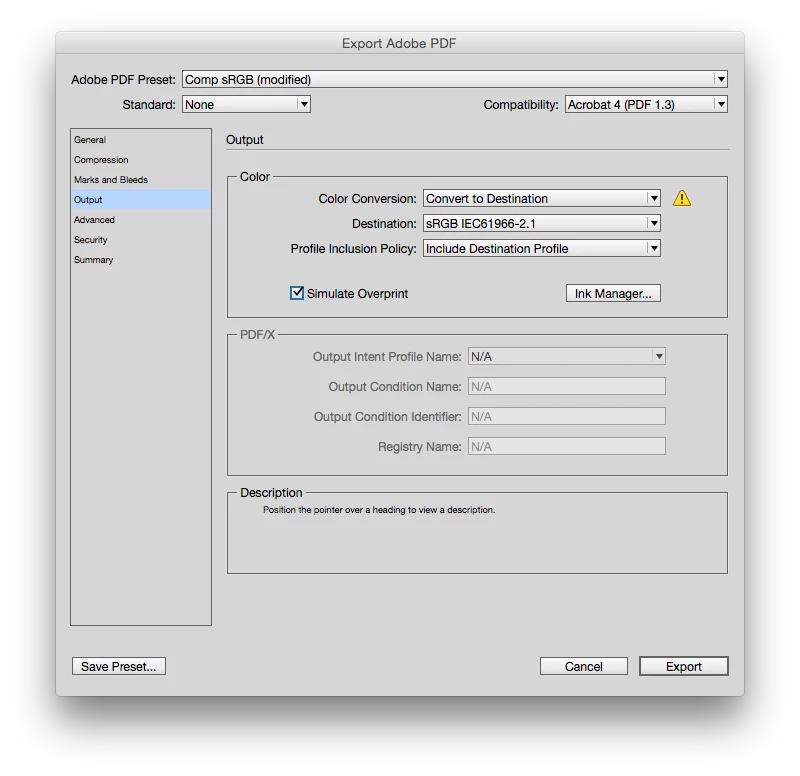
Do you really need the interactivity (the layout has interactive elements)? Try exporting a print PDF with the color conversion set to flattened sRGB. Something like this:

3 replies

Willi Adelberger
Community Expert
Community Expert
April 2, 2017

I suppose that transparency and layers is the problem for you. Any other application than Adobe Acrobat cannot display all PDFs properly. Stop viewing PDFs via browser, Apple Preview or DropBox or any other non-Adobe-viewer. You will always get problems.

BobLevine
Community Expert
Community Expert
April 2, 2017

Stop using browsers to view your PDFs is the only real answer. Anything beyond Adobe Acrobat or Reader is a crapshoot, but I would certainly stop using spot colors for screen only PDFs.

rob day
Community Expert
Community Expert
April 2, 2017

but I would certainly stop using spot colors for screen only PDFs

When you save an interactive PDF all color is forced into profiled sRGB and there would no longer be any spot color or grayscale object in the PDF, so it seems unlikely that the problem is caused by using spot colors.

I think many lower end PDF readers do have problems with live transparency and profiled color, so it would be worth at least trying a flattened sRGB PDF with no interactivity.

Steve Werner
Community Expert
Community Expert
April 2, 2017

You can also encourage your readers to view the newsletter in the FREE Adobe Reader to see your newsletter the best. Using third-party PDF readers like Mac Preview and web browsers will also lose a lot of stuff—advanced print features, poor support for transparency, form fields, and interactivity.

rob day
Community Expert
rob dayCommunity ExpertCorrect answer
Community Expert
April 2, 2017

The newsletter goes to print as a PDF and I create a web version by exporting as Adobe PDF (interactive) without any problems.

Do you really need the interactivity (the layout has interactive elements)? Try exporting a print PDF with the color conversion set to flattened sRGB. Something like this:

Known Participant
April 3, 2017

Thanks Rob - that works for Slack and I'll ask others to try in different browsers. Shame to lose the interactivity (the odd web links) but definitely better than negative images.