



Roger Breton
Legend
October 21, 2024
Question

Why Is InDesign No Longer Prompting for PANTONE Colors in Documents?

  • October 21, 2024
  • 1 reply
  • 4310 views

I noticed lately, when opening an InDesign document containing PANTONE colors in the Swatches palette such as this one:
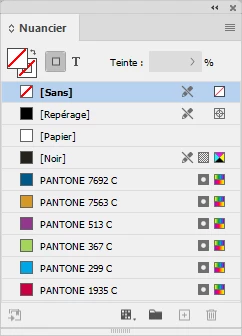
 

that InDesign no longer prompts me for the presence of PANTONE colors?
As of October 21 2024
(I have v20 installed and ready to fire up but I'm staying in v19 for my class)


<Title renamed by MOD>

1 reply

rob day
Community Expert
Community Expert
October 21, 2024

Hi @Roger Breton , InDesign no longer installs Pantone .acb files when you upgrade, but you can still do it manually. If the .acb files exist in Applications⁩ ▸ ⁨Adobe InDesign 202X⁩ ▸ ⁨Presets⁩ ▸ ⁨Swatch Libraries⁩, I would not expect any kind of alert when opening a document referencing Pantone .acb colors. You can download .acb files from the link below or subscribe to Pantone Connect.


https://github.com/Autocrit/Pantone-color-libraries

Roger Breton
Legend
October 21, 2024

Thanks Rob.

I'd rather point my students to GitHub than to supply them myself the old *.acb format files.

No V4 libraries in sight?

rob day
Community Expert
Community Expert
October 21, 2024

The github .acb files have considerably more colors than the .acb files that shipped with CS6. There are probably new colors not included in the .acbs, but if that is important then the only option will be Pantone Connect. Are your students really paying to have Spot Color separations printed on an offset press?