

Tenshi Barcelona
Participant
April 11, 2023
Question

Why is Indesign saying that my Image is RGB when I changed the colour mode in Photoshop to CMYK?

  • April 11, 2023
  • 1 reply
  • 1425 views

I have a logo image that's a png file, I edited it in Photoshop to change the colour mode and the image size (10x5.5 in) with a resolution of 150 ppi. Whenever I import the file to InDesign, it tells me that it's RGB, anyone know what's going on?
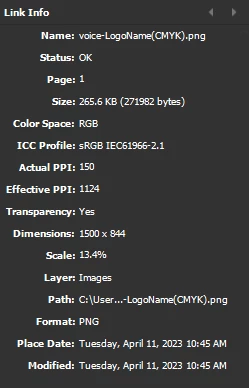
 

1 reply

BobLevine
Community Expert
Community Expert
April 11, 2023

Why are you using PNG instead of a vector format and PNG doesn't support CMYK.

Tenshi Barcelona
Participant
April 11, 2023

Oh, I didn't know that.Sorry, I'm still learning. Thank you!

Willi Adelberger
Community Expert
Community Expert
April 11, 2023

With logos it is better to use vector files in CMYK. Images (photos) it is better to use RGB images as PSD, TIFF or JPG depending on the content.

PNG do not support CMYK and have only a simple transparency model. The are supposed for web use.

JPG are good for Photos without transparency.

PSD support transparency, layers and layer composition. If images exceed a specific value (I think it is 3000px per edge) they get to their limit, so will TIFF be better. But TIFF have not such a good preview as PSD have.
If you have images combined with text and other vectors use PDF.