
Ken Nielsen
Legend
February 16, 2024
Answered

Why is InDesign showing document is open but is not showing?

  • February 16, 2024
  • 3 replies
  • 1837 views

The document I'm working in open and the pages show in the palette but not on screen. How do I get the pages to show on screen? Right now, see screen shot, InDesign is showing clear through to another app which is open... 
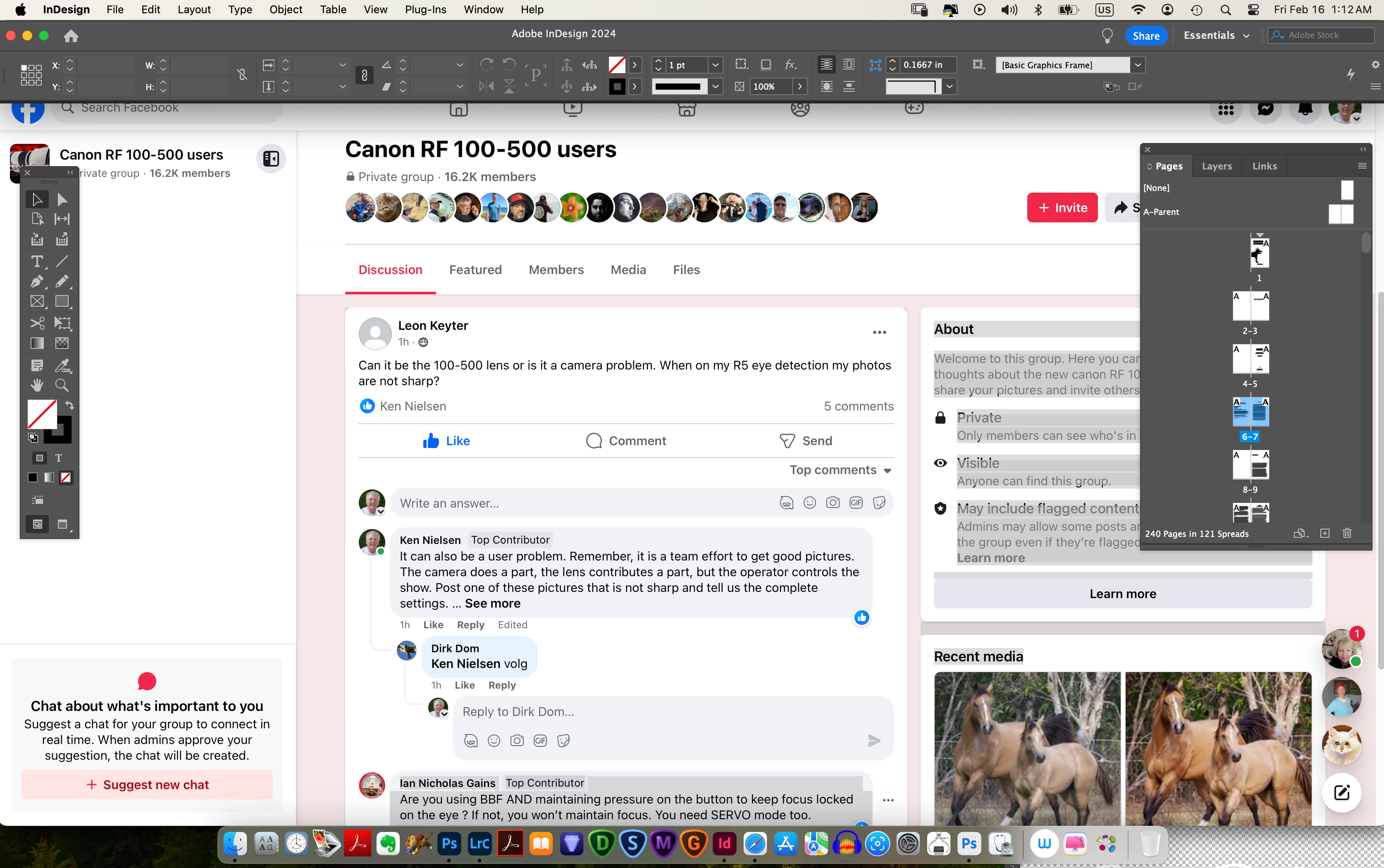
Correct answer Ken Nielsen

Try resetting your preferences:

Windows: Start InDesign, and then press Shift+Ctrl+Alt. Click Yes when asked if you want to delete preference files.
macOS: While pressing Shift+Option+Command+Control, start InDesign. Click Yes when asked if you want to delete preference files.
A dialog will appear asking to delete the InDesign Preferences, select 'Yes' on this dialog.
Further info and instructions here if needed:
https://helpx.adobe.com/in/indesign/kb/indesign-preferences-support-file-locations.html


If this has gotten to that point I did try one last thing before deleting preferences, I restarted the computer. I thought I had already dont this to no avail but this time it worked! Indesign is restored to it's old self and I'm now able to get back to work. Thanks for help everyone!

3 replies

leo.r
Community Expert
Community Expert
February 17, 2024

also, are you using a second monitor?

Ken Nielsen
Legend
February 17, 2024

Just one monitor.

Community Expert
February 17, 2024

Try resetting your preferences:

Windows: Start InDesign, and then press Shift+Ctrl+Alt. Click Yes when asked if you want to delete preference files.
macOS: While pressing Shift+Option+Command+Control, start InDesign. Click Yes when asked if you want to delete preference files.
A dialog will appear asking to delete the InDesign Preferences, select 'Yes' on this dialog.
Further info and instructions here if needed:
https://helpx.adobe.com/in/indesign/kb/indesign-preferences-support-file-locations.html


Community Expert
February 16, 2024

Can you go to Window> Application Frame and turn it on? Do the pages show now?


Ken Nielsen
Legend
February 17, 2024

Window > Application frame does not seem to exist on my computer...

leo.r
Community Expert
Community Expert
February 17, 2024
quote

Window > Application frame does not seem to exist on my computer...


By @Ken Nielsen


This is not an InDesign menu. Looks like it's from Lightroom.

BarlaeDC
Community Expert
Community Expert
February 16, 2024

Hi,


Have you tried clicking on the indesign icon in the doc, I think the document might be minimised.

Ken Nielsen
Legend
February 17, 2024

I don't see a InDesign icon, in fact I don't see the doc. I've never had this happen before and using InDesign since it was released decads ago.


leo.r
Community Expert
Community Expert
February 17, 2024
quote

I don't see a InDesign icon, in fact I don't see the doc. I've never had this happen before and using InDesign since it was released decads ago.


By @Ken Nielsen


Can you please elaborate...


There's the Dock with the InDesign icon in your screenshot: