Sutton Bay Media
Inspiring
July 28, 2024
Answered

Why is text not going to right edge?

  • July 28, 2024
  • 3 replies
  • 562 views

I am moving a document from Google docs to InDesign. That's because my 50 page Word document which is 20 mb, gives me the spinning wheel of death every time I try to copy text from it (a whole other problem)! So I moved the whole thing to Google Docs. But now, I am getting this, the text not touching the right side.  I have googled for a long time and can't find this exact problem. Any help is appreciated! 
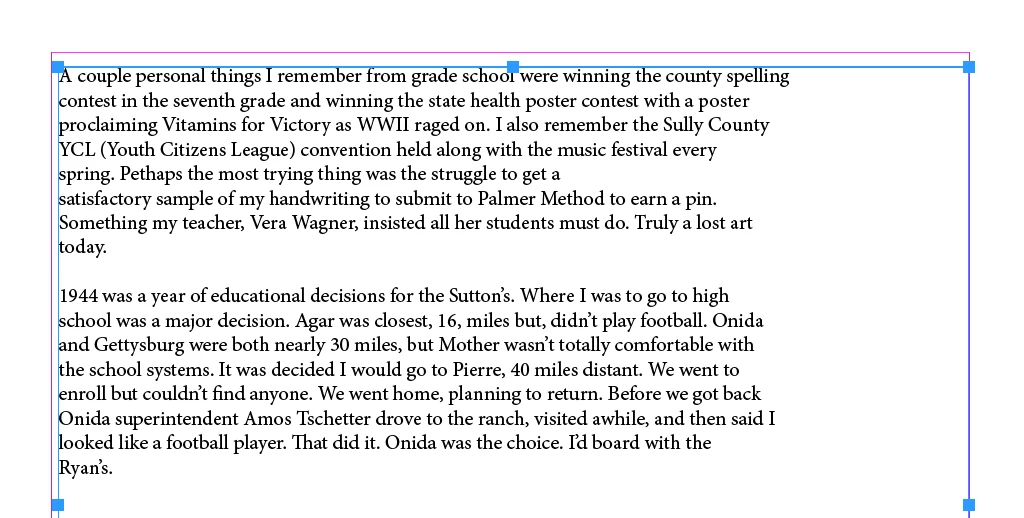
This topic has been closed for replies.
Correct answer Frans v.d. Geest

Show the hidden characters, there may be hard returns after every line maybe...

3 replies

Sutton Bay Media
Inspiring
July 29, 2024

Hidden characters are it exactly! Thank  you! How do I get rid of them? 

James Gifford—NitroPress
Legend
July 29, 2024

It's not that you want to get rid of them, exactly — you want to replace all the paragraph return (characters) with spaces, so that each paragraph has only one such return, at the end.


There is no simple search and replace (Find/Change, in InDesign) that will fix this and leave your paragraphs separated. But you can try this three-step one:


  • FIND: ^p^p (that's caret-p-caret-p)
  • REPLACE WITH: @@@


Then:

  • FIND: ^p
  • REPLACE WITH: [a single space character]


Then:

  • FIND: @@@
  • REPLACE WITH: ^p


That will, in order, replace all your paragraph breaks with the @@@ placeholder, then turn all your paragraph returns to spaces, then replace that placeholder character with a single paragraph return. Messy, but it should work.


Do this on a COPY of your file so that if it gets messed up, you can just exit without saving and try again.


You might want to do a Find/Change after to remove all double spaces, and have to do a little other cleanup here and there, but that should give you a clean document to start your InDesign formatting from.


The only other solutions are to convert all the paragraph returns to spaces one at a time, or back up to your source document and see if there is an export options that will not break the lines. (I am assuming you did not type, or mean to type the lines with a return at each end!)

Barb Binder
Community Expert
Community Expert
July 28, 2024

This has a quick fix—please share the same screenshot with Show Hidden Characters enabled as per @Robert at ID-Tasker's screenshot and we can give you specific instructions. 

~Barb 

~Barb at Rocky Mountain Training
Frans v.d. Geest
Community Expert
Frans v.d. GeestCommunity ExpertCorrect answer
Community Expert
July 28, 2024

Show the hidden characters, there may be hard returns after every line maybe...

Robert at ID-Tasker
Legend
July 28, 2024
quote

Show the hidden characters, there may be hard returns after every line maybe...


By @Frans v.d. Geest


100% there are hard - or soft - returns at the end of each line.


@Sutton Bay Media