bschaefer6
Inspiring
June 12, 2023
Question

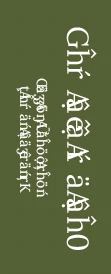
Why is the text showing like this when I export my file from InDesign as a png?

  • June 12, 2023
  • 5 replies
  • 394 views

please ignore the orientation


This topic has been closed for replies.

5 replies

Jumpenjax
Community Expert
Community Expert
June 13, 2023

If you must have a png, you should use illustrator so you can create text to outline.

Lee- Graphic Designer, Print Specialist, Photographer
James Gifford—NitroPress
Legend
June 13, 2023

The technique answers are all useful, but I think figuring out why the text is scrambled comes first.  🙂

Community Expert
June 13, 2023

Hi @bschaefer6 ,

please attach a sample document to your reply so we can test the case on our machines.

( Attach the InDesign document with the forum's controls. )


Thanks,
Uwe Laubender
( Adobe Community Expert )

Joel Cherney
Community Expert
Community Expert
June 13, 2023

James already asked most of the questions I'd ask. I would add: what was it supposed to be? Can you post a screenshot of correct display of that text? Looks like a font encoding problem, where you had some Korean or maybe Chinese text that lost its double-byte font. However, I've not seen a font drop do that to Korean in more than a decade, so that isn't very likely. 

James Gifford—NitroPress
Legend
June 12, 2023

Is the text garbled if you export to JPEG or PDF?


What is the font name, and source?

Willi Adelberger
Community Expert
Community Expert
June 12, 2023

PNG is a raster image. Theerefore text is not so crispy as if you would export as PDF.