Participant
February 3, 2023
Question

Why is there an annoying black rule around print area...

  • February 3, 2023
  • 3 replies
  • 256 views

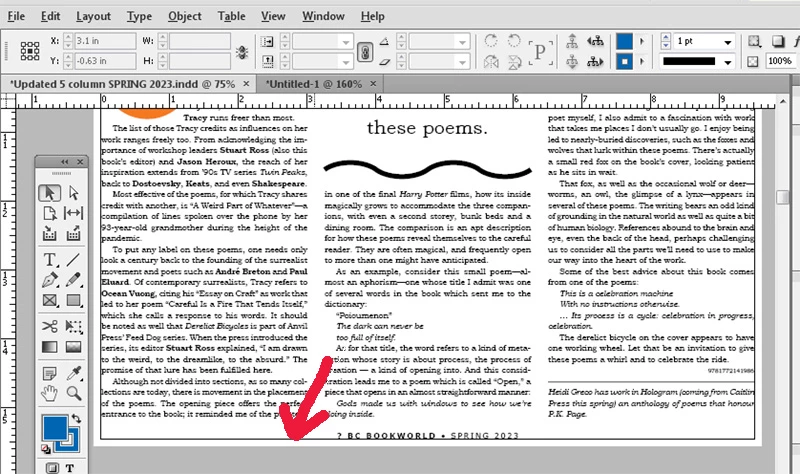
I've been using InDesign 15 years, but today, somehow (maybe by mistake) an annoying black rule has appeared around the PRINT area of my page layout (it is not on the master page). Never had this problem before. In the NORMAL display mode the rule around the page is pink, but when I switch to BLEED display mode (see screen grab, RED arrow pointing at black rule) the rule turns black. How do I get rid of the black rule in BLEED mode? Thanks for any help..
This topic has been closed for replies.

3 replies

James Gifford—NitroPress
Legend
February 3, 2023

It looks as if you (accidentally) clicked a border color while that text frame was selected. Easy enough to do, and fix.


Good place to note one of ID's less obvious features: if you have no object selected and you click on almost any setting (color, stroke, font, etc.), it will become the default for all new objects to which it applies. That is, if you had no object selected and clicked a black outline color, or set a stroke width, everything you created after that point would have a black stroke applied. The fix is to do the reverse: with no object selected, click on the desired default instead.


Not saying the latter is your problem here (more likely the first, as everyone has noted), but it's a quirk worth  knowing when, say, everything is coming up with a blue border.


Participant
February 12, 2023

Hi James, This is very helpful advice in general. I really apprciate you letting me in on that quirk of ID. with cheers, David

Derek Cross
Community Expert
Community Expert
February 3, 2023

As Willi states, you may have an Object Style applied as a default – you can see in the screenshot there's a 1pt border being applied.

Participant
February 3, 2023

Much appreciated Derek!!!! This might be the problem.

Willi Adelberger
Community Expert
Community Expert
February 3, 2023

Does your text frame or its object style have a stroke defined. Click on the frame and have a look. If nothing is selected click on no stroke in the tool panel.

Participant
February 3, 2023

Thanks Willi, I will follow up on this!