

Question
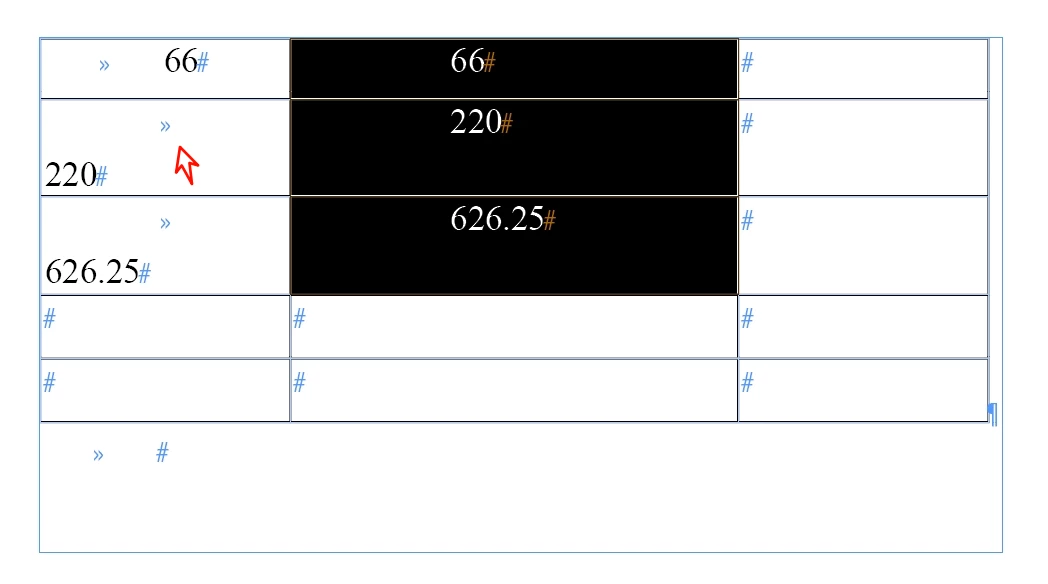
Why is this left-aligned text jumping around? It seems to have two values.
Double-click the two rows, and you'll see it has two values.
It's not perfectly centered?
Another issue: How to remove “tabs” from the table?
Sometimes it's a visible “>>”.
Sometimes it's invisible, possibly embedded within a paragraph style.
The code below clears right indentation; I want to remove "tabs" simultaneously.
//0 Go left indent to 0
(function () {
    var oColumns = app.selection[0].columns,
        i = 0,
        rCount = app.selection[0].rows.length,
        cCount = app.selection[0].columns.length,
        name, lastCell;
    for (; i < oColumns.length; i++) {
        name = app.selection[0].cells[i].name.split(':');
        lastCell = rCount > 1 ? oColumns[i].cells.item(name[0] + ':' + (Number(name[1]) + rCount - 1)) : oColumns[i].cells[-1];
        alignMe(oColumns[i].cells.itemByRange(app.selection[0].cells[i], lastCell));

        function alignMe(lCells) {
            lCells.paragraphs.everyItem().justification = Justification.LEFT_ALIGN;
            lCells.paragraphs.everyItem().rightIndent = 0;
        }
    }
})();


// Column Centered Left Aligned
(function () {
    var oColumns = app.selection[0].columns,
        i = 0,
        rCount = app.selection[0].rows.length,
        cCount = app.selection[0].columns.length,
        name, lastCell;
    for (; i < oColumns.length; i++) {
        name = app.selection[0].cells[i].name.split(':');
        lastCell = rCount > 1 ? oColumns[i].cells.item(name[0] + ':' + (Number(name[1]) + rCount - 1)) : oColumns[i].cells[-1];
        alignMe(oColumns[i].cells.itemByRange(app.selection[0].cells[i], lastCell));
    }

    function alignMe(oCells) {
        oCells.paragraphs.everyItem().justification = Justification.CENTER_ALIGN;
        var offsets = oCells.paragraphs.everyItem().endHorizontalOffset;
        maxOffset = Math.max.apply(null, offsets);
        oCells.paragraphs.everyItem().justification = Justification.LEFT_ALIGN;
        var newOffset = oCells.paragraphs[0].endHorizontalOffset;
        var nIndent = (maxOffset - newOffset);
        oCells.paragraphs.everyItem().leftIndent = nIndent;
    }
})();


 AdChoices