Participant
March 15, 2023
Answered

why my indesign doesn't see “align to baseline grid” icon?

  • March 15, 2023
  • 1 reply
  • 474 views

Hi!Could someone please help me?!

I searched the Internet a million times and couldn't figure out why my icon wasn't there, so I couldn't figure out how to align it.


Thanks for help!!!!


This topic has been closed for replies.
Correct answer Steve Werner

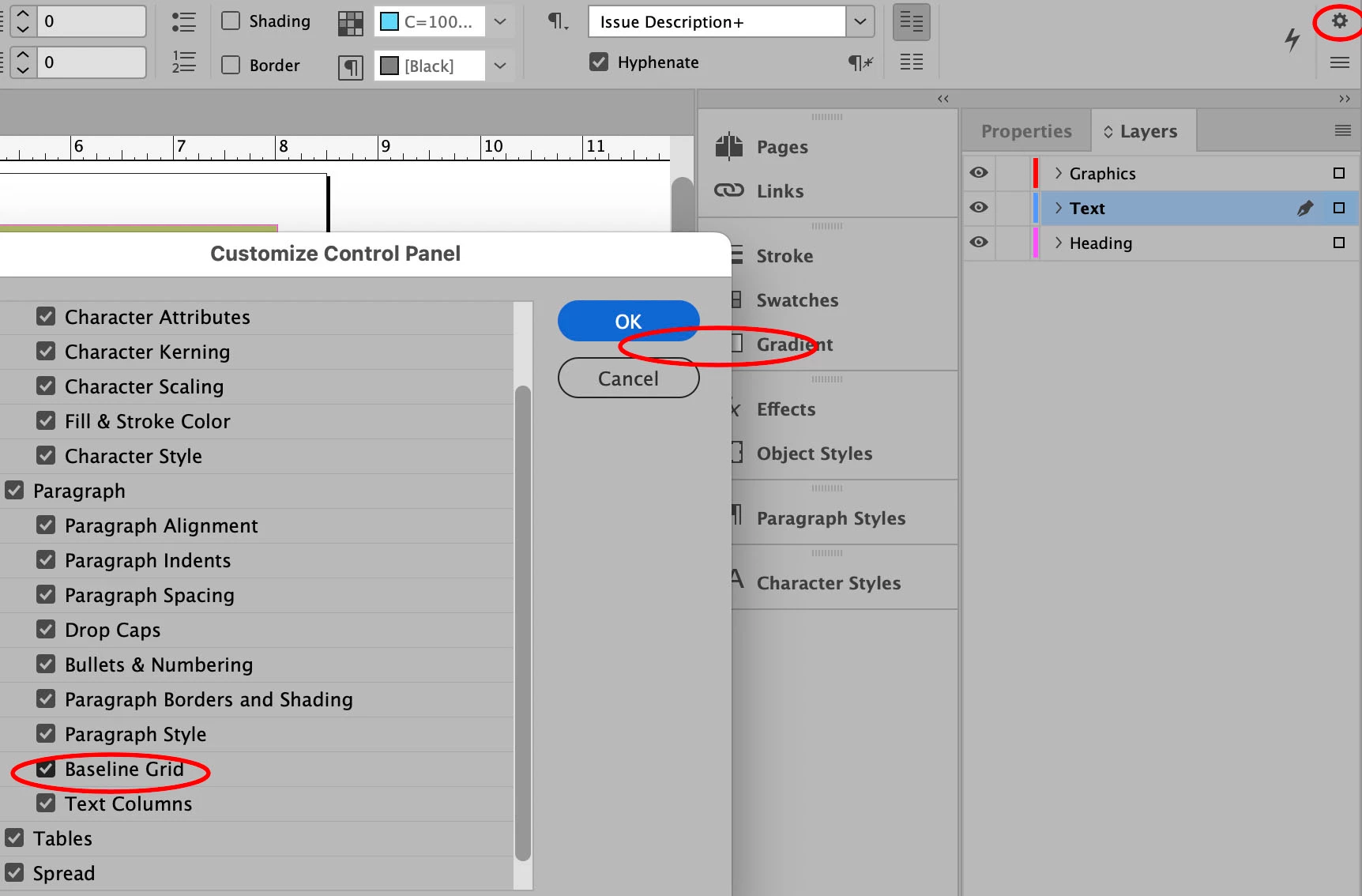
Go to the small "gear" icon at the right end of the Control Panel. When you click on it, you can customize what appears on the panel. You need to make sure the Baseline Grid option is checked.


If it's not there, restore you InDesign Preferences.


1 reply

Steve Werner
Community Expert
Steve WernerCommunity ExpertCorrect answer
Community Expert
March 15, 2023

Go to the small "gear" icon at the right end of the Control Panel. When you click on it, you can customize what appears on the panel. You need to make sure the Baseline Grid option is checked.


If it's not there, restore you InDesign Preferences.


Participant
March 15, 2023

OMG!Thank you very much!! you save my whole day !!!This is a very elementary mistake(^^)

Steve Werner
Community Expert
Community Expert
March 15, 2023

If that was the correct answer for you, please mark Correct Answer. That will help another person with the same problem.