Participant
April 16, 2025
Question

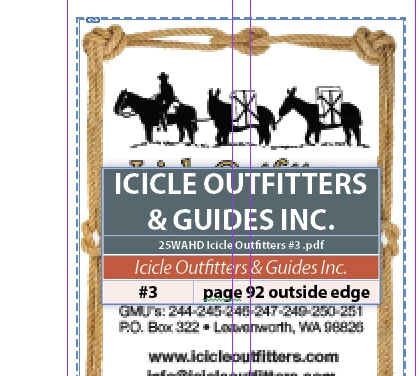
Why object disappeared when preview mode is on?
  • April 16, 2025
  • 4 replies
  • 298 views

(in normal mode)

(in preview mode)


Hi all, i have a indesign file recived today. When open it in normal mode(guidelins shows), the object on the top shows, but when preview mode is on, the top object is disappered, do you know why?

4 replies

rob day
Community Expert
Community Expert
April 16, 2025

Hi @qing_3274 , Also, a Layer set not to print (Print Layer unchecked in Layer Options) will display as italics in the Layers Panel. Its contents will be hidden when Overprint Preview is turned on:


Scott Falkner
Community Expert
Community Expert
April 16, 2025

Two places to look: Attributes panel. See if the items are set to not printing. Layers panel. See if the items are on a non-printing layer.

Pariah Burke
Community Expert
Community Expert
April 16, 2025

Please provide the following screenshots:

  • full page in Normal mode
  • Pages panel (Window > Pages)
  • Layers panel (Window > Layers)
  • Conditional Text (Window > Type & Tables > Conditional Text)
  • Attributes panel (Window > Output > Attributes) with the text frame containing the table selected
  • and the Parent page(s)


Community Expert
April 16, 2025

Preview mode is meant to not show guides etc which won't be seen when the final output is produced. For the missing object check if it is a non printing object. See the defintion of the preview mode at the link below

https://helpx.adobe.com/indesign/using/workspace-basics.html#:~:text=Displays%20artwork%20as%20if%20it%20were%20output%2C%20with%20all%20non%2Dprinting%20elements%20suppressed%20(grids%2C%20guides%2C%20non%2Dprinting%20objects)%20and%20the%20pasteboard%20set%20to%20the%20preview%20background%20color%20defined%20in%20Preferences.

-Manan

-Manan