Participating Frequently
May 16, 2022
Answered

Why the round corner object automatically changed

  • May 16, 2022
  • 3 replies
  • 1116 views

I would like to ask.

I need to change the version from InDesign CS5.5 to CC 2022

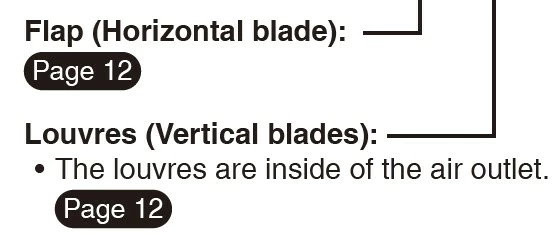
When I open an artwork in InDesign CC 2022, why the round corner object has automatically changed ?

I didn't set any further.
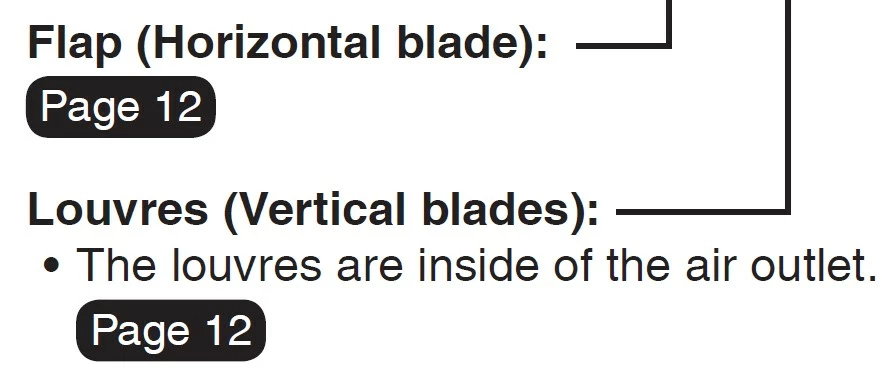


Remark: This object made by 

  1. Create object by Rectangle Frame Tool
  2. Create text frame "Page 12" > Paste Into the rectangle frame > Fit Frame to Content > Clike Rounded


This topic has been closed for replies.
Correct answer Peter Spier

The original file (CS 5.5) was created in May 2021. Then, I need to use this file as the base data to modify to new content by using InDesign CC 2022 version.

The new artwork file was created in May 2022. And I found that the rounded corners changed.


I found a copy of CS5.5 on an old laptop. It seems to use the "bad" method of drawing rounded corners with the flats and slightly skewed arcs. Worse, it doesn't seem to scale the radius if you scale the size of the frame, so you can get some real distortions.

I would say if there is a particular look you need to match you should recreate the object from scratch in the new version.

3 replies

Community Expert
May 16, 2022

Peter Spier is right!

The behavior of rendering the rounded corners has changed. With InDesign 2020.

A long-standing feature request from the community. There even was a bug report that is marked as "fixed" now:


Rounded corners aren't perfectly rounded
Anonymous, September 11, 2017
https://indesign.uservoice.com/forums/601180-adobe-indesign-bugs/suggestions/31342915-rounded-corners-aren-t-perfectly-rounded


Note: The first implementation of this new behavior was with InDesign CC 2019 version 14.0.3.422.

But this version was withdrawn or the next bug fix version of InDesign CC 2019 after that had the old rendering behavior again so that the change was effective with the full version change to InDesign 2020.


With InDesign 2020 and later the rounding of the corners follow the rounding of a circle arc that you can draw with a frame tool like the Oval Frame tool holding the Shift key.


Regards,
Uwe Laubender

( ACP )

Rosie PakAuthor
Participating Frequently
May 16, 2022

I have to say thank you everyone for your help.
I think I can understand why this happened.


Thank you...

Peter Spier
Community Expert
Community Expert
May 16, 2022

There is a major change in how automatic rounded corners are calculated and drawn in newer versions which results in flat spots.

Peter Spier
Community Expert
Community Expert
May 16, 2022

I no longer have CS5.5 installed, but I've taken a look at CS6 and CC2021, and CS 2022 and there has certainly been some evolution in how the corner effects are handled. It looks to me like that bug is fixed, actually, in the two later versions, so perhaps some additional information and maybe a sample file would help narrow this down.

In your screen shots above, which is from CS5.5? This might be a case where in one version the corner radious is scaling with the frame size change and is not changing in the other version.

Rosie PakAuthor
Participating Frequently
May 16, 2022

The screen shot of your left hand side is an artwork from CS5.5.

Actually, I need to know what caused it, so that I can explain to my team the cause correctly. And to be a point to be careful after we have version changes. 


Willi Adelberger
Community Expert
Community Expert
May 16, 2022

I do not understand why you do that:


Remark: This object made by 

  1. Create object by Rectangle Frame Tool
  2. Create text frame "Page 12" > Paste Into the rectangle frame > Fit Frame to Content > Clike Rounded


As far as I remember there was a terrible bug with round corners which could cause automatic numbers to be shown revers if an uneven number of round corners were found.

Rosie PakAuthor
Participating Frequently
May 16, 2022


In this section, I'm just explaining how to create this object. (this is the method from the original file)